

A brief for AI chatbot development services should define the business problem, conversation boundaries, approved answers, required tool connections, human handoffs, and acceptance tests. For a 2026 project, describe what happens after an inquiry arrives—not just what the chatbot should say. Name who owns follow-up and what the chatbot must never decide without approval.
TL;DR
An AI chatbot development services brief should define the workflow before the conversation design.
ClearPilot Consulting fits local service businesses seeking workflow-first chatbot consulting, not a standalone software comparison.
Lead enrichment adds useful business details to incoming leads and routes follow-up; it is not outbound prospect-list research.
Require approved answers, human handoffs, acceptance tests, and a named maintenance owner.
Why this matters
A chatbot can answer a question while leaving the actual inquiry unattended. If nobody owns the next step, a friendly conversation is not a working lead process.
ClearPilot Consulting starts with workflow mapping before building automation, connecting existing tools where practical and keeping people in control of exceptions. Your brief should describe that same operating reality: where inquiries arrive, what information staff need, and how someone takes responsibility for the reply.
AI chatbot development services: what belongs in the brief?
Write the brief around the path from inquiry to accountable follow-up. Use the sequence below to separate the business requirements from the technical choices a developer proposes.
1. State the owner problem
Describe the work that breaks today. Avoid opening with a feature request such as wanting a chatbot that sounds human; explain whether inquiries sit unanswered, staff repeatedly copy details between tools, or customers cannot tell what happens next.
Use this fill-in structure without assuming the answer: inquiries arrive through a named channel, a named person reviews them, and a specific task delays the response. Then state the change you want and how you will check it.
2. Map the current workflow
Document the route an inquiry takes before adding automation. Include the inbox, customer record, calendar, and any manual notes staff use to keep work moving.
A useful map includes:
Inquiry: Where the message arrives and what it contains.
Qualification: Which details determine the next step.
Routing: Who receives the inquiry and why.
Follow-up: What the customer receives next.
Human review: What happens when the process cannot continue safely.
These are responsibilities, not a shopping list of software. Mark each handoff clearly so the developer can distinguish a missing connection from an unclear business rule.
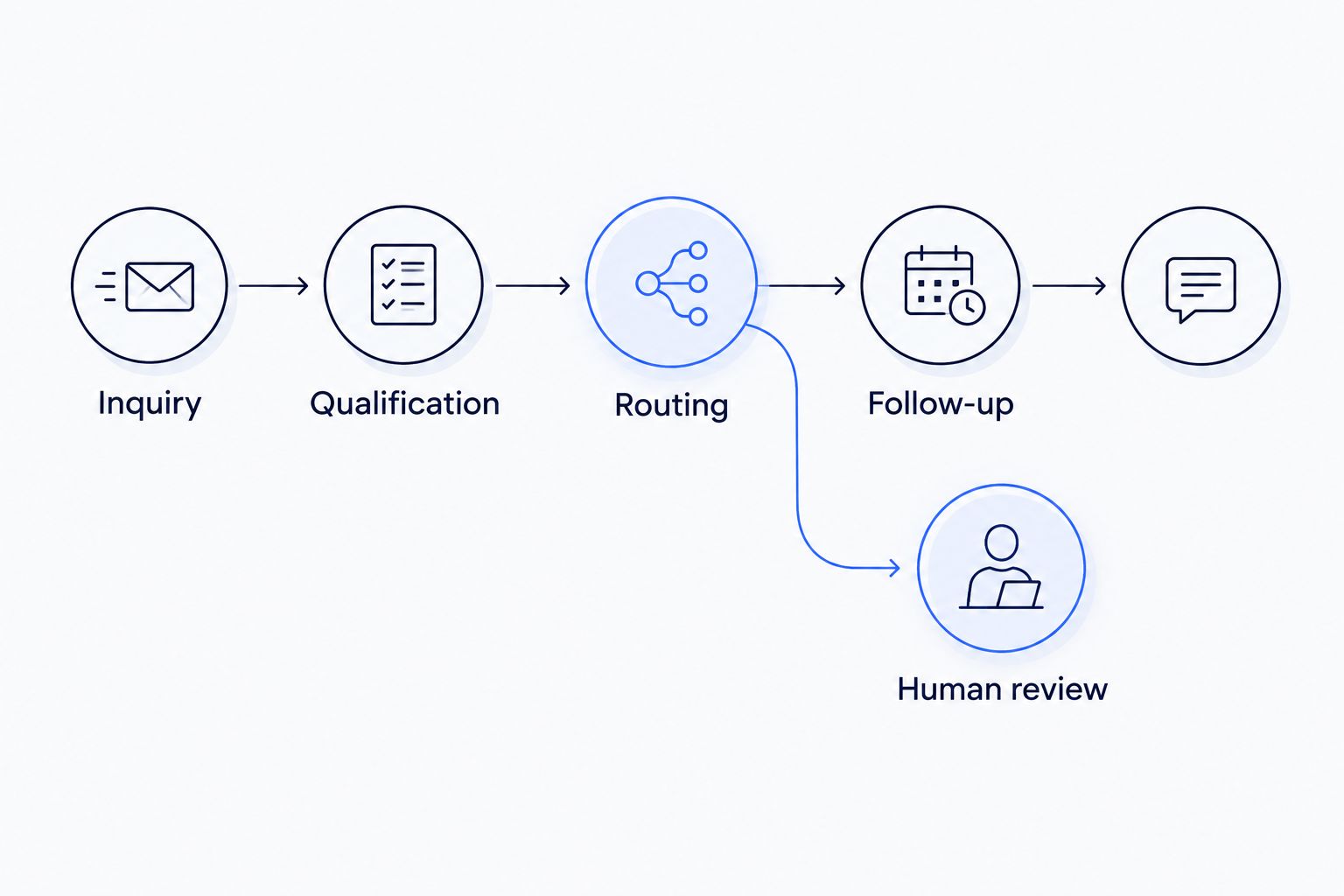
Define the human review path before connecting the chatbot to business tools.
3. Define the permitted job
Choose the initial job before choosing the chatbot's personality. Answering service questions, collecting inquiry details, and changing a booking involve different permissions and different failure consequences.
| Scope option | Best for | Useful capability | Limit to specify |
|---|---|---|---|
| Answer-only chatbot | Explaining approved service information | Answers from a defined information set | Cannot complete follow-up by itself |
| Inquiry collection | Gathering details before staff respond | Captures and routes customer information | Requires an owner to act on the record |
| Tool-connected assistant | Completing defined workflow steps | Reads or changes permitted business records | Requires access controls and failure handling |
Choose the narrowest scope that solves the stated problem. More permissions create more decisions to test and maintain; they do not automatically make the project more useful.
4. Set acceptance criteria
Describe observable behavior rather than asking for an accurate or helpful chatbot. Specify the expected answer, the destination of captured information, and the point at which a person takes over.
For example, an illustrative acceptance criterion is: when a visitor asks about a service outside the approved coverage area, the chatbot explains the limitation and routes any exception request to staff. It does not invent an exception or promise an appointment.
Define the information the chatbot can use
Give the developer an approved source for each answer category. Service descriptions, service areas, opening hours, scheduling rules, and customer instructions should have an owner who can confirm the current information.
For a 2026 launch, record when each source was reviewed and who approved it. A public page and an internal document can disagree; the brief must say which source takes priority.
Separate these information types:
Public answers: Information the chatbot can share with visitors.
Internal rules: Instructions that guide routing but are not customer-facing answers.
Customer records: Information that requires an appropriate identity check before disclosure.
Unapproved material: Drafts or old documents that must stay outside the answer set.
Also define the fallback. When the approved information does not answer a question, the chatbot should state the limit and offer the agreed human route—not fill the gap with a plausible answer.
Specify inbound lead enrichment and routing
Lead enrichment means adding useful business details to an incoming lead and directing follow-up. It is not building an outbound prospect list.
For a local service business, the brief might request the service needed, service address, customer-provided urgency, and preferred contact method. An existing-customer match can add context if the business authorizes that connection.
Keep customer statements separate from inferred details. A visitor saying the work is urgent is not the same as a verified emergency or an approved priority booking.
An illustrative inquiry workflow
A visitor asks whether the business handles a particular job. The chatbot checks approved service information, collects the agreed details, and sends the inquiry to the responsible person.
If the service address is incomplete, the chatbot asks for clarification. If the request falls outside the routing rules, it sends the conversation for human review rather than silently discarding it.
The brief should identify which details are required and why. Collecting extra information without a follow-up purpose adds work for the customer and creates more information for the business to manage.
Define tool connections and permission limits
List the tools the business already uses before requesting replacements. State what the chatbot needs to read, what it can change, and what remains staff-only.
A scheduling connection, for example, needs a clear distinction between collecting a preferred time and confirming an appointment. A customer-record connection needs rules for creating a new record, matching an existing record, and avoiding duplicate inquiries.
For every proposed connection, answer:
What event starts the action?
Which information passes between systems?
Which system holds the authoritative record?
How does the chatbot know the action succeeded?
Who receives an alert if it fails?
Require a visible failure path. If a record cannot be saved, the chatbot must not tell the customer that the inquiry has reached the team unless another approved delivery route succeeds.
Keep people in control of decisions and exceptions
Human handoff belongs in the main workflow, not a closing note. Define both customer-requested transfers and automatic transfers triggered by uncertainty, sensitive requests, or failed actions.
A useful handoff contains the conversation, collected details, unresolved question, and reason for transfer. Sending staff a vague notification creates another round of questioning for the customer.
What should stay with a person?
Keep decisions requiring judgment or authority with the appropriate employee. Examples include approving exceptions, resolving complaints, changing payment instructions, or making commitments outside documented rules.
Your brief should also define what happens when nobody is available. The chatbot can explain the approved next step, but it must not invent a response deadline or claim a person is reviewing the message when no such process exists.
Why chatbot project scope varies
In 2026, a useful brief separates conversation design from the operational work behind it. The scope changes when the chatbot moves from answering questions to taking actions across business systems.
The main scope drivers are:
Conversation boundaries: A narrow service inquiry has fewer decisions than an open-ended assistant.
Source quality: Conflicting or outdated documents require resolution before dependable answers are possible.
Tool connections: Reading a calendar differs from creating or changing a booking.
Permission requirements: Access to customer records needs rules that public service information does not.
Exception handling: Complaints, incomplete details, and failed actions need defined destinations.
Ongoing ownership: Someone must update answers, review failures, and approve changes after launch.
Ask a provider to explain which requirements affect the proposed scope. A feature list alone does not show whether follow-up, security, or maintenance is included.
Test the workflow before launch
A successful demonstration is not the same as an accepted workflow. Your 2026 acceptance plan should cover normal inquiries, missing details, unsupported requests, and failed tool connections.
Use realistic but fictional customer information during testing. For each conversation, document the expected answer, action, handoff, and saved record so the result can be checked without relying on impressions.
| Test case | Expected behavior | Failure to catch |
|---|---|---|
| Supported service inquiry | Uses approved information and collects required details | Gives an unsupported commitment |
| Incomplete inquiry | Requests the missing detail or routes for review | Creates an unusable record without warning |
| Customer requests staff | Follows the defined human handoff | Repeats automated answers instead |
| Connected tool fails | Explains the limit and follows the fallback | Claims an action succeeded when it did not |
| Visitor requests private information | Applies access rules and refuses unauthorized disclosure | Reveals another customer's information |
Approve changes through the same test process. Updating an instruction can affect more than the answer you intended to change.
What should you ask a development provider?
Ask the provider to explain the workflow in plain language before discussing the software stack. The answer should identify the trigger, information collected, permitted action, human owner, and failure path.
Request a written account of what you control after launch: approved content, account access, conversation records, connection settings, and the process for making changes. Define who handles maintenance and what happens if you stop working together.
ClearPilot Consulting is best for local service businesses seeking workflow-first chatbot consulting. The approach fits an owner who needs inquiries and repetitive admin connected to a clear process; the owner still needs to provide business rules, approve permissions, and assign staff responsibility.
If those requirements are unclear, start with the free automation assessment rather than prescribing a chatbot build. Bring an example inquiry, the current follow-up steps, and the point where work stalls.
Start with your inquiry workflow
Use the free automation assessment to discuss inquiries, follow-up, and repetitive admin.
FAQ
What should I include in a brief for AI chatbot development services?
Include the business problem, current workflow, permitted tasks, approved information, tool connections, human handoffs, and acceptance criteria. Name the person responsible for follow-up and ongoing updates.
Do I need a chatbot that connects to my business tools?
You need tool connections when the agreed job requires reading or changing information in those tools. An answer-only chatbot does not need the same permissions as an assistant that creates customer records or books appointments.
Can a chatbot qualify incoming leads without replacing my staff?
A chatbot can collect agreed inquiry details and route them for staff follow-up. Define qualification as specific information requirements, not permission to make undocumented decisions about customers.
What does inbound lead enrichment mean for a local business?
Inbound lead enrichment means adding useful business details to an incoming inquiry and routing follow-up. It does not mean researching outbound prospect lists or treating inferred information as verified fact.
What should happen when the chatbot does not know an answer?
The chatbot should state the limitation and use the approved human handoff. Your brief should prohibit invented answers and specify what information accompanies the transfer.
How do I know whether the chatbot is ready to launch?
The chatbot is ready when it passes the acceptance tests agreed in the brief and staff can handle its handoffs. Test incomplete inquiries, unsupported requests, privacy boundaries, and failed connections as well as normal conversations.
Can ClearPilot Consulting help before I know which chatbot I need?
ClearPilot Consulting offers a free automation assessment and a workflow-first approach to business automation consulting. Start with the inquiry or admin process that needs attention rather than selecting software first.
One last thing
Write the failure path before approving the happy path. For your 2026 brief, ask what the customer sees when a connection fails and what the responsible employee receives. If neither answer is clear, the workflow is not ready to build.