

Instead of manually researching every incoming inquiry and copying details between tools, set up lead enrichment to add useful business details to each lead and route follow-up to the right person. Capture contact information, service needs, and location first; add context afterward without delaying the reply.
TL;DR
Lead enrichment adds useful details to incoming inquiries; it is not outbound prospect-list research.
Capture contact information, service needs, and location before researching business details.
ClearPilot Consulting fits local businesses that need workflow-first lead enrichment with human-controlled follow-up.
Keep the original inquiry, label added details, and route uncertain records to a person.
Why this matters
A form submission is not a complete handoff. Someone still has to understand the request, check whether your business handles it, and decide who should respond. When those decisions live in an owner's inbox, adding another research tool does not fix the process.
ClearPilot Consulting starts business automation consulting with workflow mapping, not software selection. That means defining what happens between an inquiry arriving and a person taking responsibility. The ClearPilot Consulting approach connects tools your business already uses where practical and keeps people responsible for decisions and exceptions.
For your 2026 intake workflow, separate three things: what the customer supplied, what another source added, and what your team decided. Mixing them creates records that look complete but are difficult to trust.
Before you start
Gather access and examples. You need access to your inquiry source, the place you keep lead records, and the notification channel your team checks. Collect sample inquiries with personal details removed before sharing them outside your business.
Name the decision and its owner. Decide what enrichment should help someone do: assign a service team, confirm a service area, or prepare a relevant reply. Give each handoff one accountable owner and a backup.
Check the matching rule before connecting anything. A personal email address does not identify a business. Do not match a lead to a company from a name alone, and do not overwrite customer-provided information with a lookup result.
You do not need to replace your customer record system to define this workflow. Start with the tools that already receive inquiries and record follow-up. Confirm that those tools support the connections and access permissions you need before building.
What to capture first
Ask for information that changes the next action. Leave research details out of the form unless the customer is the only reliable source. Every extra question should earn its place.
The table below separates initial capture from later enrichment. These are field recommendations, not requirements for every business.
| Information group | Best for | Capture first | Add later | Benefit | Limitation |
|---|---|---|---|---|---|
| Contact details | Reaching the person who asked | Name and a usable reply channel | Corrected details confirmed by the customer | Makes a reply possible | A submitted address can contain errors |
| Service request | Choosing the next conversation | Requested service and original message | Internal service category | Preserves what the customer actually needs | Free text needs interpretation |
| Service location | Checking local coverage | ZIP code or relevant service location | Internal service-area assignment | Supports routing by location | A company address can differ from the job site |
| Business context | Preparing for business inquiries | Company name or website when relevant | Confirmed business category and source | Gives the responder useful context | Not relevant to every residential inquiry |
| Follow-up ownership | Preventing unassigned inquiries | Intake source and received time | Assigned owner and next action | Makes responsibility visible | Assignment is not proof of a reply |
For a residential service inquiry, a company website is often beside the point. For an inquiry from a business, a supplied website can help confirm which organization contacted you. Do not turn every incoming lead into a company-research task.
Treat this as your 2026 field baseline. Add another field only when you can name the decision it supports and who will use it.
Inquiry capture
The labels below are suggested fields for your own workflow, not instructions for a particular software interface. Create or map equivalent fields in the system your team uses.
Preserve the message. Store the submission in Original inquiry, including the customer's wording. Keep any summary separate so the person replying can check the source.
Map the essentials. Connect submitted values to Contact name, Reply channel, Requested service, and Service location. Require only what your team needs to respond or assess the request.
Record where it came from. Add Inquiry source and Received time. Distinguish a website form from a chatbot conversation or a manually entered phone inquiry.
Check for an existing record. Search using the contact details available. If a record already exists, attach the new inquiry without deleting the earlier conversation.
Handle incomplete submissions. Send records without a usable reply channel to a review queue. Do not silently discard them or mark them ready for follow-up.
Expected result: A new inquiry has its original message, available contact details, source, and received time in one record. A repeat inquiry remains connected to its history.
Test this stage with 3 sample inquiries: one complete submission, one missing a reply channel, and one from an existing contact. These are setup tests, not performance benchmarks.
Detail enrichment
Enrichment should make the next response more informed. It should not hold the inquiry hostage while a lookup runs.
Define the allowed details. Start with Company website, Business category, and Service-area match only where those details affect your process. For residential work, prioritize the requested job and location instead.
Use a reliable starting point. Begin with a website or company name the customer supplied. When identity is unclear, ask the customer rather than selecting a similarly named business.
Record the source. Keep Detail source and Checked date beside added information. A business category without a source is difficult for your team to verify later.
Separate fact from interpretation. Store a confirmed business detail separately from an internal judgment such as whether the request fits your services. Label uncertain information for review.
Protect original values. Put lookup results in separate fields. Let a person resolve conflicts instead of automatically replacing the customer's location, business name, or request.
Expected result: The responder sees useful context and where it came from. Unverified details remain visibly unverified, and the original inquiry stays intact.
For your 2026 enrichment rules, document which sources are approved and what information is unnecessary. Limit collection to details that support the inquiry; do not copy unrelated personal information into the record.
Follow-up routing
A detailed record with no owner is still an unattended inquiry. Define the handoff before adding more research.
Write the assignment rules. Use confirmed service needs and service location to set Assigned owner. Keep the rules understandable enough that a staff member can explain a routing decision.
Create an exception path. Send unclear requests, conflicting details, and unsupported service categories to Needs review. Give that queue a named owner rather than treating it as a holding area.
Send a useful notification. Include the original request, contact details, relevant added context, and the next action. Avoid notifications that merely announce a new lead without helping someone respond.
Separate acknowledgement from response. If you send an automatic receipt message, record it separately from a staff reply. Receipt confirmation does not answer a service question or confirm an appointment.
Keep commitments under human control. Require staff approval before promising scheduling, scope, or other terms your workflow cannot verify.
Expected result: Every accepted inquiry has an owner or a review destination. Your team can distinguish an acknowledgement, an assignment, and an actual response.
The workflow has four connected stages: Inquiry capture, Detail enrichment, Follow-up routing, and Workflow checks. Enrichment supplies context; routing turns that context into responsibility.
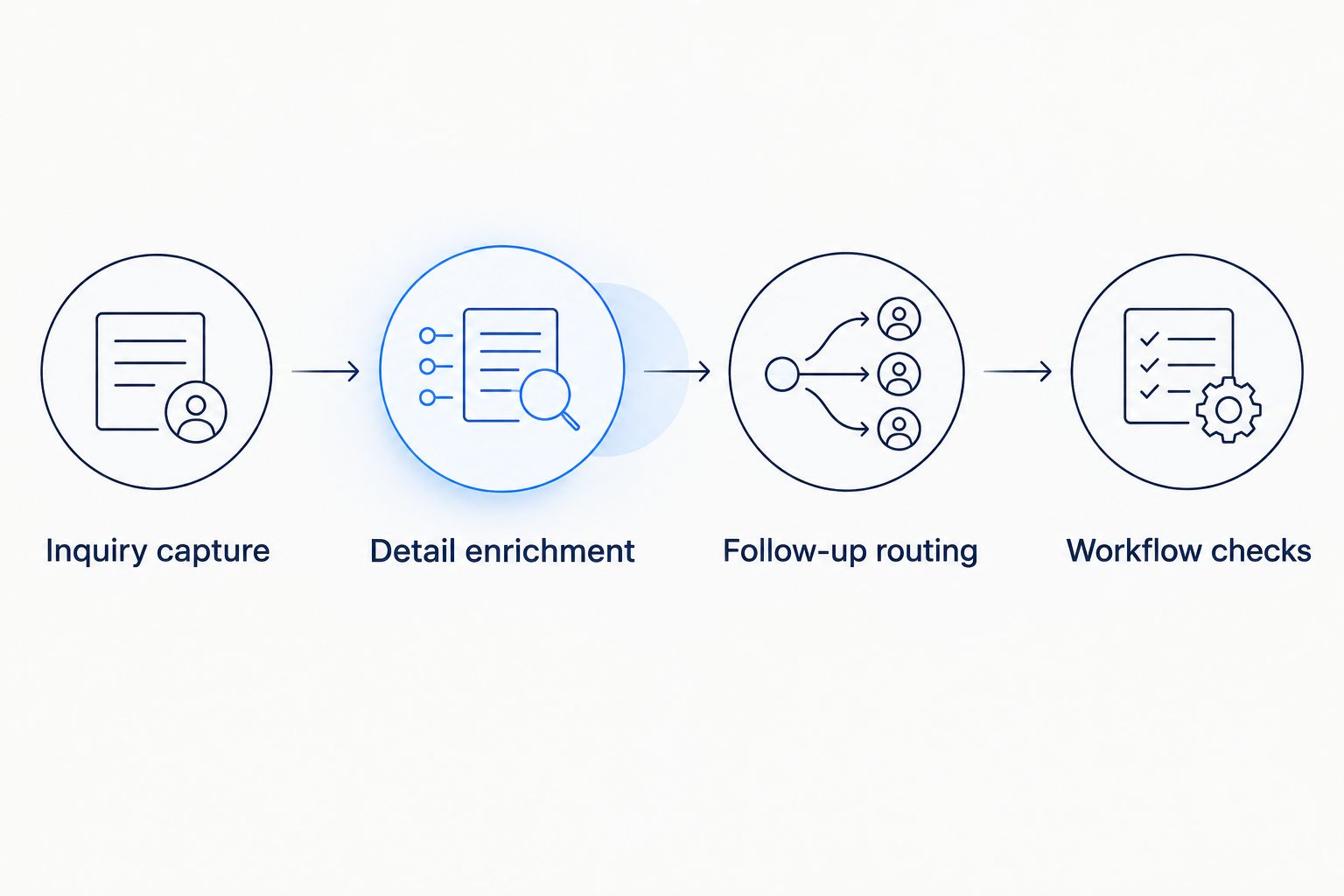
Adding details is only useful when the inquiry reaches an accountable person.
Workflow checks
Check what happens when the process works and when it breaks. A successful lookup alone does not prove that the inquiry reached someone.
Run the complete path. Submit a test inquiry through the real intake channel. Confirm that the record, added details, assignment, and notification all refer to the same request.
Test failure deliberately. Use an ambiguous company name and an unsupported service location. Confirm that both reach review without receiving an unsupported promise.
Test repeat delivery. Send the same test event again. The workflow should avoid creating duplicate records or sending repeated acknowledgements for the same submission.
Check access. Confirm that the assigned person can open the record and see the information needed to reply. Receiving a notification is not enough.
Record the operating rule. Save the workflow owner, exception owner, approved fields, and last review date in your 2026 process notes.
Expected result: Your team can trace a test inquiry from arrival to a verified handoff, including failures. Staff know where to look when a step does not complete.
Launch the smallest working handoff first. Add further enrichment only after the basic capture and assignment path passes its checks.
Refresh details when an inquiry changes
An adjacent workflow handles updates to an existing inquiry. Use it when a customer changes the service location, clarifies the request, or supplies a company website after the initial message.
Trigger a review only when information relevant to routing changes. Updating a note should not restart every lookup or send another receipt confirmation.
Compare the changed fields with the previous record.
Recheck only the affected details, such as service-area coverage after a location change.
Preserve the previous value and record the new source.
Notify the current owner when the change affects the next action.
Require review before reassigning work that someone has already accepted.
Expected result: New information updates the active conversation without creating a separate lead or erasing its history.
For example, in an illustrative scenario, a customer changes a requested service from routine maintenance to a repair. The workflow flags the change for the assigned person; it does not assume a different appointment is confirmed.
Troubleshooting
The wrong company appears on the record
The match relied on weak evidence, such as a shared name or personal email address. Remove the unverified association, retain the inquiry, and request a website or company clarification when it matters. Do not automate a match your staff cannot explain.
Repeat inquiries create duplicate notifications
The workflow treats every delivery as a new submission. Use the inquiry source's unique submission identifier when available and record whether that event has already been processed. Keep genuinely new messages from the same customer; suppress repeat processing of the same event.
A lookup failure stops follow-up
Research sits in the critical path. Change the process so a failed lookup leaves the added fields empty, records the failure, and still routes the original inquiry. Missing context is not a reason to hide a usable request.
Assigned staff cannot open the lead
The notification and record have different access permissions. Test access using the recipient's account, then correct permissions without exposing unrelated customer records. Include enough context in the notification to explain the assignment, not to duplicate every stored detail.
An update keeps restarting the workflow
The automation reacts to its own field changes. Limit the update trigger to relevant customer or staff changes, and distinguish enrichment updates from new inquiry events. Recheck the loop after changing field mappings.
Customize your workflow
ClearPilot Consulting's lead enrichment work fits local businesses that need useful inbound context and an accountable follow-up process. Map the handoff before buying another tool. A clearly assigned inquiry with a relevant message is more useful than a heavily researched record nobody owns.
Once intake works, extend the process to scheduling, onboarding, or invoicing. Keep each extension tied to a confirmed event: an accepted appointment, an approved scope, or completed onboarding. Do not treat an enriched lead as a booked customer.
Bring a redacted inquiry and your current handoff steps to a free automation assessment. Identify where people copy information, wait for clarification, or lose responsibility between tools.
Map your inquiry workflow
Start with a free automation assessment focused on intake, added context, and follow-up ownership.
FAQ
What is lead enrichment for incoming inquiries?
Lead enrichment adds useful details to a person or business that has already contacted you. Those details help your team understand the request and route follow-up; the process is not outbound prospect-list research.
What lead information should I capture first?
Capture a usable reply channel, the requested service, and the location needed to assess coverage. Preserve the original message and ask for business details only when they support the next action.
Do I need a new CRM for lead enrichment?
A new CRM is not a prerequisite for mapping lead enrichment. Check whether your existing intake and recordkeeping tools support the fields, connections, permissions, and exception handling your workflow requires.
Should I enrich residential service inquiries with company information?
Company information is unnecessary when it does not help you handle a residential request. Focus on the service need, job location, contact details, and follow-up owner instead.
Can lead enrichment automatically qualify every inquiry?
Lead enrichment does not establish whether every inquiry is a fit. Use confirmed details for straightforward routing and send ambiguous requests or conflicting information to a person.
What should happen if a lead enrichment lookup fails?
A failed lookup should not stop a usable inquiry from reaching your team. Preserve the original submission, record the lookup failure, and route the request with the information already available.
How does ClearPilot Consulting approach lead enrichment?
ClearPilot Consulting starts with workflow mapping and connects existing tools where practical. The process adds relevant inbound details, defines follow-up ownership, and keeps people responsible for decisions and exceptions.
One last thing
Add an exception owner before adding another enrichment field. During your 2026 workflow review, ask who handles an inquiry that matches no routing rule. If the answer is unclear, more information will not fix the handoff. Name the person, define the next action, and test that path.