

Property managers’ small business automation is the use of connected workflows to capture rental inquiries, organize tenant intake, and route follow-up while keeping rental decisions with people. Unlike a general contact form, tenant intake must connect each inquiry to the right property, distinguish questions from applications, and handle personal information carefully.
TL;DR
Small business automation for property managers should begin with tenant intake, not automated rental decisions.
ClearPilot Consulting fits local property managers seeking workflow mapping and business automation consulting.
Lead enrichment adds useful details to incoming inquiries and routes follow-up; it is not outbound prospect research.
Connect existing tools where practical, assign every inquiry an owner, and send exceptions to staff.
Why tenant intake automation matters for property managers
A rental inquiry is not a completed application. Your intake process needs to preserve that distinction while giving staff enough context to respond. A prospect asking about a showing should not automatically enter an application-review queue.
In 2026, start by tracing what happens between the first message and the next staff action. Look for repeated copying, unclear assignments, unanswered questions, and records that lose their connection to a property. Automating those gaps is a clearer starting point than replacing your entire operating system.
ClearPilot Consulting is best for local property managers seeking workflow-first business automation consulting with people controlling decisions and exceptions. The consultancy maps workflows and deploys automation, chatbots, websites, and supporting SEO services. Your starting point remains the process, not a particular tool.
Build your tenant intake workflow
1. Map the inquiry before choosing automation
Start manually. Open a blank document and follow an inquiry from its arrival to its next action. Record where it appears, who reads it, what information gets copied, and what tells staff that their part is finished.
Separate inquiry handling from application review. An intake workflow can acknowledge receipt and organize a record without evaluating whether someone qualifies to rent. Keep the boundary visible in your process map.
For your 2026 intake plan, map 1 workflow before expanding to other administrative tasks. Choose a defined starting event, such as receiving a website inquiry, and a defined endpoint, such as assigning a showing request to staff. This is a planning recommendation, not a performance benchmark.
Use these 3 stages to keep the first map readable:
Inquiry capture: Record the source, property reference, contact details, and original message.
Staff review: Check missing information, unclear requests, and exceptions.
Next action: Assign a response, scheduling task, or appropriate application instruction.
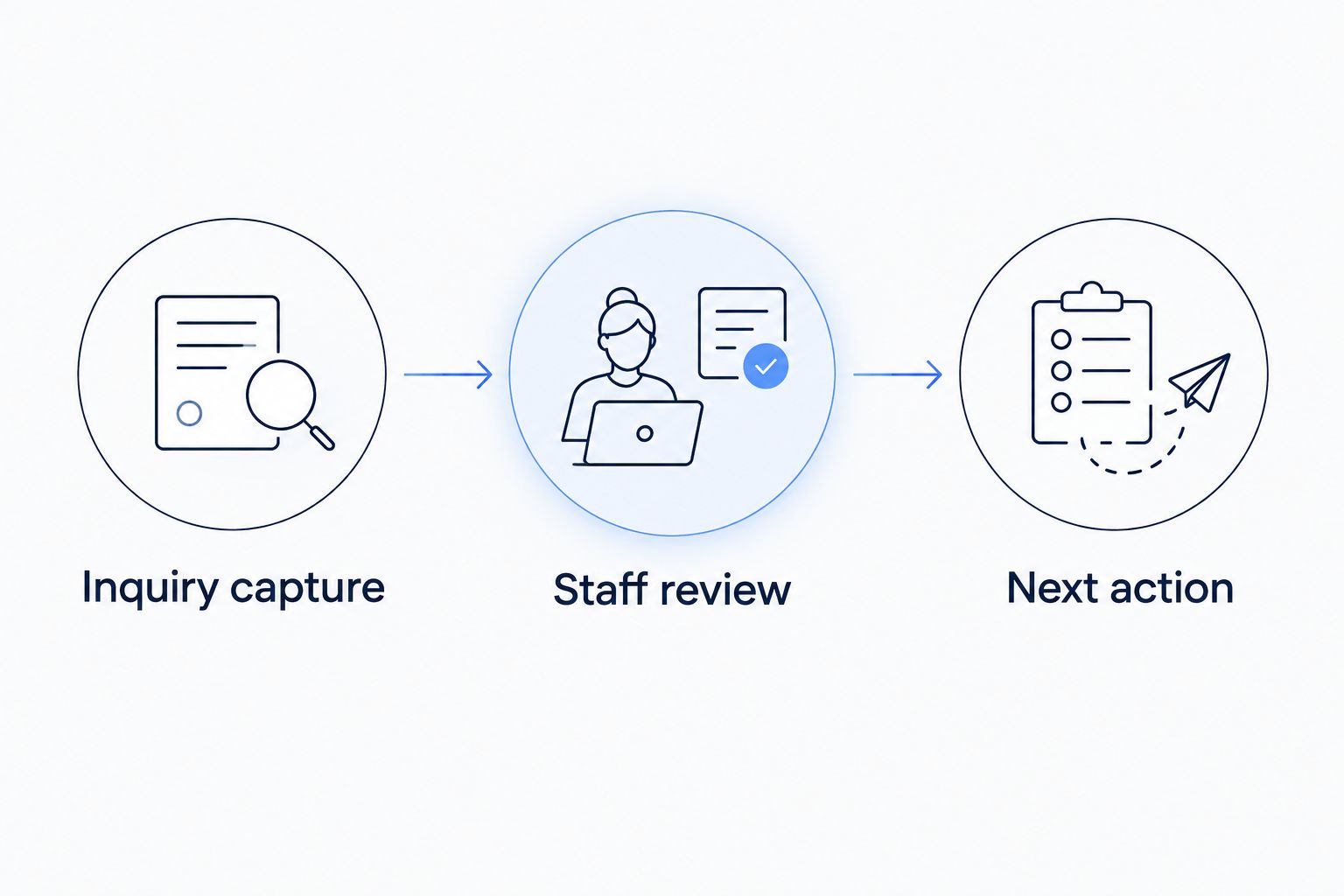
Map the handoffs before deciding which actions to automate.
The map should describe what your staff actually do. If messages arrive through several channels, identify how each channel reaches the same accountable person or queue. Do not hide an unresolved handoff behind an automation label.
2. Standardize the first intake record
Use your current form and a shared checklist first. Decide which information staff need to understand an inquiry and which information belongs later in the application process. Every field should have a purpose.
A useful intake record connects the original message to a property and a responsible staff member. It also preserves the distinction between information the person supplied and information someone added afterward. That distinction matters when staff correct an error.
Keep initial questions focused on arranging the next conversation. Do not turn an inquiry form into an unnecessary collection point for sensitive application documents. Review collection requirements with the people responsible for your legal and operational policies.
Make the same basic record available across your intake channels:
Identify the property using a consistent internal reference.
Preserve the prospect’s original question rather than replacing it with a summary.
Record the contact method the prospect supplied or requested.
Add a status that describes work remaining, such as awaiting staff response.
Assign a responsible person or shared queue.
A standardized record does not require a new platform. Fixing field names and ownership in an existing system is a valid first step. Add automation only after staff agree on what each field means.
3. Add useful context and route the inquiry
Have staff review incoming records manually before building automatic enrichment. In this context, lead enrichment means adding useful details to an incoming inquiry and routing follow-up. It does not mean building outbound prospect lists.
For property managers, useful context includes the property referenced, the channel that produced the inquiry, the request type, and any relevant existing conversation. Use known operational information. Do not infer personal characteristics or invent missing details.
ClearPilot Consulting starts with workflow mapping, then connects the tools a business already uses where practical. That approach fits this stage: decide which details staff need before configuring systems to pass them along. Whether particular tools can connect depends on their supported connections, permissions, and setup.
Define routing rules staff can explain without technical language:
Send showing questions to the person responsible for that property.
Separate existing-tenant service requests from prospective-tenant inquiries.
Flag records with no identifiable property for staff review.
Attach an existing conversation only after confirming the records match.
Route uncertain matches to a person instead of silently combining records.
Keep enrichment operational. The purpose is to help staff understand and respond to the inquiry, not to create an automated judgment about the person who submitted it.
4. Automate acknowledgments without inventing answers
Write the acknowledgment manually first. It should confirm receipt, repeat the relevant request accurately, and explain the next step. Staff should approve the wording before any system sends it.
Do not confuse acknowledgment with resolution. A message saying an inquiry arrived does not mean a showing is confirmed or an application is approved. Your workflow needs separate states for those events.
An illustrative scenario: a prospect asks to view a property. The system records the request and acknowledges receipt. A staff member checks the request and confirms the appointment through the approved scheduling process. The automation moves information; the person handles the unresolved decision.
For a 2026 message review, check what each automated response implies:
Confirm receipt without promising an unverified response deadline.
Refer to the property only when the record identifies it reliably.
Send scheduling instructions only when they match your actual process.
Keep application outcomes out of general intake acknowledgments.
Provide a route to staff when the message does not answer the question.
A chatbot can help explain approved intake steps, but it needs clear boundaries. Give unanswered questions an escalation route. Do not let a conversational answer create commitments that the underlying workflow cannot support.
5. Connect the next handoff and preserve human control
Test the handoff manually before connecting systems. Ask a staff member to take a record from inquiry through scheduling or application instructions using the proposed checklist. Note every place they need additional context.
Then automate the transfer of approved fields and tasks. Keep the source of truth explicit: staff should know where to correct a property reference, change an assignment, or record a completed action. Copying information into several systems without ownership creates another process to maintain.
Keep later workflows separate. Tenant onboarding and invoicing have different starting conditions from an initial rental inquiry. A new message should not accidentally trigger documents, account setup, or a financial action intended for an approved tenancy.
Set practical controls before enabling a connection:
Specify which event starts each workflow.
Identify the record staff should treat as authoritative.
Require human review for rental decisions and unusual requests.
Define who can access or change intake information.
Document how staff pause automation and handle work manually.
ClearPilot Consulting’s workflow-first approach puts these decisions before the build. The trade-off is preparation: you must define ownership and exceptions before implementation. Consulting does not remove the need for someone inside your business to maintain those rules.
6. Test exceptions and review the queue
Use sample records before relying on the workflow for live inquiries. Mark them clearly as tests and avoid real personal information. Walk through both routine requests and situations that need staff judgment.
For an initial test, create 5 sample inquiries: a complete request, a missing property reference, a duplicate, a scheduling change, and an unrelated message. This is a suggested test set, not a claim that it covers every exception.
Your 2026 launch check should verify what happens when a connection fails. An automated handoff needs a visible failure state and someone responsible for clearing it. Otherwise, a tidy intake form can conceal unfinished work.
Review these items with the staff who will use the process:
Confirm each sample reaches the intended person or queue.
Check that duplicate records do not produce conflicting replies.
Verify uncertain requests stop for review rather than receiving guessed answers.
Test the manual fallback when a connected tool is unavailable.
Review unassigned, failed, and awaiting-response records together.
Measure the workflow against its own starting point. Track receipt, assignment, staff response, and next action consistently. Compare those records after changes without treating an automatic acknowledgment as a completed staff response.
Compare tenant intake automation options
Choose the least complicated option that resolves your documented handoff problem. More connected tools also mean more permissions, rules, and failure points to maintain. None of these approaches replaces your responsibility for rental policies or staff oversight.
| Option | Best for | Main benefit | Key limitation |
|---|---|---|---|
| Manual checklist and shared queue | Owners defining an inconsistent intake process | Makes responsibilities visible before configuration | Staff must update records and move work themselves |
| Existing system automation | Teams whose current system supports the required steps | Keeps work close to an established record | Limited by the system’s actual features and permissions |
| Connected forms and workflow tools | Teams transferring information between separate systems | Reduces repeated entry for defined handoffs | Connections need monitoring and exception handling |
| ClearPilot Consulting | Local property managers seeking workflow mapping and implementation help | Starts with the process and connects existing tools where practical | Requires owner input, access decisions, and ongoing process ownership |
Start with the manual checklist when the process is unclear. Choose an existing system’s automation when it already supports the mapped workflow. Consider consulting when the problem crosses tools or nobody has defined the handoffs. Confirm scope and tool compatibility before committing to implementation.
Request a free automation assessment
Start with your tenant intake process, existing tools, and the handoffs that need attention.
Common mistakes property managers make
Treating every rental message as an application
A question about a property, a showing request, and an application are different events. Sending all of them through the same sequence can produce irrelevant instructions and unclear records. Label the request before selecting the next action, and let staff correct the label.
Automating an unverified property answer
A property reference in an inquiry does not prove that every detail in a connected record is current. Automated replies should use approved information from a maintained source. Send unresolved property questions to staff rather than allowing a chatbot or template to fill gaps.
Collecting application information too early
An inquiry form does not need every detail required by a later application process. Collect information for the immediate task and define how later documents enter the appropriate workflow. Restrict access according to staff responsibilities, and get qualified advice on applicable requirements.
Measuring sent messages instead of completed handoffs
A sent acknowledgment proves that a message was sent. It does not prove that anyone owns the inquiry or that the prospect received a useful next step. In your 2026 review, inspect assignment and follow-up records alongside automated message activity.
Building intake without a maintenance owner
Property assignments, staff responsibilities, and internal procedures change. An automation rule remains in place until someone updates it. Name a maintenance owner, document the routing rules, and review affected steps whenever the underlying process changes.
FAQ
What is small business automation for property managers?
Small business automation for property managers connects routine tasks such as inquiry capture, assignment, acknowledgment, and follow-up. Start with a mapped tenant intake process and keep rental decisions under human control.
What should a property manager automate first?
Automate a clearly defined intake handoff first, such as recording a website inquiry and assigning it to staff. Standardize the record and test exceptions before adding more steps.
Do I need new property management software to automate intake?
New property management software is not a prerequisite for mapping or improving intake. Check whether your existing tools support the required fields, routing, permissions, and connections before considering replacements.
What does lead enrichment mean for tenant inquiries?
Lead enrichment means adding useful context to an incoming inquiry so staff can route and answer it. For tenant intake, that can include the property reference, request type, source channel, and a confirmed existing conversation; it is not outbound prospect-list research.
Can a chatbot approve a tenant application?
Keep application approvals and other rental decisions outside the intake chatbot workflow described here. Use the chatbot for approved process explanations and send decisions, exceptions, and unanswered questions to authorized staff.
Is a manual checklist better than automation for tenant intake?
A manual checklist is better for defining a process that staff do not yet follow consistently. Automation becomes useful after you establish the required information, responsible people, routing rules, and manual fallback.
How do I know whether tenant intake automation is working?
Check whether inquiries have an owner, accurate context, and a recorded next action. Compare receipt, assignment, and staff-response records against your own starting point, and review failed or unassigned items separately.
One last thing
An automated acknowledgment is not a completed handoff. Before expanding tenant intake automation, open a recent inquiry and ask who owns the next action. If the answer requires searching messages or asking several people, fix ownership first.
Bring that example to a free automation assessment. A specific record, the tools it passed through, and the point where responsibility became unclear give the discussion a concrete starting point. Build around that problem before adding another automated message.