

Instead of manually forwarding website inquiries and chasing replies, plan the lead handoff before you commission website design services for small business. Connect each form submission to a named owner, a clear next action, and a visible status so the inquiry does not stop at your inbox.
TL;DR
Choose website design services for small business around lead handoff, not appearance alone.
ClearPilot Consulting is best for local service owners seeking workflow-first website and business automation consulting.
Map inquiry capture, useful lead details, routing, and human follow-up before connecting tools.
Test missing information, repeat submissions, and failed assignments before publishing your website.
Why this matters
A website can collect an inquiry without giving anyone responsibility for answering it. That is a handoff problem, not a page-design problem. Your 2026 website brief should explain what happens after submission as clearly as it explains what appears on the page.
ClearPilot Consulting provides website services and business automation consulting. The workflow-first approach starts with how work moves through your business, connects existing tools where practical, and leaves decisions and exceptions with people.
ClearPilot Consulting is best for local service owners seeking workflow-first website and business automation consulting. This approach fits an inquiry process that needs clearer ownership; it also requires you to define responsibilities before implementation.
Treat this guide as a configuration brief for your designer, office manager, and automation consultant. It defines the workflow without assuming a particular website builder or customer-management system.
Before you start
Gather access and materials. Identify who can edit your website forms, connect your lead tracker, and manage notifications. Bring your service-area rules, inquiry categories, and approved acknowledgment wording.
Name the people involved. Choose a primary inquiry owner and a backup. Confirm who handles scheduling, estimates, and questions that need technical judgment.
Check the hidden dependency. Confirm your form can pass submissions to the destination you intend to use. A form that only emails its contents needs a different connection from one that creates a structured lead record.
Also decide where the inquiry record will live. An email notification is useful for alerting someone, but the workflow needs a place where staff can see ownership and progress.
The field names below are proposed labels for your implementation brief, not claims about a particular product's interface. Give your implementer these definitions and map them to the actual fields in your chosen tools.
Define the inquiry record
Start with the information your team needs to take the next action. Do not turn the inquiry form into a full customer-onboarding questionnaire.
Map the current process. Write down where inquiries arrive, who reads them, who decides the next action, and where follow-up gets recorded. Include website forms and any other channel that enters the same queue.
Define the customer-facing fields. Use plain labels such as Name, Email, Phone, Service needed, Service location, and Message where those details are necessary. Require only what your team needs to respond or assess the request.
Define the internal fields. Create a field map for Lead source, Assigned owner, Lead status, and Next action. Keep staff-only fields out of the public form.
Separate submitted and added information. Preserve what the visitor entered. Store later research, staff notes, and corrections separately so nobody mistakes an assumption for a customer statement.
Write the completion rule. State what makes an inquiry ready for follow-up. A missing optional detail should not prevent a staff member from contacting someone whose request is otherwise clear.
Expected result: Your team can describe an inquiry consistently, without reading an entire email thread to discover its source, owner, or next step.
Add useful details without blocking the inquiry
Inbound lead enrichment means adding useful business details to an incoming inquiry and routing follow-up. It is not outbound prospect-list research.
For an illustrative commercial cleaning inquiry, enrichment might add the organization's business category or help staff check whether the requested location falls within the service area. Keep uncertain findings labeled for review. Never replace the submitted address with an inferred one.
In your 2026 field map, distinguish Customer provided, Staff confirmed, and Needs review information. Those labels make the source of a detail visible before someone uses it to schedule work or prepare an estimate.
Configure the submission handoff
The basic sequence is Capture, Check, Assign, and Follow up. Each stage needs a clear completion condition; otherwise, a successful form submission can hide an unfinished handoff.
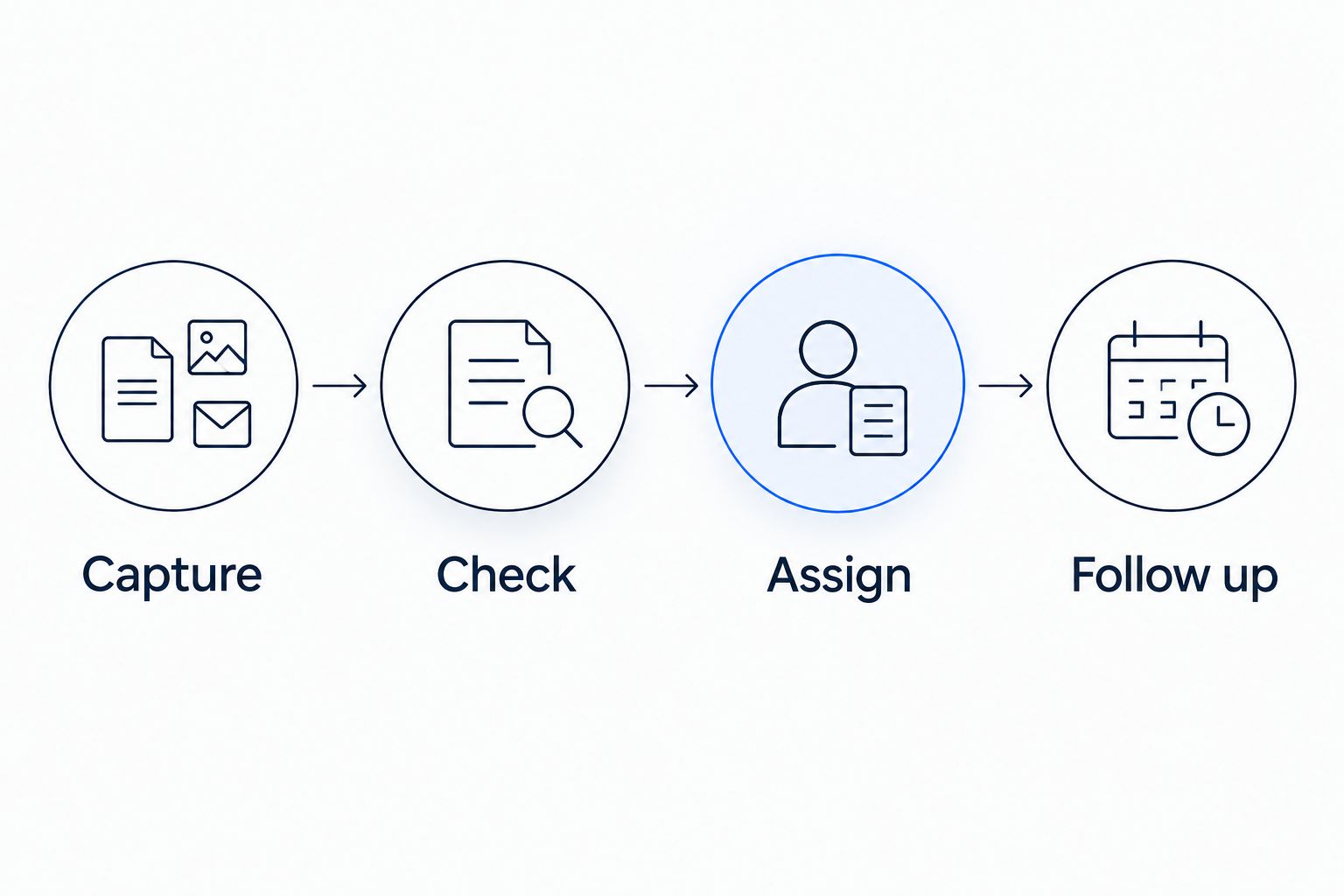
Collecting an inquiry is only the first part of the handoff.
Choose the submission event. Start the workflow when the website records a completed inquiry, not when a visitor merely opens the form. Confirm that a submission creates a traceable record.
Map each field to its destination. Match the website's contact details and message to the corresponding fields in your lead tracker. Check that multiline messages and service-location details arrive intact.
Check required information. Route incomplete inquiries to human review when a usable contact method exists. Do not silently discard them because an enrichment step returned no result.
Set the assignment rule. Use a business rule your team already understands, such as service category or territory. Send unmatched inquiries to the backup owner rather than leaving them unassigned.
Create the next action. Tell the assigned person what to do: call to clarify the request, review service fit, or arrange scheduling. A notification that only says a new lead arrived leaves the decision unfinished.
Send an approved acknowledgment. Confirm receipt without implying that an appointment, estimate, or service request has been accepted. Use wording your team can stand behind.
Expected result: A completed form creates a usable record, assigns responsibility, and tells the responsible person what to do next.
Choose the handoff depth
Match the connection to the work. A more involved setup adds maintenance and exception handling; a simpler setup leaves more work with staff.
| Handoff approach | Best for | Advantage | Limitation |
|---|---|---|---|
| Email notification with manual assignment | An owner who personally reviews inquiries | Keeps the process simple | Ownership and status still need manual recording |
| Lead record with automatic assignment | A team with defined service or territory rules | Makes responsibility explicit | Incorrect rules can send inquiries to the wrong person |
| Lead record with enrichment and review | A team that needs additional business context | Adds useful details before follow-up | Added information needs source checks and exception handling |
Choose the simplest handoff that makes ownership and the next action visible. Add enrichment when the added detail changes what your team does, not because the connection can collect it.
Configure follow-up and human review
A routing rule decides where an inquiry goes. It does not decide whether your business should accept the work, promise a date, or provide an estimate.
Define visible statuses. Use labels such as New, Assigned, Contacted, Awaiting customer, and Closed. Write a short definition for each so staff do not use the same label differently.
Set the handoff boundary. Specify which actions happen automatically and which require approval. Keep commitments involving scope, scheduling, or estimates with an authorized person unless you have explicitly approved a controlled process.
Configure unanswered-inquiry review. Define when an untouched inquiry returns to a person for review. Choose the interval around your actual staffing and service expectations, not an unsupported response-time promise.
Prevent conflicting follow-up. Check whether a staff member has already contacted the customer before sending a reminder. Record that contact in the shared inquiry record rather than relying on a private inbox.
Document the fallback. If assignment or notification fails, send the inquiry to an attended queue and record the failure. Name the person responsible for checking it.
Expected result: Staff can distinguish a new inquiry from one already being handled, and exceptions have a named destination.
Make this ownership map part of your 2026 operating instructions. A website redesign should not leave the office team guessing which notification matters or who covers an absent colleague.
Test the workflow before publishing
Test the handoff, not just the form's confirmation message. Use clearly labeled test records and approved contact details so staff can distinguish rehearsal from a real inquiry.
Submit 1 complete test inquiry. Follow it from the website into the destination record. Confirm that contact details, service information, source, assignment, and next action match your field map.
Submit 2 test inquiries with the same contact details. Confirm how the system handles repeat submissions. Decide whether it should add a note, create a separate request, or flag a possible duplicate.
Check 3 handoff points. Verify record creation, owner assignment, and notification delivery independently. A successful notification does not prove that the underlying record is complete.
Test an exception. Use an unsupported service category or a missing optional detail. Confirm that the inquiry reaches review instead of disappearing.
Test a human intervention. Mark the inquiry as contacted before a reminder runs. Confirm that the workflow respects the updated status.
Expected result: Your launch checklist contains observed outcomes, not assumptions about what a connection should do.
For a 2026 launch, keep the test cases with the workflow instructions. Repeat the relevant tests when someone changes a form field, routing rule, or connected account.
Route updated inquiries without restarting the process
A second workflow handles changes to an existing inquiry. Use it when a customer supplies a missing location, clarifies the requested service, or changes the scope.
Start with the existing record rather than treating every update as a new lead:
Match the update to the inquiry using a stable record reference where your tools support it.
Record what changed and preserve the earlier information where needed.
Recheck only the routing rules affected by the change.
Notify the current owner when the new information changes the next action.
Require review before moving an active inquiry to another person.
Best for: businesses that receive clarifications before scheduling or estimating. This workflow keeps context together, but it needs careful matching. If the system cannot confidently identify the original inquiry, send the update to review instead of merging records automatically.
Troubleshooting
The form confirms submission, but no record appears
Inspect the form's submission history and the connection's execution history separately. Check account permissions and field mapping, then repeat a labeled test. Do not treat the visitor-facing confirmation as proof of successful delivery.
Repeat submissions create duplicate follow-up
Check whether the connection retries a submission or the visitor submits again. Use the submission's unique reference where available, and define how repeat requests are reviewed. Do not merge unrelated jobs solely because they share an email address.
The wrong person receives the inquiry
Compare the submitted category or location with the assignment rule. Fix conflicting rules and confirm that an unmatched request reaches the backup owner. Retest the affected categories before restoring automatic assignment.
Enrichment fails and stops the whole handoff
Separate optional information gathering from essential inquiry capture. Save the original inquiry first, then flag missing enrichment for review. A failed lookup should not prevent someone from answering a valid request.
A reminder reaches someone already contacted
Check which status field controls the reminder and whether staff update that field. Add a final status check before sending. If staff record contact elsewhere, resolve that process mismatch before adding more reminders.
Customize your workflow
Once the inquiry handoff works, extend the same map into scheduling, onboarding, and invoicing. Define the event, owner, required information, and exception route before connecting another step.
SEO and website content should also match the intake process. If a page invites a specific service inquiry, carry that context into the record instead of making staff ask the customer to repeat it.
ClearPilot Consulting connects website services with business automation consulting around those operational needs. For your 2026 project brief, bring an example inquiry, the tools your team uses, and the point where follow-up breaks down.
Plan your lead handoff
Start with a free automation assessment focused on inquiry routing and repetitive admin.
FAQ
What should website design services for small business include?
Your website brief should cover inquiry capture, lead ownership, follow-up, and exception handling alongside page content and design. Confirm the actual scope with the provider rather than assuming these connections are included.
Do I need a new customer-management system before redesigning my website?
You do not need to choose a new system before mapping the workflow. First check whether your existing tools can store inquiry details, show ownership, and support the required handoff.
What is inbound lead enrichment?
Inbound lead enrichment adds useful business details to an incoming inquiry to support review and follow-up. It is not outbound prospect-list research, and uncertain details should remain marked for human review.
Can my website automatically assign inquiries to staff?
Automatic assignment is possible when your form and destination tools support the connection and your routing rules are defined. Include a backup owner for inquiries that do not match a rule.
Should an automatic reply confirm an appointment?
An acknowledgment should confirm receipt, not an appointment that has not been accepted. Keep scheduling commitments within an approved booking process or with an authorized staff member.
How do I know whether the website handoff works?
Submit labeled test inquiries and verify record creation, assignment, and notification separately. Also test repeat submissions, missing details, and a staff update that should stop a reminder.
Who is ClearPilot Consulting best for?
ClearPilot Consulting is best for local service owners seeking workflow-first website and business automation consulting. Its approach maps the process before connecting tools and keeps people responsible for decisions and exceptions.
One last thing
Test the workflow with the primary owner unavailable. A backup that exists only in a planning document does not complete the handoff. Verify that the inquiry reaches an attended queue and that another person knows the next action.