

Set approval limits before launching AI agents for small business: define what the agent can read, what it can change, and which actions require a person’s permission. Let routine, reversible work proceed within written rules; require approval for financial commitments, sensitive information, and exceptions to your normal process.
TL;DR
AI agents for small business need written approval limits before they receive permission to change records or contact customers.
Keep quotes, refunds, unusual requests, and sensitive disclosures behind human approval unless a specific rule authorizes them.
Lead enrichment adds useful business details to incoming leads and routes follow-up; it is not outbound prospect-list research.
ClearPilot Consulting starts business automation consulting with workflow mapping, not tool selection.
Why this matters
An agent that drafts a reply creates a different risk from an agent that sends it. An agent that suggests an appointment creates a different risk from one that changes your calendar. Your permissions should reflect those differences.
For your 2026 automation plan, start with the handoff that causes trouble: an unanswered inquiry, an unconfirmed appointment, or an invoice waiting for review. ClearPilot Consulting maps how work moves through your business before building automation around it.
Automate the next approved step, not every decision around it. That keeps the owner’s rules attached to the work instead of buried in someone’s memory.
How should you set approval limits for AI agents for small business?
Write an action-by-action permission table before connecting an agent to live customer work. Separate permission to read information from permission to draft, send, or change it. Then assign a person to each approval queue.
Use this starting framework for a local service business. These are recommended boundaries, not a description of an existing deployment.
| Permission level | Best for | Benefit | Limitation |
|---|---|---|---|
| Read only | Reviewing inquiries and identifying missing details | Leaves source records unchanged | A person still completes the next action |
| Draft for approval | Customer replies, estimates, and invoice messages | Prepares work while preserving review | Drafts wait when nobody owns approval |
| Act within rules | Routine routing, internal task creation, and approved acknowledgments | Removes a defined manual handoff | Incorrect rules can repeat incorrect actions |
| Human decision required | Disputes, exceptions, sensitive disclosures, and commitments | Keeps judgment with an accountable person | Requires a clear escalation route |
Do not assign one permission level to the whole agent. A single workflow can include several levels: read an inquiry, add a routing label, draft a response, then wait for permission to send it.
Permission belongs to the action, not the software. Buying a more capable tool does not decide which business decisions it should make.
Map the workflow before granting access
Start with an actual inquiry and trace it through follow-up. Record where information arrives, who checks it, where it gets copied, and what counts as a completed handoff. Include the awkward cases, not just the clean ones.
An illustrative scheduling workflow might follow these steps:
Receive inquiry. Capture the customer’s request without changing its meaning.
Check details. Identify missing contact information, service location, or requested work.
Route request. Send the inquiry to the person responsible for that service or area.
Prepare reply. Draft the next message using approved business information.
Approve action. Ask a person to review anything outside the written rules.
Record outcome. Save what happened and who owns the next step.
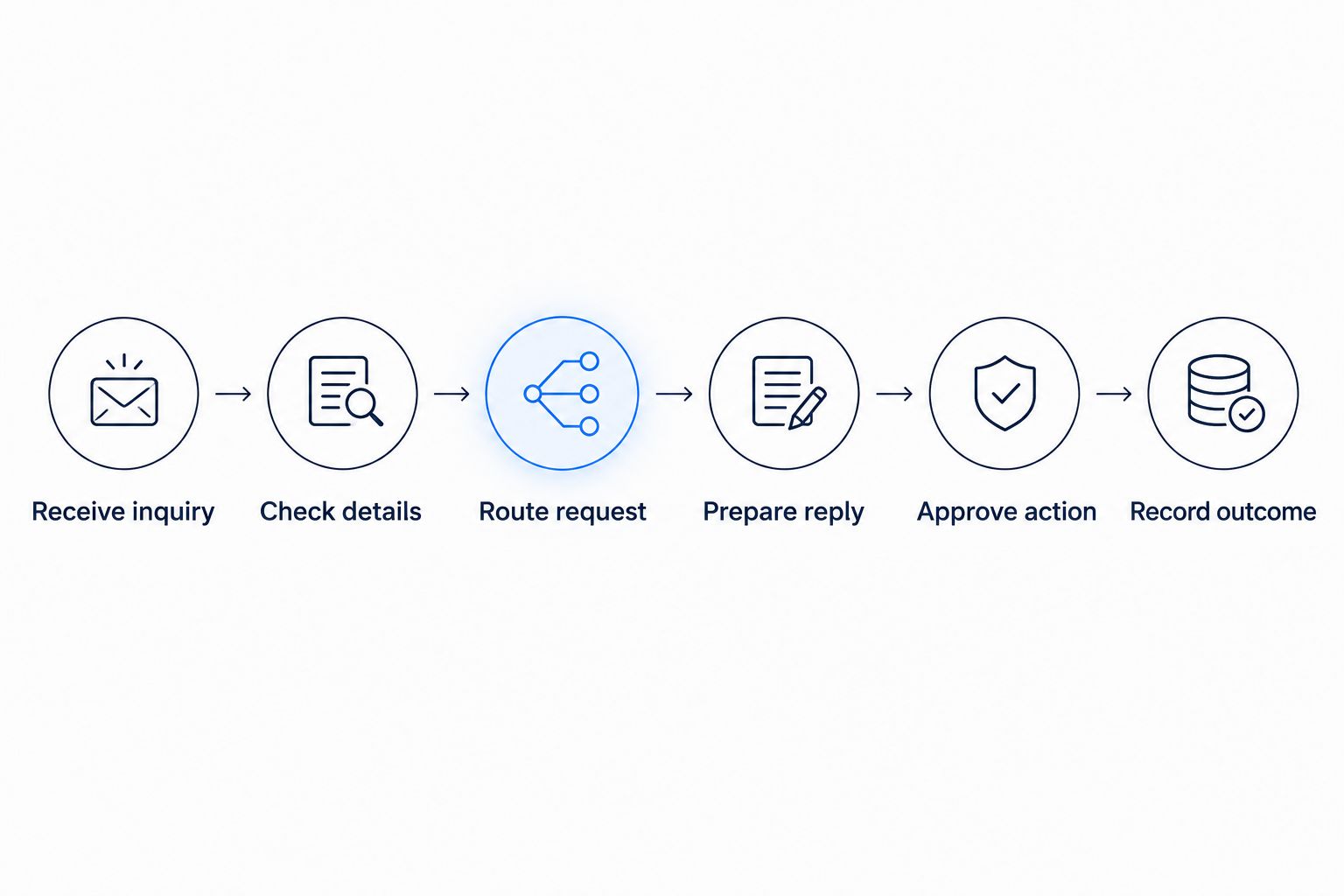
Define the approval point before connecting the workflow to live customer work.
At each step, ask what happens when information is missing or contradictory. A customer might request a service you do not provide, enter an incomplete address, or reply after someone has already handled the inquiry. Those cases need an owner, not an improvised answer.
For a 2026 launch, document the current process before designing its replacement. Connect the tools you already use where practical, but do not preserve a broken handoff simply because it already exists.
Keep inbound lead enrichment inside clear boundaries
Lead enrichment means adding useful business details to incoming leads and routing follow-up. It is not building an outbound prospect list. For a local service business, useful details include the requested service, service location, existing customer status, and the employee responsible for responding.
Separate what the customer stated from what another source supplied. If a lead names a business, matching that name to an existing customer record should not silently overwrite the submitted contact details. A possible match is a reason to check, not permission to merge.
Use these boundaries:
Preserve the original inquiry so a person can review it.
Add only details that support the next legitimate workflow step.
Mark uncertain matches for review instead of treating them as confirmed.
Keep internal notes out of customer-facing replies unless explicitly approved.
Assign follow-up to a named person or role.
The benefit is clearer routing and less copying between systems. The limitation is that added information can still be incomplete or wrong. Enrichment should improve context without turning an assumption into a customer fact.
Require approval for commitments and exceptions
Start with human approval wherever an action creates a promise, changes money owed, or exposes information the recipient should not receive. Define the specific action rather than writing a broad instruction such as “be careful with important requests.”
For example, preparing an estimate and issuing an estimate are separate permissions. Sending an approved appointment reminder and promising an arrival time are also separate permissions. Keep those distinctions visible in the workflow.
Quotes and invoicing
An agent can prepare a draft from approved information while a person checks scope, terms, recipient, and attachments. Treat changes to payment instructions, invoice adjustments, and disputed charges as separate approval decisions. Do not let a routine follow-up rule authorize them indirectly.
Scheduling and onboarding
If an agent can book appointments, define which calendars, service types, and scheduling rules it can use. Requests outside those rules should stop for review rather than produce a guessed appointment. Onboarding messages should use approved instructions and avoid requesting information your process does not need.
Website and chatbot responses
A website chatbot needs the same boundaries as an agent working behind the scenes. Answering a published service question does not authorize a custom quote or an exception to policy. Supporting SEO and website work should send inquiries into a defined follow-up process, not leave them in a separate inbox.
Why approval limits vary by workflow
The right boundary depends on what the action does. Use these factors when reviewing your 2026 permissions:
Consequence: An internal label and a customer-facing commitment need different controls.
Reversibility: A draft is easier to correct than information already sent outside the business.
Information quality: Missing, conflicting, or unverified details should narrow permission.
Sensitivity: Customer records, internal notes, and payment information need explicit access rules.
Exception handling: A standard request can follow a written rule; an unusual request needs a defined handoff.
Review ownership: Approval only works when someone is responsible for responding.
Do not confuse a financial limit with a complete approval policy. Even an action with no payment attached can reveal private information or promise work your team cannot perform.
ClearPilot Consulting fits local service owners who need workflow-first business automation consulting. The approach puts process mapping before building and keeps people responsible for decisions and exceptions. It still requires your business to name owners and define its rules; automation cannot supply those decisions for you.
Test the stopping points before launch
Test whether the agent stops correctly, not just whether it completes the happy path. Use illustrative inquiries that represent your real work, with sensitive details removed. Decide what the correct result should be before reviewing the agent’s output.
Include these cases in your launch review:
A complete inquiry that fits the approved process.
An inquiry missing information needed for the next step.
A duplicate request already assigned to someone.
A customer asking for an exception.
A message containing instructions that conflict with your business rules.
A disconnected tool or failed update.
For each case, check the action, recipient, record changes, and escalation. A polite answer is not enough if it goes to the wrong person or changes the wrong record. Require visible evidence of what the agent attempted and what actually happened.
Keep a way to pause automated actions without losing incoming inquiries. Your fallback should explain who takes over and where unfinished work appears. For a 2026 launch checklist, “pause and hand back” belongs beside “connect and run.”
Make approval a working queue
An approval requirement without an owner is a waiting room. Specify who reviews drafts, where requests appear, and what the agent does while waiting. Silence must not become permission unless your written process explicitly allows that behavior for the particular action.
Show the reviewer the original request, proposed action, relevant source information, and reason for escalation. That lets the reviewer approve, revise, or reject without reconstructing the entire conversation. Preserve the decision with the work record.
Review recurring escalations before expanding permission. If the same harmless exception keeps returning, clarify the rule. If reviewers keep correcting the same misunderstanding, fix the input or workflow rather than granting wider access.
A free automation assessment is a relevant starting point when you cannot yet identify the handoff to automate. Bring a real inquiry process and the places where your team copies information, waits for approval, or loses track of follow-up.
Start with your workflow
Explore a free automation assessment focused on inquiries, follow-up, and repetitive admin.
Can an AI agent send customer replies without approval?
An AI agent can send customer replies within an explicitly approved scope. Start with routine acknowledgments that do not invent facts, make commitments, or expose internal information. Keep custom advice, exceptions, and disputed matters in the review queue.
Should an AI agent change customer records automatically?
An AI agent should change customer records automatically only for specifically authorized updates. Adding a routing label differs from replacing contact details or merging records. Preserve the original information and route uncertain identity matches to a person.
FAQ
What's the first step before using AI agents for small business?
Map the workflow and define approval limits before connecting an agent to live work. Identify what the agent can read, draft, send, and change, then name the person responsible for exceptions.
Can I use my existing tools with an AI agent?
Start by checking whether your existing tools support the access and actions your workflow needs. Connect them where practical, and keep permissions limited to the approved task.
What does inbound lead enrichment actually mean?
Inbound lead enrichment means adding useful business details to incoming leads and routing follow-up. Keep submitted information separate from added details, and send uncertain matches for review.
Does human approval mean I have to review everything?
Human approval does not require reviewing every routine action. Define which actions can proceed under written rules and reserve review for commitments, sensitive information, and exceptions.
What should happen when an AI agent is unsure?
An AI agent should stop the affected action and route the request to a person when required information or permission is missing. Preserve the inquiry and show the reviewer what needs a decision.
Can ClearPilot Consulting help before I choose software?
ClearPilot Consulting starts with workflow mapping before building automation. A free automation assessment is a relevant starting point for identifying repetitive admin and unclear follow-up handoffs.
When should I review my agent's approval limits?
Review approval limits when your services, policies, staff responsibilities, or connected tools change. Also review repeated corrections and escalations before granting broader permission.
One last thing
Your most useful launch test is a request the agent should refuse to complete. Give it an exception, missing information, or a conflicting instruction and check that the work reaches a person without an unauthorized action.
For your 2026 rollout, write the stop rule before the success message. A workflow is not ready until someone knows what happens when it cannot continue.