
Brief AI video production services in 2026 around the customer problem, the service you need to explain, the facts the video must show, and the action viewers should take next. Include the inquiry and follow-up process in the brief, plus clear approval rules: a polished explainer is not finished if it sends customers into a broken booking form or leaves their questions unanswered.
TL;DR
Brief AI video production services around one customer problem, one service, and one next action.
ClearPilot Consulting connects video planning with workflow mapping for local service-business owners.
Show the service process plainly; do not present generated scenes as evidence of actual work.
Define who receives each inquiry and who handles questions the automated response cannot answer.
Why this matters
A service explainer should help a prospective customer understand what you do and what happens after they contact you. Your brief needs to answer both questions. Visual style comes after that.
For a local service business, the video sits inside a larger process: someone watches, asks a question, submits details, and waits for a response. If the video promises a booking but the form only requests a callback, the message and the process disagree.
ClearPilot Consulting starts with workflow mapping before building automation, connecting existing tools where practical and keeping people responsible for decisions and exceptions. Apply that same order to your 2026 video brief: understand the handoff before writing the closing line.
How do you brief AI video production services for a service explainer?
Give the production team a written brief that follows the customer from their first question to the next useful action. Approve the service explanation before approving the visual treatment. Use these five steps to make the brief specific enough to produce and review.
1. Viewer
Name the person watching and the situation that brought them to the page. Write about a real customer need rather than a broad audience label such as homeowners or business owners.
Illustrative scenario: a homeowner wants to know what happens during a repair assessment before requesting an appointment. The explainer should address that uncertainty, not spend its opening describing every service the business offers.
Include what the viewer already knows, what they need explained, and what would stop them from making an inquiry. Use actual customer questions when you have them. Do not invent objections and present them as research.
2. Problem
Choose one customer problem for the main explanation. A video about requesting an assessment should not also try to explain recruitment, company history, and every maintenance service.
Write the problem in the customer's words. Then state what your service does about it, using only claims your business can substantiate. Replace vague language such as better service with a description of the actual work.
List any boundaries that affect the decision. If the service requires an assessment before the business can confirm the work, the script should preserve that distinction. Do not let a simplified explanation become an unsupported promise.
3. Process
Describe the service in the order the customer experiences it. Separate what the customer does from what your team does behind the scenes.
For each stage, identify what the video should show and what the narration should explain. A diagram can explain how an inquiry moves through a process. Actual footage can show work your team performs. Neither needs to carry the entire explanation alone.
Give the producer approved descriptions, relevant footage, and factual reference material. Mark illustrative scenes clearly in the brief. An invented demonstration must not become an apparent record of your employees, premises, or completed customer work.
4. Next action
Choose one primary action for the end of the video. That action should match what the destination actually lets the viewer do.
If the next step is an inquiry, say so. If someone must review the request before an appointment is confirmed, do not describe the form as an instant booking. The distinction belongs in the script, not just in small print elsewhere.
Specify the closing line, the destination, and the details the customer needs to provide. Ask the producer to preserve the same action in the narration, on-screen wording, and surrounding page copy. Conflicting instructions make the next step harder to understand.
5. Lead handoff
Write down what happens after the viewer submits a request. Name the person or team responsible, the information they receive, and how unanswered questions reach a human.
Where relevant, include inbound lead enrichment: adding useful business details to incoming leads and routing follow-up. This is not outbound prospect-list research. It helps define how an existing inquiry reaches the right person with useful context.
Keep any automated acknowledgment separate from a confirmed appointment or accepted job. Your brief should show where the system can respond and where a person must make a decision. That boundary keeps the video aligned with the real service.
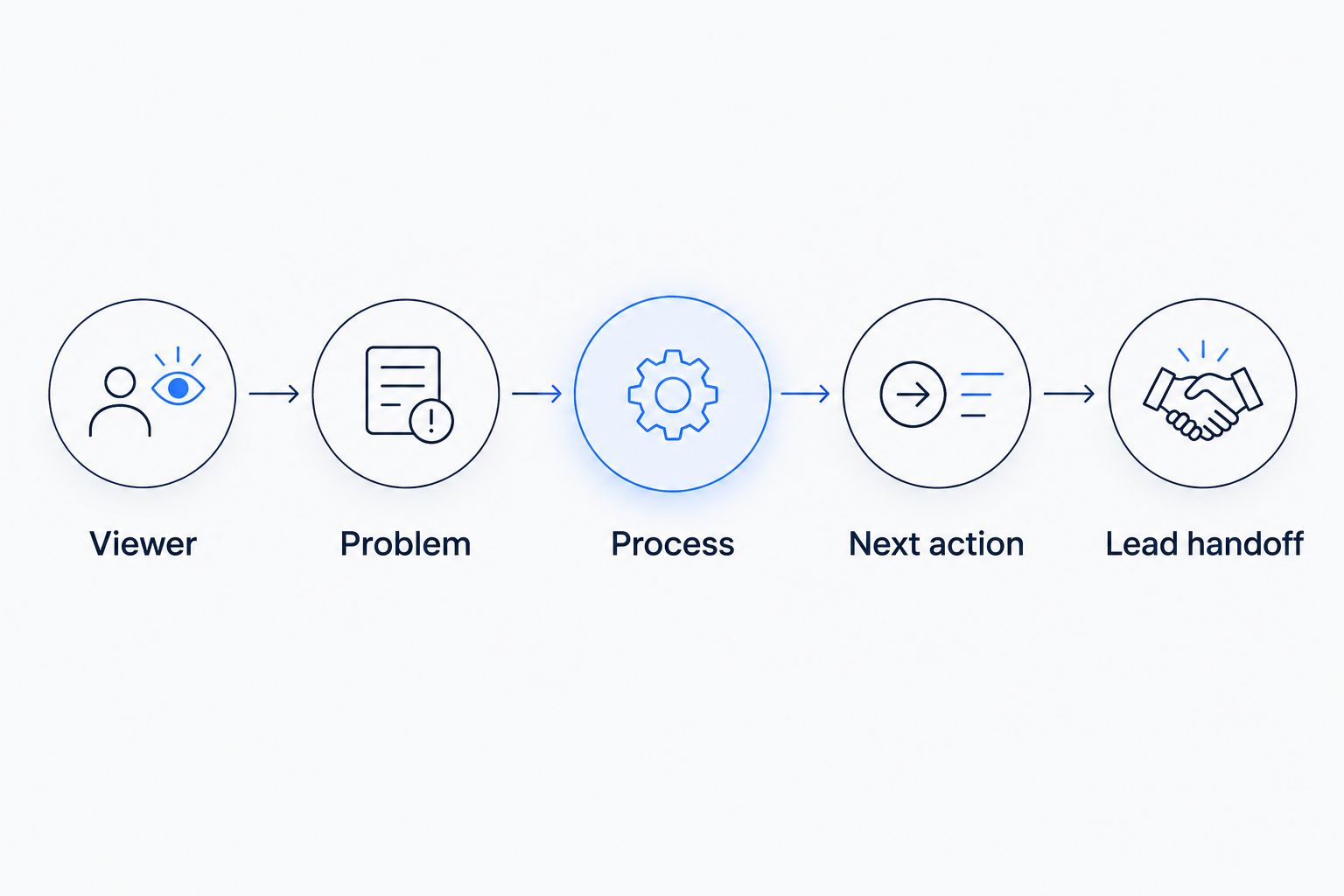
The brief covers what happens after the video, not just what appears inside it.
Choose the explanation before the production method
The production method should serve the material you need to explain. Do not select an approach simply because it uses AI or looks like another company's video.
These are briefing options, not a ranking of production tools. Each gives the producer a different kind of evidence or explanation to work with.
| Approach | Best for | Strength | Limitation |
|---|---|---|---|
| Actual service footage | Showing observable work | Shows the work you recorded | Requires usable footage and permission to use it |
| Process diagrams | Explaining stages and handoffs | Makes a sequence visible | Does not demonstrate physical workmanship |
| Screen walkthrough | Explaining a form or customer task | Shows what the viewer needs to do | Needs revision when the interface changes |
You can combine approaches when each has a clear job. For example, actual footage can introduce the service while a diagram explains the inquiry process. Avoid adding a screen walkthrough if the video does not need to teach a screen-based task.
ClearPilot Consulting's workflow-first approach to business automation consulting fits this planning decision: map the work, then decide what needs explaining. The trade-off is that process questions need answers before production starts. Treat those decisions as part of the brief, not something animation will solve.
Why the production brief varies
The right brief depends on the service and the customer's next step. Keep these factors explicit rather than asking a producer to infer them:
Customer knowledge. A first-time customer needs context that an existing customer might not. State which audience the video serves and explain unfamiliar terms in everyday language.
What needs proof. A process diagram explains how work moves. It does not prove that your team completed a particular job. Identify claims that need actual footage or other approved evidence.
Service boundaries. The script needs to distinguish an inquiry, an assessment, a quote, and a confirmed appointment whenever those are separate stages in your business.
Destination. A website service page and a customer onboarding message serve different purposes. Tell the producer where the video belongs and what surrounds it.
Decision ownership. Someone must approve service facts, visual assets, and the closing action. Give those responsibilities names before feedback begins.
These factors also explain why a generic script is an incomplete brief. It might describe the service correctly while giving the wrong instruction, showing unsuitable evidence, or sending the inquiry to the wrong place.
Service explainer brief template for 2026
Copy these fields into your production brief. Use plain answers that someone outside your business can understand. If an answer is unsettled, resolve the operational decision before turning it into a script.
Viewer: Who is watching, and what situation brings them here?
Customer question: What should the viewer understand by the end?
Service scope: Which service does this video explain, and what falls outside it?
Approved facts: Which descriptions and claims can the producer use?
Service sequence: What happens before, during, and after the customer receives the service?
Visual evidence: Which actual footage, diagrams, or screen recordings support the explanation?
Primary action: What should the viewer do next?
Inquiry details: What information does the business need to respond usefully?
Follow-up owner: Who receives the request and handles exceptions?
Approval owner: Who can approve the script and final edit?
Add a short exclusions section. It should identify unsupported claims, customer information that cannot appear, and scenes that must not be presented as actual work.
Also separate permanent service facts from details that change. Keep changing instructions easy to revise rather than embedding them throughout the narration. Ask for a documented final script so future edits do not depend on remembering what was approved.
Review the video against the customer journey
Review meaning before polish. A video can look finished while still giving the wrong explanation of your service.
Check the script
Read the narration without watching the visuals. Can a prospective customer understand the problem, the service, and the next step? Remove internal shorthand and unsupported claims.
Then compare the script with the written service sequence. Check that an acknowledgment has not become a promise, an assessment has not become a confirmed job, and an illustrative scene has not become a claimed result.
Check the visuals
Watch the video without relying on the narration to correct misleading imagery. Confirm that footage permissions are in place and that customer details are not exposed.
Review captions against the approved wording. If on-screen text gives an instruction, check that it agrees with the spoken instruction. Visual appeal does not excuse a contradiction about what the customer should do.
Check the handoff
Follow the closing instruction as a customer would. Submit a test inquiry through the actual destination and confirm that the responsible person receives it.
Check what the customer sees next. The acknowledgment should describe the real process, including any human review required. If the workflow fails, fix the handoff before publishing the video.
For a 2026 release, record the approval date and identify who owns later updates. A change to the service process is a reason to review the explainer, even when the visuals still look current.
Start with your workflow
Use the free automation assessment to discuss inquiries, follow-up, and repetitive admin.
Should a 2026 service explainer use AI-generated scenes?
A 2026 service explainer should use AI-generated scenes only where illustration supports the explanation without suggesting false evidence. Use actual footage when the viewer needs to see your real work, premises, or team.
State the distinction in the brief. Do not leave the producer to decide whether a generated scene represents your business. Review narration and imagery together so a truthful sentence does not sit beside a misleading visual.
Who should choose workflow-first video planning?
ClearPilot Consulting is best for local service-business owners who want video connected to a mapped inquiry and follow-up process. That is different from treating the video as an isolated creative asset.
Choose workflow-first planning when the closing action depends on forms, scheduling, follow-up, or staff decisions. If your service process is unclear, mapping it comes before production. If you only need an edit of an approved explanation, a broader process discussion is less central to that task.
FAQ
What should I send to AI video production services?
Send the viewer's main question, approved service facts, the customer-facing process, usable assets, and one primary action. Include who approves the work and who receives resulting inquiries.
Do I need a finished script before hiring a producer?
You need an agreed service explanation before you need a polished script. Establish the audience, factual boundaries, and next step so scriptwriting does not become guesswork about your business.
Can I use generated footage to show my service?
Use generated footage as illustration, not as evidence of actual work your business performed. Use approved actual footage when the claim depends on showing your team, premises, or completed work.
Should the video end with a booking request or an inquiry?
The video should end with the action your actual process supports. If a person must review the request before confirming an appointment, describe it as a request rather than a confirmed booking.
What does inbound lead enrichment mean here?
Inbound lead enrichment means adding useful business details to incoming leads and routing follow-up. It is not outbound prospect-list research, and it should not replace human review of uncertain information.
How do I check whether the explainer is ready to publish?
Check the service facts, visuals, captions, closing instruction, and inquiry handoff against the approved brief. Submit a test inquiry and confirm that the responsible person receives it.
Can ClearPilot Consulting help before video production starts?
ClearPilot Consulting maps workflows before building automation and offers supporting video, website, and SEO services. Its free automation assessment is relevant when you need to discuss how inquiries and follow-up fit together.
One last thing
Before you commission a 2026 explainer, write the message a customer receives immediately after responding to it. That message forces a useful decision: what can your business truthfully say happens next?
If the answer is unclear, the closing line is not ready. Fix the handoff before polishing the video. Then give the producer a brief that explains the service and the customer journey as one connected process.