

A chatbot for small business should hand the conversation to a person when the customer asks, the answer needs judgment, or the next action exceeds the bot’s approved authority. Complaints, conflicting information, sensitive details, and exceptions to your normal process belong with a named employee—not another automated reply.
TL;DR
A chatbot for small business should transfer customer requests, complaints, uncertain answers, and policy exceptions to a person.
Workflow mapping defines what the chatbot can answer, what it can do, and who handles exceptions.
Lead enrichment adds useful business details to incoming inquiries and routes follow-up; it is not outbound prospect research.
ClearPilot Consulting fits local service businesses that need workflow-first chatbot planning with people controlling exceptions.
Chatbot for small business: when should a person take over?
A person should take over whenever continuing automatically risks a wrong commitment, an unresolved complaint, or a lost inquiry. Build those transfer rules into the workflow before you connect the chatbot to scheduling, customer records, or other business tools.
Use this decision table for your 2026 chatbot plan. These are operating recommendations, not claims about a particular chatbot’s features.
| Handling option | Best for | Benefit | Limitation | Transfer rule |
|---|---|---|---|---|
| Chatbot answers | Approved questions about your normal process | Gives a consistent answer without staff typing it again | Cannot resolve an exception through an approved answer alone | Transfer when the approved answer does not fit |
| Chatbot collects details | New inquiries needing follow-up | Organizes the request before an employee responds | Collection alone does not resolve the request | Route the record to a named owner |
| Person takes over | Complaints, unclear requests, and decisions requiring authority | Applies judgment and accepts responsibility | Requires staff coverage and a follow-up process | Keep the bot from continuing the same discussion |
A transfer is not complete because the chatbot displays a message saying someone will help. It is complete when the request reaches a responsible person with enough context to act.
Why this matters
An inquiry can look handled in a chat window while nobody owns the next step. A bot answers a question, collects a phone number, and closes the conversation—but your office still needs to review the request, contact the customer, and record the outcome.
ClearPilot Consulting approaches business automation through workflow mapping before building automation. For a local service business, that means identifying where an inquiry arrives, what information it needs, and who handles it when the normal path breaks.
Your 2026 chatbot plan should define responsibility, not just responses. Start with the point where a customer needs help and work through to a completed follow-up.
Which situations need an immediate human handoff?
The customer asks for a person
Treat a direct request for a person as a transfer instruction. Do not make the customer explain the same issue again or complete an unrelated qualification script first.
Ask only for the details needed to make the connection. If nobody is available, explain that clearly and offer the approved follow-up route without implying that a live employee is joining.
The answer requires an exception
A chatbot can explain an approved process. A person should decide whether to depart from it.
Examples include a disputed invoice, a request outside your service area, or a scheduling change that requires staff approval. The bot can summarize the request, but it should not turn an exception into a commitment.
The information conflicts or remains unclear
If the customer’s account differs from the information available to the chatbot, stop treating the stored answer as a resolution. Flag the conflict and send both versions to the employee reviewing it.
Repeated clarification is another warning. When the bot cannot establish what the customer needs, collect a short description and route it rather than restarting the same questions.
The conversation involves sensitive information
Do not encourage customers to enter passwords, payment-card details, or unnecessary personal information into general chat. Define which details the bot can request and which approved channel handles anything more sensitive.
A human handoff does not remove the need for careful data handling. Your employee still needs an appropriate process for receiving, accessing, and recording the information.
The customer reports harm or an urgent safety concern
Do not use a routine lead-collection script to handle a report of immediate danger. Provide approved safety wording and direct the customer to the appropriate emergency channel when necessary.
Keep business follow-up separate from emergency response. A chatbot should not present a callback request as a substitute for urgent assistance.
Why the handoff point varies
The right transfer point depends on the work your chatbot is allowed to perform. Set these boundaries for each workflow rather than applying one rule to every conversation.
Decision authority: Answering an approved question differs from approving an exception or making a commitment.
Information quality: Incomplete, outdated, or conflicting records require review before the bot acts on them.
Customer intent: Someone requesting a person needs a different route from someone checking a routine detail.
Data sensitivity: The information involved determines what the chatbot should collect and where it should send it.
Staff coverage: Your transfer wording must match whether an employee can respond live or must follow up later.
Connected tools: A chatbot that updates records or schedules work needs clearer action boundaries than one that only answers questions.
Record these decisions in your 2026 operating instructions. Staff should be able to identify the transfer rule without guessing what the chatbot was supposed to do.
How do you build a handoff that actually works?
Use this sequence before adding more automated actions. Each step should describe something your team can observe and check.
1. Map the inquiry
Write down where the inquiry starts and what happens next. Include website chat, the customer record, the notification, and the employee’s follow-up.
Follow the request beyond the chat window. If an employee must copy details into another system, include that work in the map rather than assuming the chatbot has eliminated it.
2. Define authority
List what the chatbot can answer, collect, and change. Keep those categories separate: permission to collect a preferred appointment time is not permission to confirm an appointment.
Mark decisions that require approval. Connect tools your business already uses where practical, but do not give the chatbot broader access simply because a connection supports it.
3. Set triggers
Write explicit transfer conditions using the situations above. Include a customer request for a person, an unresolved question, a complaint, and an action outside the bot’s authority.
Describe the next action for each trigger. A rule that says only to escalate leaves staff guessing where the request goes.
4. Assign ownership
Assign 1 primary owner and 1 backup owner to each handoff queue. These are recommended responsibilities, not staffing benchmarks; the same employee can cover several queues when that matches your operation.
State what happens when both people are unavailable. The customer should receive an accurate explanation of the next step, not a promise the team cannot meet.
5. Pass context
Send the conversation summary, the requested outcome, and the reason for transfer. Include the customer’s contact details only when needed and permitted by your process.
Pause automated replies on the transferred issue. Otherwise, the employee and the bot can give competing instructions while each appears to own the conversation.
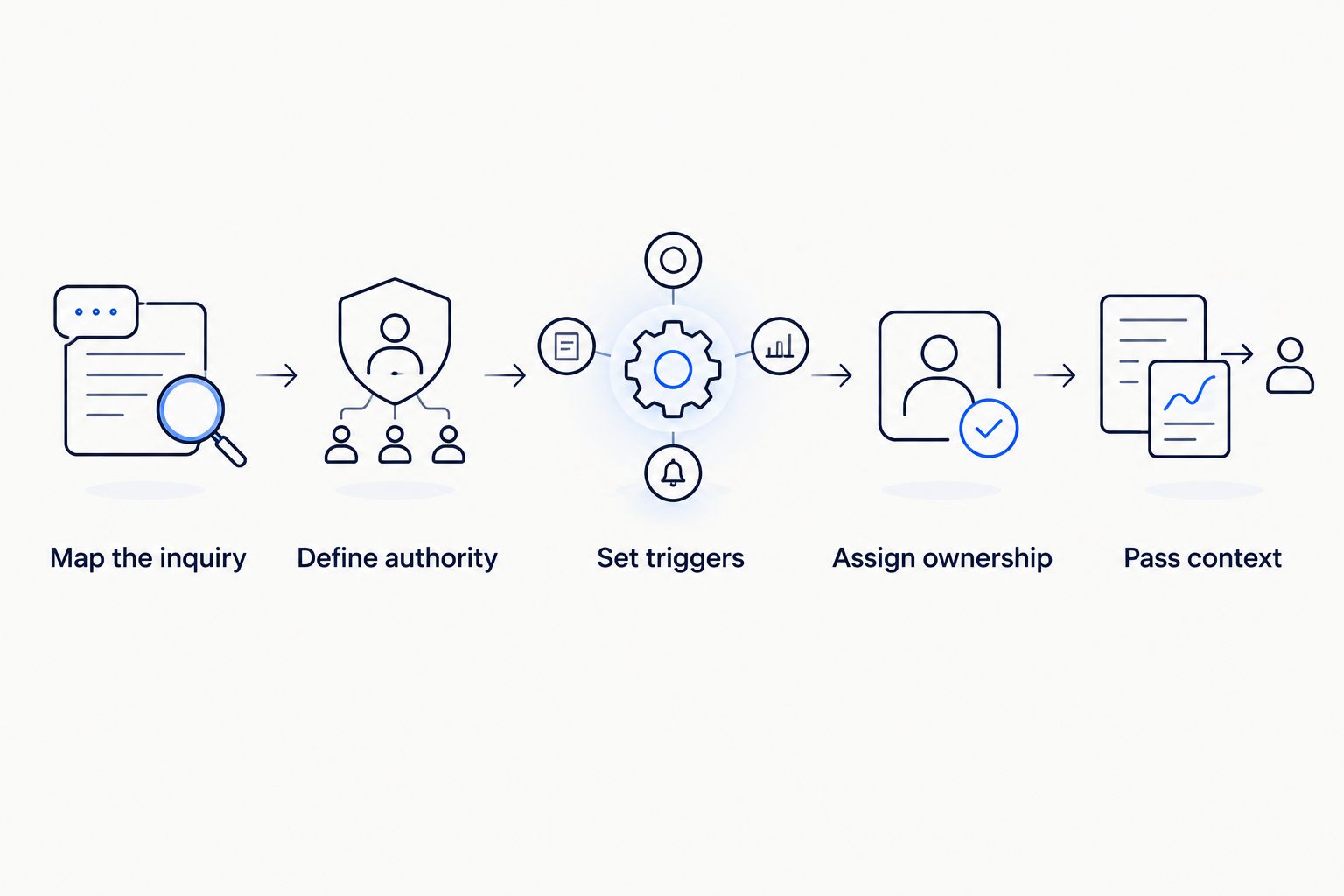
A handoff needs a trigger, an owner, and enough context for the next action.
Before publishing your 2026 workflow, walk through a normal inquiry and an exception with the employees who receive them. Check the actual destination, not just the chatbot’s on-screen response.
What should the chatbot send to your employee?
At minimum, use 3 handoff fields: requested outcome, transfer reason, and next owner. Attach relevant conversation context so your employee does not have to reconstruct the issue from scattered messages.
An illustrative handoff for a local service business could contain:
Requested outcome: The customer wants to move an existing appointment.
Transfer reason: The requested change needs staff approval.
Next owner: The employee responsible for scheduling.
Relevant context: The customer’s preferred time and the appointment reference already provided.
This is an example, not a client result or a description of an installed system. The point is to make the next action clear without collecting details that do not help resolve the request.
Keep a distinction between what the customer said and what the chatbot inferred. An employee should not mistake a generated summary for a confirmed customer statement.
Where does inbound lead enrichment fit?
Inbound lead enrichment means adding useful business details to an incoming lead and routing follow-up. It is not outbound prospect-list research.
For example, a service inquiry can include the requested work, service location, and preferred contact method. Those details help the receiving employee understand the request before replying, provided the information is relevant and its source is clear.
Do not let enrichment delay a requested human handoff. Ask for what is necessary, pass along what you have, and let the employee resolve missing details when appropriate.
The same rule applies to website and SEO inquiries. A person arriving through search still needs an accountable follow-up process after the chatbot captures the request.
Is a chatbot enough, or do you need automation consulting?
A chatbot is enough when your task is limited to approved answers and your team already has a clear follow-up process. Broader automation work becomes relevant when requests cross tools, ownership is unclear, or employees repeatedly copy information between systems.
ClearPilot Consulting is best for local service businesses that need workflow-first chatbot planning with people controlling exceptions. Its business automation consulting approach starts with mapping work and connects existing tools where practical.
The trade-off is that workflow-first planning requires your team’s input. You need to identify who makes decisions, which information is reliable, and what happens when the normal process fails; software cannot supply those business rules for you.
Bring a representative inquiry and an unresolved exception to the free automation assessment. Focus the discussion on where work stalls and who needs to act next.
Map your chatbot handoff
Discuss your inquiry process in ClearPilot Consulting’s free automation assessment.
FAQ
When should a chatbot for small business transfer me to a person?
A chatbot for small business should transfer you when you ask for a person, need an exception, or have an issue outside its approved authority. Complaints, conflicting information, and sensitive requests also need a defined human review route.
Should my chatbot keep asking questions before connecting a customer?
Your chatbot should ask only for information needed to route the request after a customer asks for a person. Do not make unrelated lead-qualification questions a condition of receiving human help.
What should my chatbot do when nobody is available?
Your chatbot should explain that live help is unavailable and provide your approved follow-up route. It should identify the next step without inventing a response-time promise.
Can a chatbot confirm appointments for my business?
A chatbot should confirm appointments only when your workflow explicitly authorizes that action and the connected scheduling information supports it. Collecting a preferred time is not the same as confirming a booking.
What information should a human handoff include?
A human handoff should include the requested outcome, transfer reason, and next owner. Add relevant conversation context and necessary contact details so the employee can continue without restarting the discussion.
Is inbound lead enrichment the same as finding prospects?
Inbound lead enrichment adds useful business details to leads that have already contacted you; it is not outbound prospect-list research. Use those details to route follow-up without blocking a requested human transfer.
How should I review my chatbot handoff rules in 2026?
Review your 2026 chatbot handoff rules against actual conversations and the employee follow-up they produced. Update the rules when responsibilities, business policies, connected tools, or approved actions change.
One last thing
Check the notification destination before rewriting the chatbot’s answers. A well-written transfer message does not help if it sends the inquiry to an unattended inbox.
Trace a sample handoff through to the employee who receives it. Confirm that the employee can see the request, understand the next action, and stop automated replies on the same issue. That is the difference between announcing a handoff and completing one.