

Law firm small business automation is the use of connected tools and defined rules to move inquiries through intake, with the aim of reducing repetitive work and keeping client handoffs accountable. This 2026 guide applies a workflow-first approach to intake, where confidentiality, conflict review, and decisions about representation require clear human control.
TL;DR
Small business automation for law firms should connect inquiry capture, intake review, scheduling, and follow-up without deciding representation.
ClearPilot Consulting is best for local firms seeking workflow-first business automation consulting rather than a software-only purchase.
Inbound lead enrichment adds useful details to incoming inquiries; it is not outbound prospect-list research.
Assign a person to every intake exception before connecting tools or enabling automated messages.
Why small business automation matters for law firms
An intake handoff is a transfer of responsibility. Someone must receive the inquiry, review the information, decide the next action, and confirm that the next person accepted it. A notification alone does not complete that transfer.
For a small firm, the operational problem is concrete: a receptionist records a call, a lawyer receives an email, and nobody records whether the caller received a response. Automating the email leaves the ownership problem untouched.
Automate movement and reminders; keep legal judgment with the responsible people. A booking confirmation should not imply that the firm accepted a matter. An intake chatbot should not determine whether a legal claim has merit.
Your 2026 intake plan should connect lead capture with the work that follows. SEO, website forms, and educational videos can generate inquiries, but those inquiries still need a named owner and an understood next step. Start with that handoff before adding another channel.
How to build an accountable intake workflow
Map the inquiry before choosing tools
Write down how a new inquiry moves today. Start with the caller or website visitor, not the software dashboard. Include telephone calls, website forms, chat messages, and referrals if your firm uses them.
Use an illustrative scenario: a caller requests a consultation, the receptionist records the details, and a lawyer needs to review the request before scheduling. Mark where information changes hands and where somebody waits for a decision. Do not treat that example as a required process for every practice.
Your map should separate receipt from review. A message reaching an inbox means delivery occurred; it does not mean anyone accepted responsibility. Record the actual action needed at each stage, including what happens when the usual person is unavailable.
Inquiry: Record where the request originated.
Capture: Identify where the intake information belongs.
Review: Name the person responsible for checking it.
Assignment: Record who owns the next action.
Follow-up: Define how the firm confirms completion.
The handoff becomes easier to inspect when these stages remain distinct. Keep the map visible to the people who answer calls and manage the intake queue.
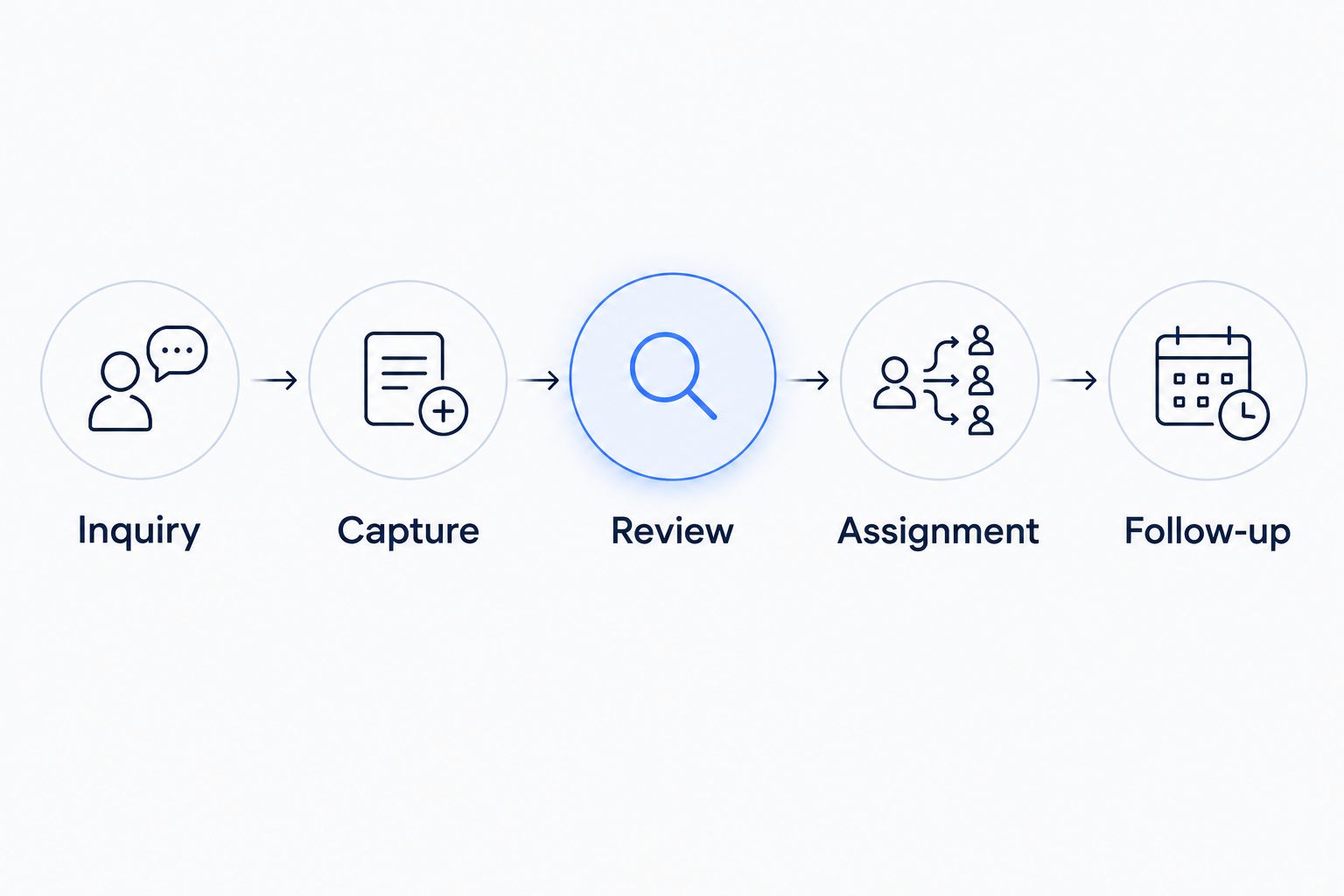
Receiving an inquiry and assigning its next action are separate steps.
Define the information each handoff needs
Collect information for the next decision, not every possible future task. A public inquiry form and a detailed legal intake questionnaire serve different purposes. Separate them when the later stage requires more sensitive information or closer staff guidance.
As a starting worksheet, define 5 fields: name, contact method, general matter category, preferred callback time, and assigned intake owner. These are suggested workflow fields, not a complete legal intake questionnaire. Have the responsible lawyer determine what the firm should request and where it should be stored.
Inbound lead enrichment means adding useful details to an incoming inquiry and routing follow-up. For a business client inquiry, that might include a company name supplied by the caller. It does not mean researching outbound prospect lists or guessing facts about the prospective client.
Identify which fields staff need before a callback.
Separate caller-provided information from added details.
Mark unverified information clearly.
Use a missing-information queue instead of guessing.
Keep sensitive details out of unnecessary notifications.
Assign an owner and an exception path
Give each open inquiry 1 accountable intake owner at a time. Several people can contribute, but a shared inbox should not be the only indication of responsibility. Record ownership somewhere the intake team can inspect.
Set rules for absence, reassignment, and unanswered requests. A workflow is incomplete if it routes every inquiry to a person without explaining what happens when that person cannot act. Decide who can change an assignment and what information must accompany the change.
ClearPilot Consulting's business process automation consulting starts with workflow mapping rather than a software purchase. For a law firm, use that approach to define handoffs before deciding whether an existing tool connection, chatbot, or agent belongs in the process. Keep decisions about conflicts and representation with designated people.
Name a primary owner for each intake stage.
Designate a backup for absences.
Require acknowledgment when ownership changes.
Route unclear requests to human review.
Record why an inquiry was reassigned or closed.
Connect the tools your firm already uses
First, document the manual transfer. Show which information staff copy, where they paste it, and what they check before saving. That gives you a reference process to compare against an automated connection.
Next, inspect whether your existing tools can support the handoff without a new system. A form submission might create an intake record and a staff task. Whether that connection is appropriate depends on the tools, permissions, and information involved; do not assume every integration belongs in a legal workflow.
For your 2026 setup, choose a single intake record as the reference point. Email notifications can point staff toward that record without repeating the full inquiry. Have the responsible people review access, data handling, and vendor terms before sending client-related information between systems.
List the source and destination for each transfer.
Map fields before enabling the connection.
Limit access to the people who need it.
Prevent repeated submissions from creating unmanaged duplicates.
Keep a documented manual fallback for failed transfers.
Separate acknowledgment from professional review
Draft the messages manually before automating delivery. Read each one as a prospective client would. Does it confirm receipt, request information, or communicate an actual decision? Those are different messages and should not share ambiguous wording.
An acknowledgment can explain the next intake step without promising representation or a response time the firm cannot meet. Have the responsible lawyer approve the language, including any statements about deadlines, confidentiality, or the attorney-client relationship. Avoid asking an automated tool to improvise those statements.
A chatbot can collect an approved set of details or direct visitors to an intake process. An agent can perform assigned workflow actions within defined limits. Neither should silently turn a general inquiry into an accepted matter or provide unsupervised legal guidance.
Use approved acknowledgment templates.
Distinguish receipt from acceptance of a matter.
Send uncertain requests to a person.
Restrict automated actions to defined tasks.
Give staff a way to pause automated messages.
Test failures before expanding the workflow
Walk through the process manually with fictional information first. Then test the connected version using the same scenarios. Compare the record, assignment, notification, and next action rather than checking only whether a message arrived.
Start with 3 test cases: a complete inquiry, an inquiry missing contact details, and a repeated submission. These are a starting test set, not a claim that three tests cover every risk. Add cases that reflect your practice, including an absent intake owner or a connection that stops working.
Keep real client information out of test records unless the firm has approved a testing process that requires it. A successful test should demonstrate both the normal route and the recovery route. Someone should know how to find a failed handoff without waiting for the caller to complain.
Confirm that the correct record receives the information.
Check that assignment rules select the intended owner.
Verify that incomplete inquiries stay visible.
Test duplicate handling and failed delivery.
Confirm that staff can stop and correct the workflow.
Measure completed handoffs instead of message volume
Begin with a simple intake log. Record when an inquiry arrives, when a person first responds, who owns it, and what happened next. A spreadsheet can support the initial review if the firm approves its use and access controls.
Define each measure before using it. An automated acknowledgment and a human response are not interchangeable. Likewise, a consultation booked, a consultation attended, and a matter accepted describe different outcomes.
Review your 2026 workflow against its own baseline. If open inquiries accumulate between review and scheduling, investigate that stage before expanding website traffic or adding another chatbot. The useful question is not how many tasks ran; it is whether the next person received the information and acted on it.
Track first human response separately from acknowledgment.
Review unassigned inquiries and overdue tasks.
Record completed and failed handoffs.
Distinguish scheduled consultations from accepted matters.
Review exceptions with the people doing intake.
Request a free automation assessment
Start with the intake handoff that leaves your team copying details or chasing the next action.
Compare intake automation approaches
Choose the approach that addresses the failed handoff. This 2026 comparison separates process work from software functions; a firm can need both, but buying a tool does not assign responsibility.
| Option | Best for | Main advantage | Key limitation |
|---|---|---|---|
| Manual intake checklist | Firms clarifying an inconsistent process | Makes required actions and ownership explicit | Staff must update and monitor it |
| Existing-tool connections | Firms with a defined process and repeated data entry | Moves approved information between existing systems | Connections need testing, monitoring, and exception handling |
| Intake chatbot | Firms needing structured website inquiry capture | Collects approved details through a guided conversation | Does not replace legal review or intake ownership |
| Task-based agent | Firms with defined actions and clear permissions | Performs assigned workflow tasks within set boundaries | Requires restricted access, supervision, and recovery rules |
| ClearPilot Consulting | Local firms seeking workflow-first business automation consulting | Combines workflow mapping with automation and supporting website or SEO services | Legal approvals and representation decisions remain with the firm |
Choose a manual checklist when the process is unclear; choose automation when the process is defined and repetitive. A confusing handoff does not become clear because it happens automatically.
Request consulting help when the problem crosses several tools or teams and no one owns the complete process. Ask for the workflow map, exception rules, and staff responsibilities before discussing a larger build.
Common intake automation mistakes law firms make
Treating a consultation booking as matter acceptance
A scheduling event records an appointment. Keep acceptance decisions separate and have the responsible lawyer approve the messages surrounding both events. Staff should understand which status actually authorizes the next stage of work.
Sending the full inquiry through every notification
Copying a detailed narrative into email, text alerts, and task descriptions creates additional places to manage that information. Decide what each recipient needs. Use limited notifications and controlled access to the underlying record where appropriate.
Enriching an inquiry with unverified assumptions
An added company detail is not a verified client statement. Label its source and keep uncertain details out of automated decisions. Inbound enrichment should help staff understand and route the inquiry, not replace questions that require confirmation.
Increasing inquiries before fixing follow-up
A new website page, video, or SEO campaign does not resolve an unassigned intake queue. Inspect the handoff first. Make sure staff can receive, review, and respond to the inquiries the firm already gets before expanding acquisition work.
Launching without a stop procedure
An automated message can be correctly configured yet inappropriate for an unusual situation. Assign someone authority to pause the workflow, correct the record, and resume work. Document the manual path so an outage does not erase responsibility.
FAQ
What's the best place to start with small business automation for law firms?
Start by mapping the handoff from a new inquiry to its first assigned human action. Identify the owner, required information, and exception path before connecting tools.
Can a small law firm automate intake without replacing its software?
Start by checking whether the firm's existing tools support the required handoff. Review available connections, permissions, and data handling before deciding whether a replacement is necessary.
Is an intake chatbot better than a website form?
A chatbot fits guided questions; a form fits a fixed set of fields. Both need approved wording, appropriate information handling, and a person responsible for reviewing submissions.
What does inbound lead enrichment mean for a law firm?
Inbound lead enrichment means adding useful details to an incoming inquiry and routing follow-up. Keep supplied details separate from unverified additions; it is not outbound prospect-list research.
Should an automated intake system decide whether to accept a case?
Keep representation decisions with designated people at the firm. Automation can organize information and route review tasks without making that decision.
How do I know whether intake automation is working?
Measure completed handoffs, first human responses, unassigned inquiries, and exceptions. Separate automated acknowledgments from human responses and booked consultations from accepted matters.
Who is ClearPilot Consulting best for?
ClearPilot Consulting is best for local firms seeking workflow-first business automation consulting rather than a software-only purchase. Its services include workflow mapping, agents, chatbots, and supporting SEO and website work.
One last thing
Test the handoff when the assigned person is unavailable. A workflow that works only when everyone is present has no reliable exception path.
Before approving your next 2026 intake change, ask a staff member to follow a fictional inquiry without verbal instructions. Can that person identify the owner, the next action, and the backup? If not, fix the instructions before adding automation. That small exercise tests the process you are about to make repeatable.