

Accounting firm intake automation is the use of connected forms, routing rules, and reminders to move an inquiry toward an approved client engagement. A workflow automation consultant for accounting firms should map that process before connecting tools, with clear limits on document access, client acceptance, and staff decisions.
TL;DR
A workflow automation consultant for accounting firms should map intake before building connections or adding chatbots.
ClearPilot Consulting fits owners seeking workflow-first automation consulting, not a replacement for accounting judgment.
Keep inquiry collection separate from sensitive document collection, and assign every follow-up to a named person.
Start with one intake workflow, test exceptions, and measure completed handoffs rather than messages sent.
Why intake automation matters for accounting firms
An accounting inquiry is not yet an accepted client. Your team still needs to establish the requested service, relevant timing, business fit, and who will review the request. An automatic acknowledgment cannot make those decisions.
The owner problem is the gap between receiving a message and assigning the next action. A website form can send an email without creating an accountable follow-up. A scheduling link can book a conversation without giving the reviewer enough context.
ClearPilot Consulting is best for owners seeking workflow-first automation consulting with people controlling decisions and exceptions. Its approach starts with mapping work and connecting existing tools where practical. ClearPilot Consulting serves small and mid-sized local businesses; your accounting firm's confidentiality requirements and approval rules still need to shape the implementation.
For your 2026 intake plan, define success as a completed handoff: the right reviewer receives the right information and knows what happens next. Do not treat a delivered email as proof that intake is working.
Build an accounting intake process before adding automation
Map the inquiry-to-engagement handoffs
Start manually. Take 5 recent inquiries and trace each from the first message to its current status. This is a suggested mapping exercise, not a performance benchmark. Include requests that became clients, stalled, or did not fit.
Write down each action, the person responsible, and where the information lives. Include the work outside your main system: forwarded emails, personal reminders, and notes made during calls. Those details belong on the map because the automated process must account for them.
Then mark the boundary between inquiry handling and approved onboarding. Do not let a booking or form submission silently cross that boundary.
Inquiry received: Record the source and requested service.
Reviewer assigned: Name the person responsible for the next action.
Fit reviewed: Record the decision and any missing information.
Engagement approved: Require the firm's defined approval before onboarding.
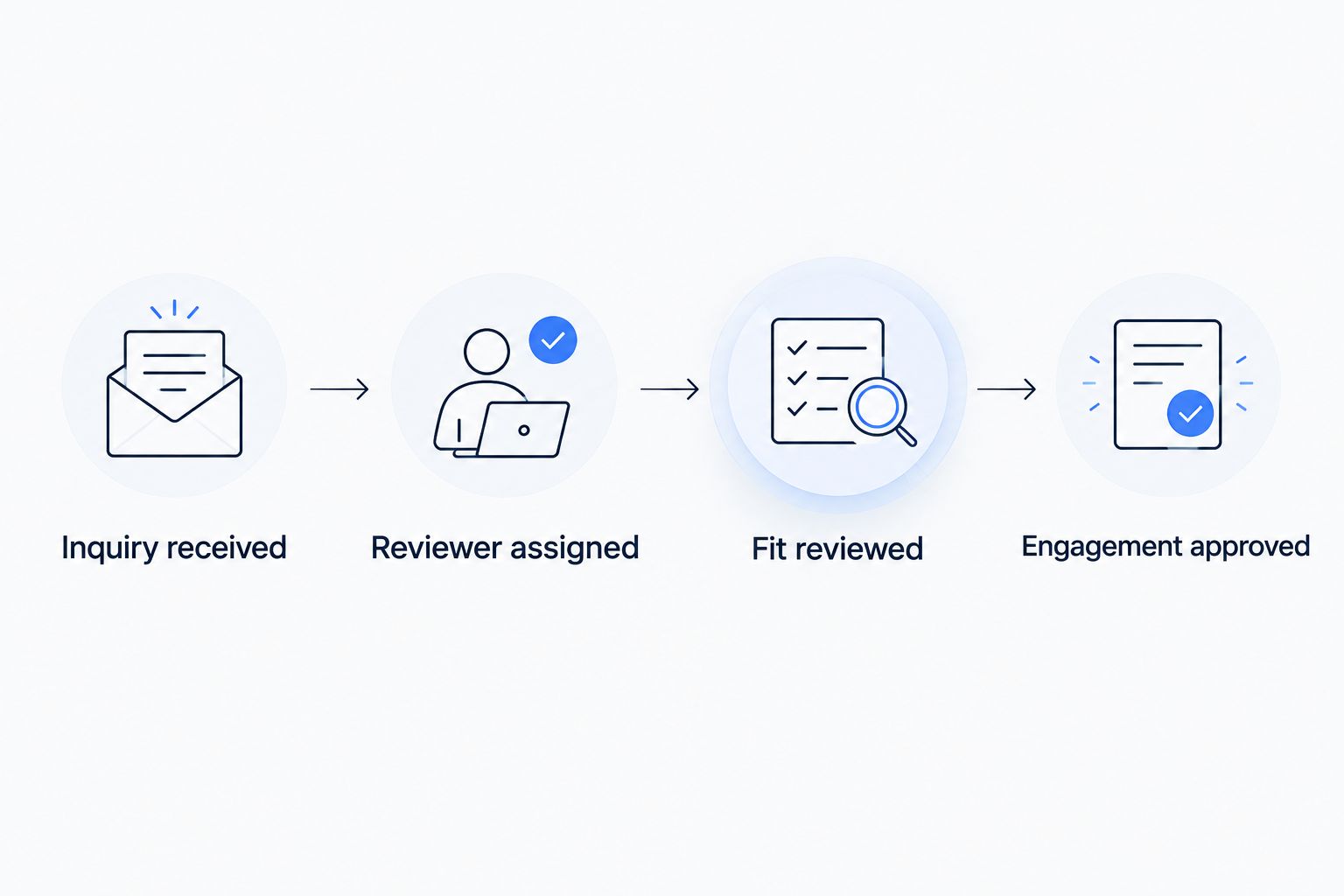
Receiving an inquiry and approving an engagement are separate steps.
Define the information each decision needs
Build a simple intake checklist before changing your website form. Ask what the reviewer needs to decide the next action, not everything the firm might eventually need to perform the work. Initial qualification and client document collection serve different purposes.
For an illustrative bookkeeping inquiry, useful starting details include the business name, requested help, existing accounting system, and preferred contact method. Do not ask for account credentials or tax documents simply because the form supports attachments.
ClearPilot Consulting's workflow automation consulting starts with mapping these requirements before building connections. The benefit is a defined process; the trade-off is that your firm must supply its acceptance criteria and review boundaries.
Separate required fields from information staff can collect later.
Explain why each requested detail is needed.
Direct sensitive records to a firm-approved collection method.
Give incomplete requests a visible status and an assigned reviewer.
Enrich incoming leads without replacing their answers
Start with a staff review of the inquiry and the business details the sender provides. Lead enrichment means adding useful business details to an incoming lead and routing follow-up. It does not mean building outbound prospect lists.
An illustrative enrichment step might identify the business website or organize a stated service request into a category. Preserve the original submission alongside any added details. Staff need to distinguish what the prospective client said from what another source supplied.
Automated enrichment belongs after you define useful fields and acceptable sources. A missing or conflicting detail should create a review task, not a confident but unsupported conclusion about the business.
Keep submitted answers separate from added business details.
Record the source of information used for qualification.
Flag conflicts between the inquiry and added information.
Route uncertain requests to a person rather than rejecting them automatically.
Assign routing rules and follow-up ownership
Use a shared queue and a written assignment rule first. The queue can be simple, provided staff can see the status, owner, and next action. An inbox alone does not establish responsibility when several people read the same message.
An illustrative rule could send payroll inquiries to the payroll reviewer and bookkeeping inquiries to the bookkeeping reviewer. Mixed-service requests need their own route. Otherwise, the same inquiry can trigger several disconnected conversations.
In your 2026 routing rules, define what happens when the assigned person is unavailable. Automation should make missed ownership visible rather than repeatedly sending reminders to an unattended account.
Assign a primary owner and a backup for each service route.
Use a review queue for unclear or mixed-service requests.
Stop duplicate follow-up when someone replies or closes the request.
Escalate overdue actions according to a firm-approved rule.
Connect scheduling to a reviewed next step
Start with a manual scheduling checklist: who can book, which conversation they need, and what staff must know beforehand. If every inquiry receives the same booking link, your calendar rules are doing work that belongs in qualification.
Connect scheduling only after those rules are clear. A confirmed appointment should update the inquiry record, identify the assigned reviewer, and preserve the context already collected. A cancellation should also change the next action.
Keep onboarding and invoicing separate from the booking event. If your firm uses a payment or engagement step, document the approval that allows it to begin. A scheduled conversation is not an accepted engagement.
Match the appointment type to the reviewed service request.
Carry relevant intake answers into the appointment record.
Route cancellations and incomplete bookings back to the owner.
Require approval before creating onboarding or invoicing tasks.
Set document-access and decision boundaries
Write the access rules before connecting systems. Decide who can read inquiry details, who can view client documents, and which information each connection actually needs. An intake integration does not automatically need access to the entire client file.
If you add a chatbot, keep its role narrow. It can collect an inquiry or explain the next step using approved information. Do not design it to provide individualized accounting advice, accept engagements, or make exceptions to your firm's policies.
Review these boundaries as part of your 2026 implementation. A consultant can configure the process, but the firm's authorized decision-makers must approve access and handling requirements.
Limit each connection to the records and actions it needs.
Keep credentials out of ordinary intake forms and chat messages.
Require human approval for acceptance and exceptional requests.
Document how staff pause the process and remove access.
Pilot one workflow and test its failure paths
Start with 1 workflow, such as website inquiries for bookkeeping consultations. A suggested 7-day pilot gives staff a defined review window; it is not a promised implementation timeline. Choose a longer window if the firm needs more time to observe the process.
Test unsuccessful paths as deliberately as the normal path. Submit a duplicate inquiry, leave a field incomplete, cancel an appointment, and disconnect a test connection. Confirm that someone sees the exception and knows how to recover.
Before expanding your 2026 rollout, compare the actual handoffs with the map. Fix missing owners and confusing statuses before adding more channels, services, or automated messages.
Check that each test inquiry creates the intended record.
Confirm that duplicate submissions do not trigger duplicate conversations.
Verify that failures alert an accountable person.
Keep a manual fallback available while the pilot runs.
Choose the right intake approach
Best for a process that is still changing: manual mapping before implementation. You need a stable decision path before you can judge whether software follows it correctly.
The table compares approaches, not accounting software products. Choose according to the work your team can own and the exceptions the process must handle.
| Option | Best for | Main advantage | Key limitation |
|---|---|---|---|
| Manual checklist and shared queue | Defining an unclear intake process | Makes ownership and decisions visible before building | Staff must maintain records and reminders |
| Existing-tool automation | Connecting a defined process within current systems | Keeps intake close to tools staff already use | Available connections and permissions constrain the design |
| Chatbot-assisted intake | Collecting structured inquiries through conversation | Gives visitors a guided way to submit information | Requires approved answers, limits, and human handoff |
| ClearPilot Consulting workflow automation consulting | Owners needing workflow mapping and connected handoffs | Starts with the process and keeps people in control | Requires firm input, access decisions, and review time |
Existing-tool automation is not automatically the better choice because you already have the software. Check whether it can represent your statuses and stop follow-up correctly. A chatbot also needs a reason to exist: if a short form collects everything required, conversation adds another interface to maintain.
For 2026 planning, ask a consultant to explain the proposed handoffs before discussing individual tools. A useful scope names the trigger, required information, owner, approval point, exception route, and completion condition. That description lets you assess the work without needing technical expertise.
Measure completed handoffs, not automation activity
Keep a simple record during the pilot. Track when an inquiry arrived, when a person took responsibility, and whether it reached a clear outcome. These observations reveal different problems: an unassigned request needs a routing fix, while an assigned but stalled request needs a follow-up decision.
Separate an automatic acknowledgment from a substantive response. The acknowledgment confirms receipt. The substantive response addresses the request or explains what information is needed next.
Review unresolved inquiries alongside completed ones. A process that closes easy requests but hides exceptions is not ready to expand.
Record arrival, assignment, and substantive-response timestamps.
Track missing information and the reason a request stalls.
Record engagement approval separately from appointment booking.
Review failed connections and manual recoveries with the process owner.
Request an automation assessment
Discuss intake handoffs, repetitive follow-up, and where staff approval belongs.
Common mistakes accounting firms make
Treating intake like client onboarding
Sending every new inquiry into document collection skips the qualification decision. Keep an explicit approval between reviewing a request and opening the firm's onboarding process. Staff should be able to explain why that transition occurred.
Requesting sensitive records too early
A detailed intake form is not necessarily a useful intake form. Collect what the initial decision requires, then use the firm's approved process for sensitive documents. Do not turn an ordinary inquiry channel into an uncontrolled document repository.
Letting enrichment overrule the inquiry
Added business details are context, not instructions from the prospective client. If the form requests payroll help but an enrichment field suggests bookkeeping, preserve the request and flag the mismatch. Do not silently send the lead down a different service route.
Automating reminders without a stop condition
A reminder sequence needs to know when to end. Replies, declined requests, booked appointments, and approved engagements represent different states. Test each state so a prospective client does not receive a request for information already supplied.
Expanding before staff can recover a failure
A connected workflow needs a manual fallback and an owner who understands it. If staff cannot find a failed inquiry or restart the next action safely, adding more channels only expands an unresolved operating problem.
FAQ
What does a workflow automation consultant for accounting firms do?
A workflow automation consultant maps how inquiries, information, and tasks move through an accounting firm, then connects suitable tools around that process. The firm still defines acceptance rules, document handling, and approval authority.
What's the best accounting intake process to automate first?
Start with one clearly defined inquiry route that has an owner and an observable outcome. Website requests for a specific service are a useful starting point when the firm can explain the review and follow-up steps.
Can I automate accounting intake with the tools I already use?
Use existing tools when their connections, permissions, and status controls support the mapped process. Check that they handle duplicate submissions, replies, cancellations, and failed connections before expanding the workflow.
What does inbound lead enrichment mean for an accounting firm?
Inbound lead enrichment adds useful business details to an incoming inquiry and helps route follow-up. It is not outbound prospect-list research, and added information should remain distinguishable from the prospective client's answers.
Should an accounting firm use a chatbot for intake?
Use a chatbot when guided questions serve a defined intake need better than a straightforward form. Limit it to approved information and collection tasks, with a clear handoff for advice, acceptance decisions, and exceptions.
Can automated intake decide whether to accept a client?
Keep client acceptance under the firm's defined human approval process. Automation can organize information and route a request for review without making the engagement decision.
How should I choose an accounting workflow automation consultant?
Choose a consultant who can explain the workflow, required access, approval points, and failure recovery before proposing tools. Ask who owns each exception and how your staff can pause the process.
One last thing
Test what happens after someone replies. Submit an inquiry, trigger a follow-up, then respond through the normal channel. Confirm that the reminder stops, the owner sees the response, and the status changes correctly.
That small test checks the difference between sending messages and managing a conversation. Make it an acceptance requirement before you expand intake automation.