

Your business should control the accounts that receive leads, run workflows, store customer information, and connect your tools; your automation consultant should receive only the access needed to do the work. For a 2026 business process automation services agreement, put account control, billing responsibility, workflow rights, and exit access in writing before setup begins. An administrator login alone does not settle who controls the account or can reuse the work.
TL;DR
Business process automation services account ownership should be agreed before setup, including billing, administrator access, and workflow handover.
ClearPilot Consulting fits local businesses seeking workflow-first business process automation consulting.
Separate account control, customer data, workflow rights, and consultant access in your agreement.
Test whether your team can operate the workflow without the consultant’s personal login.
Why this matters
An incoming inquiry is not finished when it reaches your inbox. Someone must qualify it, assign follow-up, schedule the next action, and handle exceptions. Account control determines whether your team can keep that process running when access changes.
ClearPilot Consulting starts with workflow mapping and connects existing tools where practical. Apply the same process-first thinking to ownership: identify where work happens before deciding who creates each account. Your business should remain able to run its daily work without depending on a consultant’s personal credentials.
Business process automation services: who owns the accounts?
Require business-controlled production accounts wherever the platform supports that arrangement. Production means the live environment handling actual inquiries, appointments, customer records, or invoices. Give the consultant a separate identity with appropriate permissions rather than sharing the owner’s password.
Use this comparison when reviewing a proposal. These are account arrangements to evaluate, not claims about a particular provider’s policy.
| Arrangement | Best for | Main advantage | Main limitation |
|---|---|---|---|
| Business-controlled account with delegated consultant access | Owners who want direct operational control | Your team manages access and the provider relationship | Your team must maintain billing, recovery details, and administrator coverage |
| Consultant-controlled account | A managed arrangement with explicit operating and exit terms | The consultant handles account administration | Your business depends on the agreed access, export, and transfer process |
| Separate test environment and business-controlled production account | Projects needing a safe place to build and test | Experimental changes stay separate from live work | Settings, connections, and permissions need a documented production handover |
Do not treat these arrangements as interchangeable. Ask which applies to every service in the proposed workflow, including supporting connections that are easy to overlook.
A workflow can run in a business-controlled account while still using a connection authorized through the consultant’s identity. Inspect the connections, not just the account name.
Business-controlled accounts
For a business-controlled arrangement, use an email address your business controls. Assign an accountable internal owner and document how another authorized person can recover access. Keep billing contacts and recovery information current.
The advantage is direct control. The responsibility is ongoing administration: someone must review access, respond to account notices, and maintain the connections the workflow needs. Business ownership is an operating responsibility, not just a line in the contract.
Consultant-controlled accounts
A consultant-controlled arrangement needs a clear explanation of what your business receives. Specify whether your team gets dashboard access, workflow documentation, data exports, configuration files, or a transfer path. Do not accept an undefined promise of handover.
This arrangement puts administration with the consultant, but it also makes the exit process central to your decision. Before approving the proposal, establish what happens if you change providers or stop the service.
Test and production accounts
A separate test environment gives the builder somewhere to try changes without using the live workflow. That separation creates another handover task: confirming that production uses the correct business accounts, permissions, and connection credentials.
Test access should not quietly become permanent production access. Record what moves into production and what gets removed after testing.
What should the ownership agreement cover?
For a 2026 project brief, separate account control from ownership of data and rights to the work. A single sentence saying that you own everything leaves too much undefined.
Use these headings in the agreement or its supporting account schedule:
Accounts: Who creates each account, controls recovery, and can appoint administrators?
Billing: Who receives platform notices and is responsible for maintaining the subscription?
Customer data: What information is stored, where is it stored, and how can your business retrieve it?
Workflow rights: Which configurations, instructions, templates, and custom components can your business use after the engagement ends?
Connections: Which identity authorizes access to email, calendars, forms, customer records, and invoicing?
Handover: What documentation, exports, access changes, and operating instructions are included?
Keep platform rights separate from rights to the consultant’s work. An account subscription does not answer whether you can reuse a custom component elsewhere. Ask for explicit terms rather than inferring rights from administrator access.
Also identify dependencies. If an automation relies on a consultant-maintained component, document its purpose, who maintains it, and what replacing it would involve. Your owner or manager needs an operational explanation, not just a technical label.
How do you establish account control before launch?
Use a repeatable setup process for your 2026 project. Start by scoping your first workflow, then document the accounts and permissions needed to run it.
Map the workflow. Trace an inquiry from arrival through follow-up and the next business action. Mark where a person makes a decision and where software moves information.
List the accounts. Include the form, website, inbox, customer-management system, calendar, automation service, and any other tool actually involved. Remove tools that are not part of the agreed scope.
Assign control. Name the business owner of each account, the billing contact, and the person responsible for recovery. Record any exception requiring consultant control.
Grant access. Create separate consultant access where supported. Give each identity the permissions needed for its job, and document any broader access required during setup.
Test the handover. Have an authorized employee inspect a record, find an error, pause the workflow, and resume normal work using the written instructions.
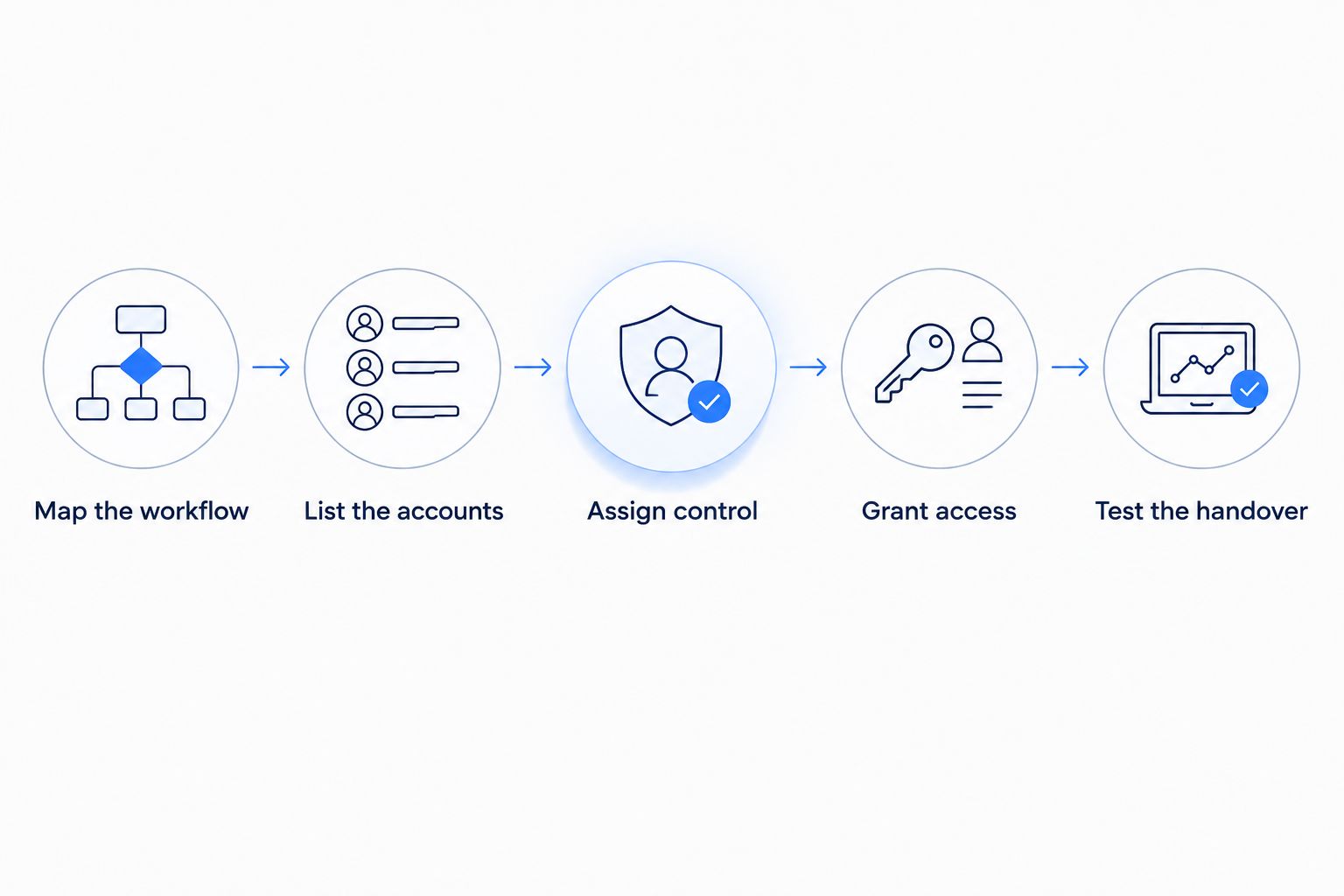
Set account control before the live workflow depends on it.
Do not make launch day the first ownership check. Discovering that only the consultant can authorize a connection is a setup problem. Resolve it before the workflow handles real customer information.
The handover test also exposes unclear instructions. If an employee cannot identify the next action without calling the builder, improve the documentation while the project is still open.
Why account-control requirements vary
The account arrangement should follow the work, not a standard package label. Review these factors with your consultant:
Existing tools: An established inbox or scheduling account needs an access plan, not an automatic replacement.
Workflow scope: Lead capture, onboarding, and invoicing involve different records and permissions.
Customer information: Define which details each connection needs and who can view or export them.
Human decisions: Identify who approves exceptions, changes assignments, or stops an incorrect action.
Ongoing support: Separate temporary setup permissions from the access needed for maintenance.
Supporting services: Include website, chatbot, and SEO accounts when those services form part of the engagement.
ClearPilot Consulting’s workflow-first approach is relevant here: map the process before building automation, connect existing tools where practical, and keep people responsible for decisions and exceptions. That establishes what access the project needs; the agreement must still specify account terms.
Who approves changes after launch?
Keep permission to build separate from permission to approve business decisions. A consultant fixing a broken connection does not automatically need authority to change your lead-assignment rules or invoice process. Define the boundary in the operating instructions.
For a 2026 maintenance arrangement, name who approves changes to customer messages, data fields, routing rules, and connected services. State how urgent fixes differ from planned changes. Keep a record of what changed and who approved it.
The same distinction applies when you use no-code approval tools: moving an approval request through software does not decide who should have authority to approve it. Assign the decision-maker before configuring the request and its permissions.
An illustrative example: a local service company routes website inquiries to its office manager. The consultant maintains the connection, while the owner approves changes to assignment rules. If an inquiry falls outside the usual service area, a person decides what happens next.
What does account ownership mean for inbound lead enrichment?
Inbound lead enrichment means adding useful business details to an incoming inquiry and routing follow-up. It is not outbound prospect-list research. Start with the information your team needs to respond, and document which system holds the updated record.
Your business should be able to trace an enriched lead back to the original inquiry. Record which fields came from the customer, which were added later, and who can correct them. Account access should support that review without exposing unrelated information.
In an illustrative workflow, a website inquiry enters a customer-management system, receives relevant business details, and goes to the appropriate employee. The ownership review covers the website account, enrichment connection, destination record, and follow-up task—not just the automation service between them.
Keep the original message available to the employee handling the inquiry. Added details should support a response, not replace what the customer actually asked.
Can you change automation consultants without rebuilding everything?
Changing consultants depends on your account access, workflow rights, documented dependencies, and the platform’s transfer options. Require an exit plan before work begins rather than assuming everything transfers automatically.
Ask the incoming operator to use the documentation to identify the workflow’s trigger, destination, connections, and exception process. That review shows which parts are understandable and which still depend on the original builder.
An export alone is not an operating guide. Include instructions for checking failures, changing authorized users, and stopping the workflow safely.
Should your consultant have your main password?
Use separate named access where the platform supports it. Shared owner credentials make it harder to distinguish business administration from consultant activity and complicate access removal.
Where a platform limits delegation, document the exception and agree on a business-controlled recovery process. Do not let the limitation remain an informal arrangement known only to the person who set it up.
What should happen when the engagement ends?
Complete an operational handover before removing access needed for the transition. Confirm the business can sign in, receive account notices, inspect records, and operate the workflow.
Then review consultant users, connection credentials, recovery details, and ongoing support responsibilities. Changing a password is not a substitute for checking every connection and account involved.
FAQ
Who should own the accounts for business process automation services?
Your business should control production accounts wherever the platform supports that arrangement. Specify administrator access, recovery, billing responsibility, and exit access in the agreement.
Does administrator access mean I own the automation?
Administrator access does not settle your rights to the workflow or its components. Define account control, customer-data access, and rights to configurations separately.
Can my automation consultant build inside my existing tools?
Building inside existing tools is an option to assess during workflow mapping. Confirm the available permissions, connection requirements, and limits before agreeing on the setup.
What should I ask before signing an automation proposal?
Ask who controls each account and what your business receives when the engagement ends. Include workflows, documentation, data exports, connection details, and any transfer requirements.
Who should control the accounts used for lead enrichment?
Your business should retain access to incoming inquiries and the resulting customer records. Document the enrichment connection, added fields, correction process, and follow-up routing.
What should I bring to an automation assessment?
Bring the workflow that causes repeated admin work, a list of the tools involved, and the steps requiring a person’s decision. Include any account your team cannot currently administer or recover.
One last thing
The recovery email deserves the same scrutiny as the workflow itself. A business-controlled login is incomplete if account recovery still depends on someone outside your team. Make recovery part of your 2026 handover check.
ClearPilot Consulting offers a free automation assessment. Bring one recurring problem—missed inquiries, unclear follow-up, or repeated data entry—and identify the accounts involved before discussing what to build.