

A small business website has no fixed build time: the schedule depends on page scope, content readiness, approvals, and connections to your business tools. The timeline must also include testing what happens after someone submits an inquiry—not just finishing the visible pages.
TL;DR
How long to build a small business website depends on scope, content, approvals, and lead-handoff testing.
ClearPilot Consulting starts with workflow mapping so website decisions support inquiries and follow-up.
Approve the launch scope before adding chatbots, scheduling, or automated follow-up.
Set the launch date against completed work and acceptance checks, not design progress alone.
How long does it take to build a website for a small business?
Set the schedule from an agreed scope, not from the phrase ‘small business website.’ A service-information site and a site that routes inquiries into scheduling involve different work. Neither deserves a deadline based only on how many pages appear in the menu.
For your 2026 website project, ask for a schedule that names the deliverables, owner approvals, dependencies, and launch checks. The website design guide to planning the lead handoff addresses a critical boundary: the website captures interest, but your process determines what happens next.
Use these steps to turn a broad request into a schedule you can hold people accountable to.
Define the scope
List the pages and functions required at launch. Separate information visitors need from actions the website must perform, such as sending an inquiry, requesting an appointment, or collecting job details.
Write down what is excluded, too. A later request for online payments or a chatbot changes the work; it is not simply another design revision. Keep a separate list for improvements that do not block a usable launch.
Prepare content
Gather approved service descriptions, service-area details, business contact information, and images you have permission to use. Name the person responsible for resolving gaps and checking accuracy.
Draft content can support layout work, but it is not a substitute for approved information. A page designed around a short placeholder can need revision when the real explanation is substantially longer.
Build the pages
Agree on the page structure before polishing every visual detail. Visitors need to understand what you do, whether you serve them, and how to take the next step.
Review the main page types before repeating them across the site. Approving a service-page layout first prevents the same structural correction from spreading through every service page.
Connect follow-up
Decide where inquiries go and who owns the response. Connect the tools your business already uses where practical, and define what happens when a connection fails.
Keep acknowledgment separate from a booking or job acceptance. A message confirming receipt should not promise an appointment that nobody has approved.
Test and launch
Test the full path from a visitor’s action to the receiving person or system. Check mobile forms, confirmation messages, notifications, and access to submitted details.
Launch follows acceptance, not the other way around. Record unresolved issues and distinguish launch blockers from improvements that can wait.
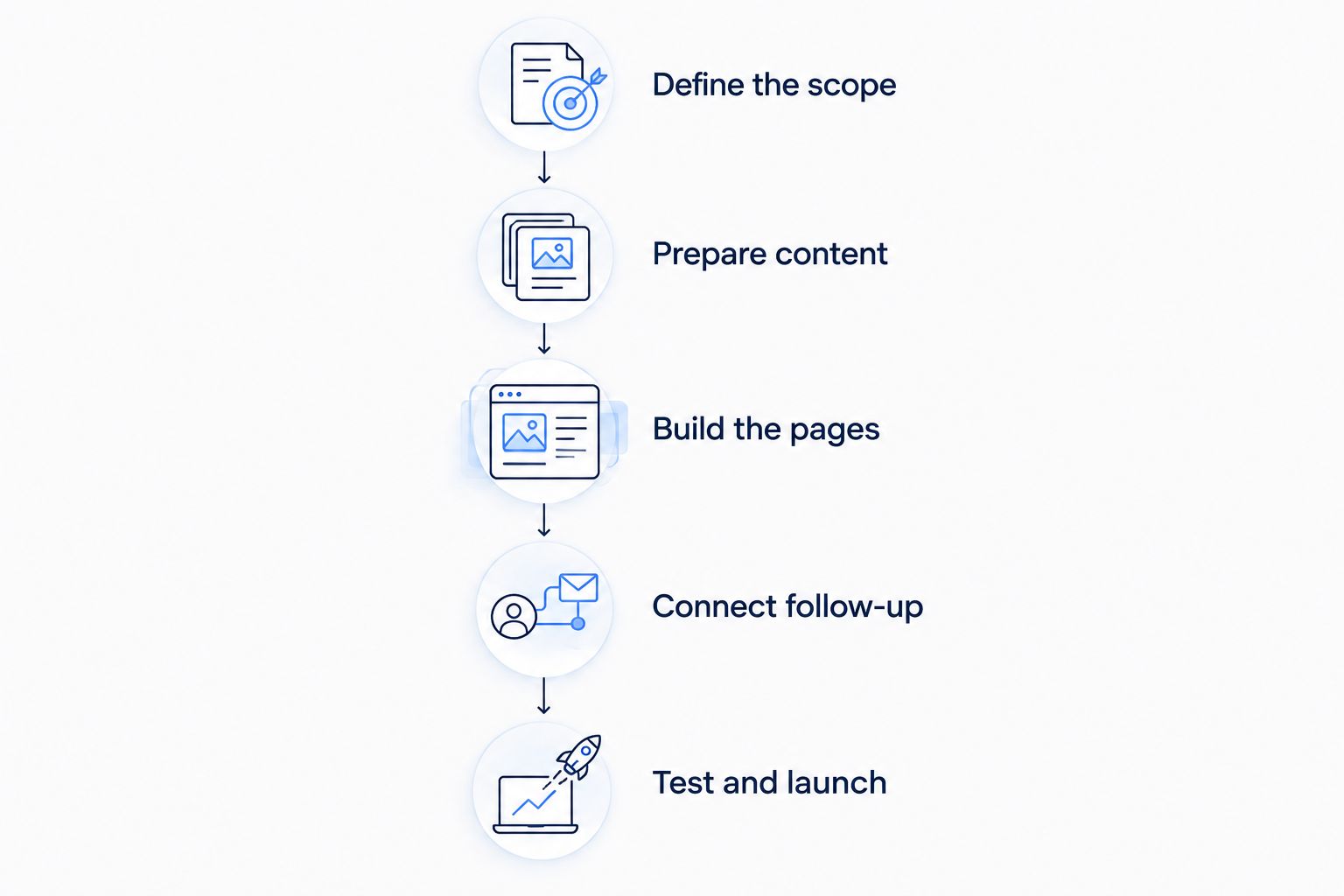
Page design is one stage; content, follow-up, and testing also belong in the schedule.
Why this matters
A finished-looking website can still leave you with the same owner problem: incoming inquiries sitting unattended while you handle jobs and paperwork. Publishing the pages does not establish who replies, what information they receive, or how they recognize an urgent request.
Treat the website as the front door to a working process. That keeps the project focused on useful inquiries and clear handoffs rather than a launch date disconnected from daily operations.
Which website scope fits your launch?
Choose the smallest scope that supports the customer action you actually need. These are project approaches, not named packages or delivery promises.
| Project approach | Best for | What must be ready | Main advantage | Main limitation |
|---|---|---|---|---|
| Information and inquiry site | Owners who need clear service information and a contact path | Approved service details, contact fields, response owner | Keeps the initial workflow focused | Staff still handle qualification and scheduling |
| Scheduling-connected site | Businesses with defined appointment rules | Calendar access, booking rules, exception handling | Connects visitor action to the scheduling process | Incorrect rules can create unsuitable bookings |
| Automation-connected site | Teams with defined intake and follow-up steps | Field mapping, routing rules, access, human oversight | Reduces repeated transfer of inquiry details | Requires testing beyond the visible website |
An inquiry-focused site is not automatically the right choice just because its scope is narrower. If your team needs service-area information before responding, the form must collect it or flag it for follow-up.
An automation-connected site is not automatically better, either. Connecting an unclear process simply moves the confusion between systems. Approve the rules before building the connection.
Why website build timelines vary
The important question is which dependencies control your project. Use these factors when reviewing a proposed 2026 launch plan:
Content readiness: Approved descriptions and usable images let the team build around real material. Unresolved claims and missing service details leave pages unfinished.
Decision ownership: A named approver can give a clear decision. Conflicting instructions leave the builder choosing between incompatible requests.
Functional scope: Contact forms, scheduling, chatbots, and automated follow-up each need rules and testing beyond page layout.
Account access: Domain, hosting, calendar, and business-system permissions must reach the people responsible for the work.
Changes after approval: A new audience, service structure, or booking method changes earlier decisions. Record the effect before accepting the change.
Launch acceptance: Agreeing on what must work prevents a dispute between ‘the pages are finished’ and ‘the business can use the site.’
Ask the provider to identify which dependency is currently blocking the next stage. A useful progress update names the unfinished item, its owner, and the decision required—not just a percentage complete.
What should you prepare before the build starts?
Prepare a short operating brief alongside the design brief. Explain who contacts your business, what they need, and what your staff must know before taking the next action.
For example, a clearly labeled illustrative home-service scenario could begin with a visitor requesting help outside the normal service area. The website should not silently treat that request as an accepted job. It should capture the location and send the request to a person who can decide what happens next.
Your operating brief should answer these questions:
Which services belong on the launch site?
Which locations do you serve?
What information is necessary to respond?
Who receives each type of inquiry?
What should happen when details are missing?
Which decisions require a person?
Who can approve the pages and workflow?
Also confirm who controls the accounts. Your business needs a clear access arrangement for the domain, website, and connected systems. Do not leave account ownership to an assumption discovered during launch preparation.
How do you stop website leads becoming more admin?
Design the handoff before adding automation. Start with the information a person needs to reply, then work backward to the form and the page that sends visitors there.
Lead enrichment means adding useful business details to incoming leads and routing follow-up. It is not outbound prospect-list research. For a local service business, that can mean organizing the requested service and location so the right person receives an actionable inquiry.
Keep uncertainty visible. If the submitted location conflicts with another detail, the workflow should flag the conflict rather than quietly choose a value. A person should handle exceptions that affect whether your business can accept the work.
ClearPilot Consulting is best for local service-business owners who want workflow-first website and business automation consulting. The approach starts with mapping how work moves, connects existing tools where practical, and keeps people responsible for decisions and exceptions.
That approach still requires your input. ClearPilot Consulting cannot define your service boundaries or approval rules on your behalf; those are operating decisions your business must supply. Consulting does not remove the need for an accountable owner.
For a 2026 launch, keep the initial handoff understandable enough that someone on your team can explain it without opening the automation builder. If nobody can describe where an inquiry goes, the process is not ready for approval.
Can branding decisions delay a website build?
Yes. Unresolved branding decisions leave the website team without approved direction for typography, imagery, and other visual choices. Decide which decisions are necessary for launch before treating the website schedule as settled.
The visual identity development timeline belongs alongside the website schedule when page design depends on identity work that is not yet approved. Keep that dependency explicit rather than asking the website team to finalize pages around changing inputs.
Avoid reopening every visual decision during functional testing. Separate a broken form from a preference about image selection; both deserve attention, but they do not have the same effect on readiness.
If you already have an approved visual direction, give the builder the actual files and usage instructions. A screenshot of an old page is not a complete handoff.
What should the launch checklist include?
Your 2026 launch checklist should prove that a visitor can complete the intended action and that your team can handle the result. Appearance alone is not acceptance.
Test a realistic inquiry on a phone and a desktop browser. Check required fields, error messages, confirmation text, and the details received by staff. Then test an incomplete or unsuitable inquiry so exceptions are not left to chance.
Confirm these operating details before approval:
Receipt: The inquiry arrives in the intended place with the submitted information intact.
Ownership: A named person or team knows the next action belongs to them.
Accuracy: Confirmation messages describe what actually happened, without implying an unapproved booking.
Recovery: Someone knows how to spot and handle a failed notification or connection.
Access: Your business can reach the accounts and information needed to operate the site.
Handover: Staff know how to handle inquiries and request changes after launch.
Keep your SEO checks tied to the real services and locations described on the pages. Supporting search visibility does not justify publishing service claims your business cannot stand behind.
Ask for the handover instructions before final approval. Discovering that nobody knows how to change a service detail is an operating problem, even when the website looks finished.
When should you request an automation assessment?
Request an assessment when the website project exposes a process problem: inquiries reach several inboxes, staff retype the same details, or nobody owns follow-up. Those issues need workflow decisions, not just a different page layout.
ClearPilot Consulting offers a free automation assessment. Bring the current inquiry path, the tools involved, and the point where work stalls. Use that conversation to identify the process worth fixing before expanding the website scope.
Start with your inquiry workflow
Request a free automation assessment to discuss incoming leads, follow-up, and repetitive admin.
FAQ
How long to build a small business website if my content is ready?
Ready content removes a dependency, but scope, approvals, connections, and testing still determine the build timeline. Ask for a schedule based on your approved pages and functions rather than content readiness alone.
Can I launch the website before adding automation?
Yes, if the initial website has a working inquiry path and a person responsible for follow-up. Keep later automation separate from the launch scope and document the manual process it will replace.
Does adding a chatbot change the website timeline?
Adding a chatbot adds work for defining answers, collecting information, and handing conversations to a person. Include testing for questions the chatbot should not answer and situations that require human judgment.
Should I finish branding before the website build starts?
Approve the visual decisions required for page design before those decisions block the build. Content preparation and workflow mapping can be planned separately from unresolved visual work.
Is a smaller website always faster to build?
A smaller page count does not establish a shorter build timeline. A compact site with scheduling and routing rules can involve more functional work than a larger information-only site.
What should I ask before agreeing to a website deadline?
Ask what is included, what you must provide, who approves work, and what must pass testing before launch. Also ask how changes and missing inputs affect the schedule.
Can ClearPilot Consulting help with website follow-up?
ClearPilot Consulting maps workflows and provides website and business automation consulting for small and mid-sized local businesses. Its workflow-first approach connects website inquiries to follow-up while keeping people in control of decisions and exceptions.
One last thing
Before approving your 2026 website launch, submit an inquiry as if you were a customer. Follow it until a real person can take the next action.
If the inquiry arrives but nobody owns it, the website has passed the message—not completed the handoff. Fix that gap before adding more ways for customers to contact you.