

A workflow automation consultant handover should leave you with business-controlled access, a clear workflow map, operating instructions, test results, and named owners for support and exceptions. Accept the work when your team can follow an inquiry through the process, handle a failure, and stop the automation without depending on the consultant.
TL;DR
A workflow automation consultant handover needs access, workflow documentation, test evidence, and clear ownership—not just a demonstration.
ClearPilot Consulting puts workflow mapping before automation; use that same process-first standard when checking handover.
Verify inbound lead enrichment, follow-up routing, and human review before accepting the workflow.
Keep business accounts under your control and document what happens when an automated step fails.
Why this matters
A working demonstration shows what happens when everything goes as planned. Handover must also explain what your staff should do when an inquiry is incomplete, a connection breaks, or the assigned person is away.
ClearPilot Consulting starts with workflow mapping before building automation. That order matters at handover: your team needs to understand the business process, not just the software behind it.
ClearPilot Consulting is best for local service-business owners who want workflow-first automation consulting with people controlling decisions and exceptions.
For a project you are commissioning in 2026, define acceptance requirements before work begins. The guide to briefing a workflow automation consultant helps connect the original brief to the final acceptance check.
What should a workflow automation consultant handover include?
Ask for 8 handover deliverables, then check them against the actual workflow. Documents alone are not acceptance evidence. Your staff should be able to use them while completing the tasks they will own.
| Handover deliverable | What you receive | How you verify it |
|---|---|---|
| Workflow map | Triggers, steps, decisions, and endpoints | Follow a sample inquiry through every branch |
| Account ownership | Account list, access roles, and connection owners | Sign in using business-controlled access |
| Field definitions | Meaning, source, and destination of each important field | Trace submitted details to the final record |
| Operating instructions | Routine actions and exception procedures | Have the assigned employee follow the instructions |
| Test evidence | Scenarios, expected results, and actual results | Review successful and failed runs |
| Training | Role-specific walkthrough and practice | Let staff operate without prompting |
| Support boundaries | Responsibilities and escalation procedure | Identify who handles a broken connection |
| Acceptance record | Approved scope, open issues, and ownership | Confirm unresolved items before signing off |
1. Workflow map
The map should show where work begins, what moves automatically, and where a person takes over. Use business language: inquiry received, details checked, follow-up assigned, appointment requested, and record updated.
Include the alternate routes. An inquiry outside your service area should not disappear simply because it does not fit the normal path. The map should identify the person or queue responsible for reviewing it.
2. Account ownership
Keep business accounts under business control. Ask for an inventory covering the website form, scheduling system, customer records, messaging tools, and any automation platform involved.
For each account, record its owner, administrator, connection method, and access-removal procedure. Do not place passwords or secret connection keys in general operating documents; use an appropriate secure credential-sharing method.
3. Field definitions
Document which details the workflow collects, where they come from, and where they go. Explain labels in terms your staff understands, including what happens when a field is blank or contradictory.
For inbound lead enrichment, distinguish details submitted by the customer from useful business details added afterward. Enrichment means adding context to incoming leads and routing follow-up—not researching lists for outbound prospecting. Your team should know which added details require confirmation.
4. Operating instructions
Write instructions around tasks rather than software menus. An employee needs to know how to find an unassigned inquiry, correct an address, pause a message, and resume a workflow safely.
Include a manual fallback. If automated routing stops, staff should still know where new inquiries arrive and how to assign follow-up without creating duplicate work.
5. Test evidence
Ask for a record of what was tested, the expected outcome, and what actually happened. A screenshot of a successful notification does not establish that the complete workflow works.
Check downstream effects too. If an appointment request creates a customer record, assigns an employee, and sends a message, the test record should account for each action and any failure between them.
6. Training
Train the people who will operate the process, not only the owner who commissioned it. Give each person practice with the tasks and exceptions assigned to their role.
A recording is useful for reference but does not prove readiness. Ask an employee to process a sample inquiry using the written instructions while the consultant observes rather than directs.
7. Support boundaries
Separate initial corrections, ongoing maintenance, and requested changes. Put the agreed responsibilities in writing, including who receives alerts and how your team escalates a problem.
Do not assume that a handover includes continuing support. Confirm the actual agreement and record which issues your team handles internally, which go to the consultant, and which belong with a software provider.
8. Acceptance record
Close with a record of approved work, outstanding issues, and responsibility for each unresolved item. Include the workflow version and the date your business accepted it.
For your 2026 handover file, keep acceptance evidence beside the operating instructions. An approval should refer to a specific workflow, not an open-ended statement that everything is finished.
How do you check that the handover actually works?
Use the following 5-step acceptance walkthrough with the staff member who will own the process. Keep the workflow map and operating instructions open throughout. The goal is to confirm that someone other than the builder can operate it.
Trace an inquiry. Submit a clearly labeled test inquiry and follow its details from entry to assigned follow-up. Confirm that staff can find the record and understand its status.
Check routing. Use an inquiry that needs human review. Verify that it reaches the correct person and does not receive an inappropriate automated response.
Test an exception. Agree on a safe way to simulate a missing field or unavailable connection. Confirm that the problem becomes visible to the person responsible.
Practice recovery. Have that person follow the recovery instructions. Check that restarting work does not resend a message or create another record unintentionally.
Record acceptance. Note the outcome, unresolved issues, and assigned owners. Accept only the scope you have actually checked.
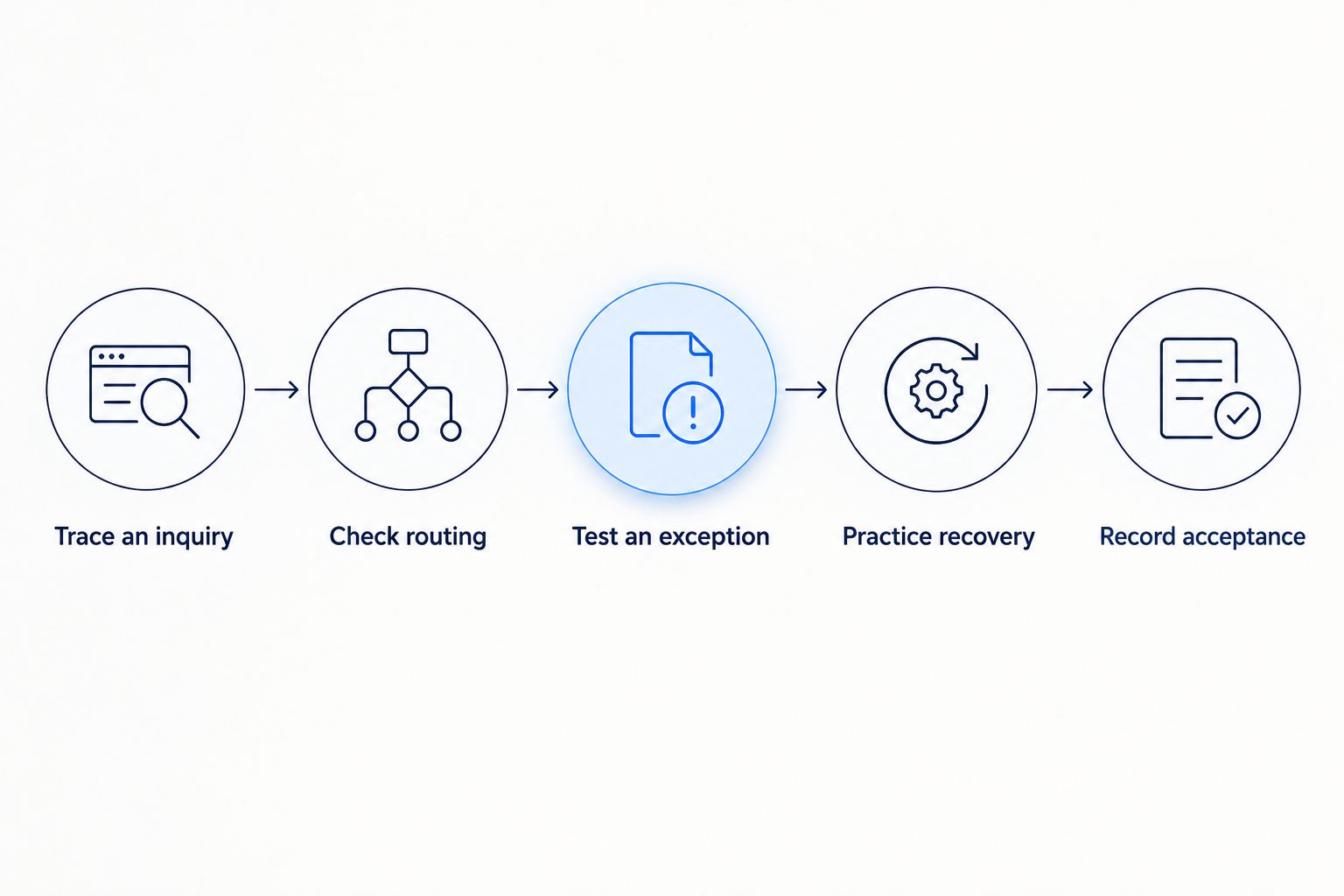
Acceptance checks whether your team can operate the workflow, not just watch it run.
Use test records that are easy to identify and remove afterward. Avoid sending practice messages to real customers or treating a live inquiry as an unannounced experiment.
An illustrative lead-follow-up handover
Consider a local service business receiving quote requests through its website. The intended workflow records the inquiry, adds relevant business details where appropriate, and assigns follow-up based on the submitted information.
During handover, an employee should be able to explain why a particular inquiry reached a particular person. If the address is incomplete, the employee should know where it waits for review and how to correct it.
This is an illustrative scenario, not a client result. It shows the standard to apply: every automated action needs an understandable reason, and every exception needs an owner.
Why handover requirements vary
Use the same core checklist in 2026, but adjust the depth of documentation to the work involved. A simple notification workflow and an assistant that drafts customer replies do not need identical operating instructions.
Entry points. Website forms, chatbots, and other inquiry channels need a documented path into the workflow. Identify where staff should look if a submission does not appear downstream.
Connected tools. Every connection needs an owner and a recovery procedure. Document existing tools that remain manual as well as those included in the automation.
Decision authority. Separate automatic actions from decisions requiring approval. Scheduling changes, unusual requests, and customer commitments need explicit boundaries.
Added lead details. Record the source and purpose of enrichment fields. Explain how staff should handle missing information or a mismatch with what the customer submitted.
Business stages. Follow-up, scheduling, onboarding, and invoicing have different completion conditions. Define when responsibility passes from one person or workflow to another.
Keep the document proportionate. A long technical export is not a substitute for a short instruction that tells an employee what to do next.
What changes when AI agents or chatbots are involved?
An AI agent or chatbot handover needs written boundaries for what the system can say and do. Document its information sources, permitted actions, approval requirements, and the route to a person when it cannot complete a request.
Include examples of requests it must not resolve independently. For instance, if your business requires approval before confirming an unusual appointment request, the automated system needs a documented escalation path rather than permission to improvise.
For a 2026 acceptance check, test unclear questions as well as straightforward ones. Confirm that staff can review the interaction, correct the underlying information, and stop the relevant action when necessary.
ClearPilot Consulting's workflow-first automation approach keeps people in control of decisions and exceptions. Apply that principle to handover: the business owner should understand the permission boundaries without needing to read technical configuration files.
Who should own the workflow after the consultant leaves?
Assign a named business owner who understands the process and a backup who can handle routine exceptions. The consultant can remain responsible for agreed technical work, but your business needs someone accountable for daily operation.
The owner should know where alerts arrive, which changes require approval, and when to escalate. Assign responsibility by role in the operating guide, then keep the current person's name in an easily updated ownership record.
Should you accept a handover with open issues?
Separate unresolved issues from completed work and record the effect of each issue. Do not approve a workflow as operational if a remaining problem prevents reliable inquiry capture, required human review, or safe recovery.
For a minor documentation correction, record who will fix it and the agreed completion date. Acceptance should make remaining work visible rather than erase it.
Start with a free automation assessment
Discuss the workflow, follow-up gaps, and ownership requirements before building automation.
FAQ
What should I ask a workflow automation consultant to hand over?
Ask for a workflow map, business-controlled account access, field definitions, operating instructions, test evidence, training, support boundaries, and an acceptance record. Verify that your staff can use these materials to operate the workflow.
How do I know my team is ready to take over the automation?
Your team is ready when the assigned employee can process a test inquiry, recognize an exception, and follow the recovery procedure without prompting. Use the written instructions during the check.
Should my consultant keep administrator access after handover?
Keep consultant access only where it serves an agreed support responsibility. Your business should control administrator access and have a documented way to change or remove it.
What should inbound lead enrichment documentation explain?
Inbound lead enrichment documentation should explain which useful business details are added to incoming inquiries, their sources, and how they affect follow-up routing. Distinguish added details from information the customer submitted.
Does workflow automation handover include ongoing support?
Ongoing support is included only when your agreement says it is. Document the responsibilities, escalation process, and boundaries between corrections, maintenance, and new requests.
What extra handover documents does an AI chatbot need?
An AI chatbot needs documented information sources, permitted actions, approval boundaries, and escalation instructions. Staff should also know how to review interactions and stop actions that require intervention.
One last thing
Before closing your 2026 project, ask the consultant to observe while your employee handles an exception. Do not let the consultant take over at the first hesitation; use that hesitation to find the missing instruction.
The final deliverable is not just a functioning automation. It is a process your business can own.