

Plumbing-team AI agents are software assistants that monitor quote status and prepare follow-up so your office can move open estimates toward a clear customer decision. Using AI agents for small business plumbing teams starts with mapping how estimates move, not letting software decide prices, promise appointments, or handle urgent service requests alone.
TL;DR
AI agents for small business plumbing teams need clear quote stages, reliable records, and stop rules.
ClearPilot Consulting suits plumbing owners seeking workflow-first AI agents with human control over decisions.
Use inbound lead enrichment to add useful inquiry details and route follow-up, not build prospect lists.
Start with one quote-follow-up workflow before connecting scheduling, onboarding, or invoicing.
Why AI agents matter for plumbing teams
A plumbing quote is not always ready to book when it leaves your office. A customer might need clarification, a landlord's approval, or a revised scope. Follow-up needs to reflect that situation rather than send the same reminder to everyone.
Your first move is to scope your first workflow. Separate estimates awaiting a decision from active service requests, scheduled work, and jobs that need technical review.
For a 2026 rollout, the useful question is not how many messages software can send. It is whether your office can identify the next action for each open estimate without searching through inboxes and job notes.
Automate the reminder to act before automating the customer conversation. A task assigned to the right person is a sensible first version when customer records are incomplete. Sending messages from those same incomplete records adds risk instead of removing work.
How to build a quote-follow-up workflow
1. Map the estimate from inquiry to decision
Start manually. Review a small set of recent estimates with the person who answers inquiries and the person who prepares quotes. Write down where information changes hands, where the record lives, and who decides what happens next.
Keep the map tied to work your team actually performs. An estimate awaiting a site visit belongs in a different state from an estimate already sent to a customer. A customer asking whether the proposed repair includes access work needs an answer, not another booking prompt.
Use these stages as an illustrative starting map, then adapt them to your process:
Inquiry: Record the requested work and the customer's contact details.
Site visit: Identify whether assessment is needed before quoting.
Quote sent: Record the estimate reference and delivery status.
Follow-up: Assign the next action and the person responsible.
Decision: Record acceptance, rejection, a requested change, or a pause.
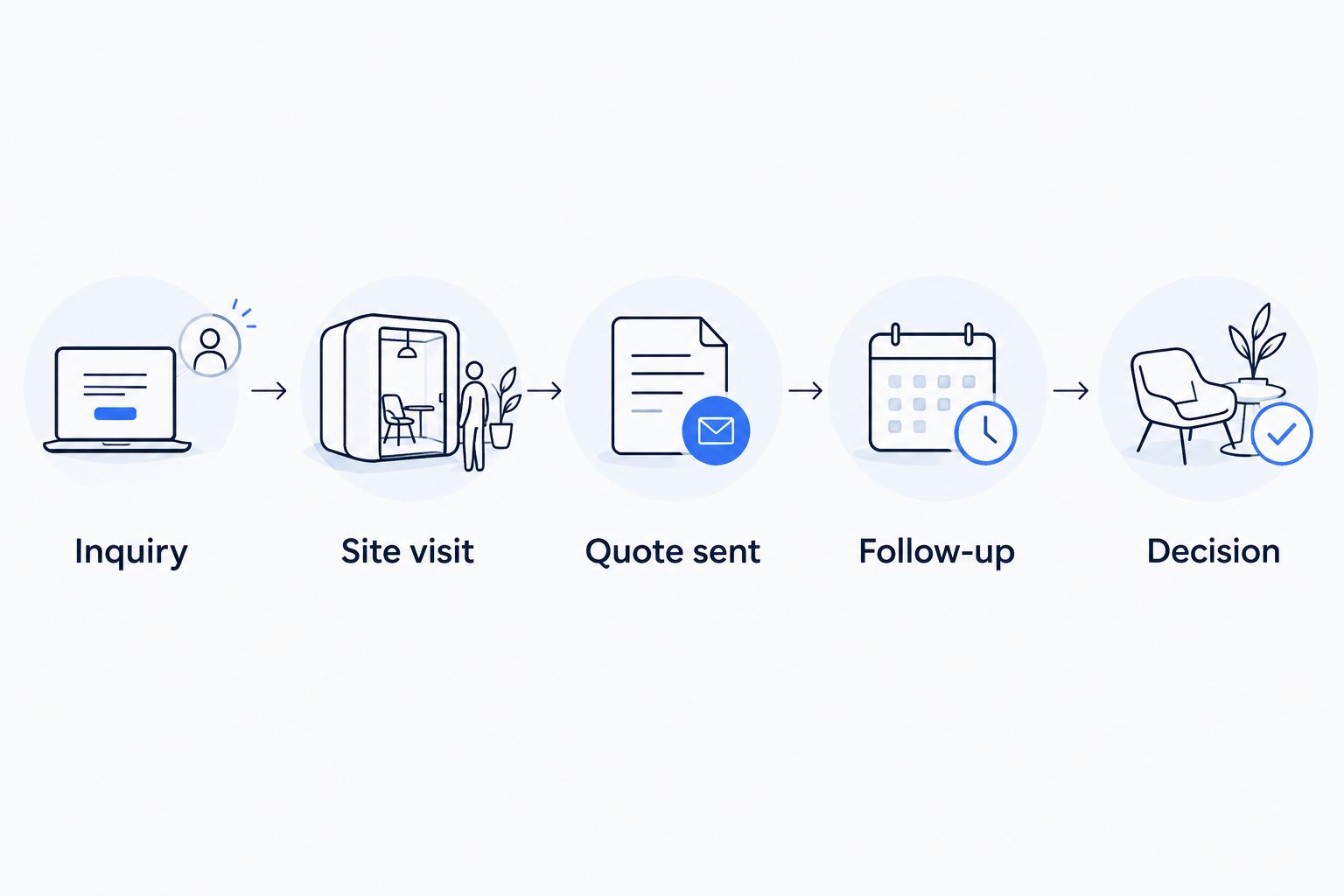
Map who owns each handoff before deciding which actions to automate.
2. Clean up the information behind each quote
Use your existing job record or a shared worksheet first. Your office should be able to understand the customer's request without reconstructing it from separate messages. Keep the estimate itself as the source for approved scope and terms.
Inbound lead enrichment means adding useful details to an incoming inquiry and routing the right follow-up. For plumbing work, that includes the service address, requested work, property contact, and whether the person asking can approve the job. It does not mean researching strangers to build an outbound prospect list.
For your 2026 pilot, make missing information visible rather than having an agent fill gaps with guesses. If the record does not establish who can approve the work, assign a clarification task.
Capture the inquiry source and preferred reply channel.
Separate the property address from the billing contact.
Record the requested work in the customer's own terms.
Attach the current approved estimate reference.
Mark missing details and assign someone to resolve them.
3. Choose the smallest useful automation
Begin with a saved reply and a task reminder. This manual version reveals whether your follow-up wording, timing, and ownership make sense before software acts on them. If a fixed condition determines the next action, a rule-based reminder might be enough.
An AI agent becomes useful when a task requires interpreting a reply or preparing a context-specific draft. For example, it can be assigned to distinguish a request for clarification from a request to schedule, with uncertain messages sent to a person.
ClearPilot Consulting is best for plumbing owners who want workflow-first AI agents with people controlling decisions and exceptions. Its consulting approach starts with mapping the process and connecting existing tools where practical. The trade-off is that the workflow needs definition before implementation; this is not a substitute for deciding who owns follow-up.
Use a manual task queue when records still need cleanup.
Use fixed rules for predictable reminders and status changes.
Use AI-assisted drafts when replies require interpretation.
Require approval before changing scope or making commitments.
Confirm required connections before selecting any implementation.
4. Set message timing and stop rules
Write the sequence on paper before enabling it. Specify what starts follow-up, what pauses it, and what ends it. A quote being created is not necessarily proof that the customer received it.
For illustration, your office might review an unanswered estimate after 3 business days, then review it again after 7 calendar days. These are sample settings, not performance benchmarks. Choose intervals that match your service process, customer expectations, and communication permissions.
Your 2026 workflow should stop automated reminders when a customer replies, declines, books, or asks not to be contacted. A reply should create a decision point, not silently restart the sequence. Check applicable messaging requirements before enabling customer-facing email or text follow-up.
Start only after the approved quote has been sent.
Use the customer's recorded communication preference.
Pause follow-up when a reply arrives.
Stop on rejection, booking, or an opt-out request.
Route delivery failures to the office for review.
Block reminders when quote status is missing or contradictory.
5. Keep technical questions and commitments with people
Prepare a short set of approved responses manually. Separate administrative questions from decisions requiring a plumber or the owner. An agent drafting a reply about estimate status is different from an agent deciding whether a repair is safe or whether additional work belongs in the quote.
Illustrative scenario: A customer replies that the proposed work sounds acceptable but asks whether the quote includes opening a wall. The workflow should flag a scope question and assign it to the estimator. It should not treat the positive wording as unconditional acceptance.
Keep urgent service requests outside the estimate-reminder sequence. Direct those messages to your established human response process rather than leaving them in a quote-follow-up queue.
Escalate questions about diagnosis, safety, or repair methods.
Require approval for scope changes and quote revisions.
Confirm scheduling through the actual scheduling process.
Send disputed charges or complaints to a named person.
Show staff the original message alongside any suggested reply.
Record who approved an exception and what changed.
6. Test the handoffs before expanding
Test the workflow without sending live customer messages first. Use clearly labeled sample records for acceptance, rejection, a scope question, a wrong number, and an urgent request. Check the resulting task, status, and draft reply for each case.
Then run a limited pilot with office review. Compare the agent's proposed action with the action your team actually chooses. A correct draft is not enough if the workflow assigns it to the wrong person or leaves the estimate open after booking.
Before expanding your 2026 workflow, make sure someone owns failures as well as successful handoffs. Do not connect onboarding or invoicing merely because a customer sounds interested. Require the approval event your business already uses.
Check that every open estimate has an owner.
Verify that replies pause further reminders.
Test that revised estimates replace outdated references.
Record completed, reassigned, and unresolved tasks separately.
Review incorrect classifications and adjust the instructions.
Expand only after the existing handoffs work as intended.
Request a free automation assessment
Discuss your quote-follow-up process, existing tools, and the decisions your team needs to control.
Compare quote-follow-up options for your plumbing business
Choose the least complicated option that handles your actual process. A repeatable reminder does not automatically need an AI agent. A reply that changes the next action needs more interpretation and a clear review path.
| Option | Best for | Main advantage | Key limitation |
|---|---|---|---|
| Manual task queue and saved replies | Owners defining their first follow-up process | Staff can inspect and adjust every action | Someone must maintain the queue and send each reply |
| Rule-based follow-up | Teams with consistent stages and predictable reminders | Applies explicit conditions without interpreting conversation | Unusual replies need a separate human handling process |
| AI-assisted follow-up | Teams preparing replies from varied customer messages | Can classify messages and prepare drafts for review | Incorrect interpretation still requires checks and escalation |
| ClearPilot Consulting implementation | Owners needing workflow mapping and deployment support | Connects process design with automation and existing tools where practical | Requires staff input, process decisions, and confirmation of technical fit |
Consulting support and follow-up technology serve different purposes. Consulting defines the handoffs and controls; the resulting workflow can use manual tasks, fixed rules, AI assistance, or a combination. Judge the implementation by its fit to your operation, not by how much of it uses AI.
Common mistakes plumbing teams make
Treating every open quote as the same situation
A replacement estimate awaiting approval is not the same as an unanswered inquiry or an unresolved service issue. Separate the states before writing reminders. Otherwise, the office still has to untangle the context after each message goes out.
Letting a positive reply trigger everything
A customer can express interest while asking for changes. Do not trigger scheduling, onboarding, or invoicing from positive sentiment alone. Define what counts as acceptance and route conditional replies to the estimator.
Adding another inbox without assigning an owner
A chatbot, website form, or call record needs a destination. If the incoming inquiry does not reach the person responsible for the next action, collecting more information does not fix the handoff. Assign the owner when the record enters the workflow.
Measuring messages instead of decisions
Sent-message counts describe activity, not whether estimates are being resolved. Track quotes awaiting action, customer replies, booked work, declines, and unresolved exceptions as distinct outcomes. Keep definitions consistent so staff can explain what each status means.
FAQ
What do AI agents for small business plumbing teams actually do?
AI agents for small business plumbing teams can monitor quote status, classify customer replies, and prepare follow-up drafts when configured for those tasks. Your workflow still needs clear ownership, reliable records, and human review for technical questions or commitments.
Is an AI agent better than an automatic quote reminder?
An AI agent fits tasks that require interpreting messages; a fixed reminder fits predictable conditions. Start with rules when the next action is obvious, and add interpretation only where the workflow needs it.
Can an AI agent change a plumbing quote or book a job?
Keep quote changes and booking commitments under your team's control. Define an approval step before a workflow changes scope, records acceptance, or passes work to scheduling.
What information should a plumbing business add to incoming leads?
Add details that help your team handle the incoming request, such as the service address, requested work, property contact, and approval authority. Record unknown information as missing rather than guessing it.
How often should a plumbing team follow up on an estimate?
Set follow-up timing around your service process and the customer's communication preferences. Define the review intervals before launch, pause when a reply arrives, and stop when the customer declines, books, or opts out.
Do I need to replace my current tools to automate quote follow-up?
Start by checking whether your current tools support the required records, triggers, and permissions. ClearPilot Consulting connects existing tools where practical, but technical fit must be confirmed for the specific workflow.
What should I prepare for a free automation assessment?
Prepare your current quote stages, the tools your office uses, and examples of follow-up that gets stuck. Include who approves changes, who handles customer replies, and what event moves an accepted quote into scheduling.
One last thing
Close the estimate when the customer declines. A recorded rejection gives your team a clear outcome; an estimate left open creates another follow-up task with no useful next action.
For your 2026 project, bring ClearPilot Consulting a recent quote that stalled between sending and decision. Walk through the actual messages and handoffs. That example gives the free automation assessment a concrete starting point: where work stopped, who needed to act, and what the system should have done next.