
Instead of manually sending review links after each job, connect your completed-job status to a checked, logged review request. An automated Google review request after job completion should confirm that the work is finished, send a neutral invitation through an appropriate channel, and stop duplicate messages.
TL;DR
An automated google review request after job completion needs a completion trigger, contact checks, and duplicate protection.
ClearPilot Consulting maps the review-request workflow before connecting the tools your business already uses.
Google review requests must not offer incentives or screen customers by expected rating.
Keep people responsible for incorrect records, delivery failures, and reopened jobs.
Why this matters
A completed job should not leave your office guessing whether someone requested a review. Put the request beside the job record, with a clear owner for exceptions. That makes review follow-up part of finishing the work rather than another task someone must remember.
ClearPilot Consulting is best for local service-business owners who want workflow-first business automation consulting. The process starts with how work moves through your business, not with another subscription. ClearPilot Consulting maps workflows and connects tools where practical, while keeping people responsible for decisions and exceptions.
For your 2026 setup, define success as a correctly handled request—not a promised rating or review count.
Before you start
Access: Have permission to manage your Google Business Profile, edit your job-management workflow, and send messages through your business email or texting service. Confirm that your current systems support status-change triggers or another supported connection.
Materials: Gather the correct location's Google review link, your actual completion-status definition, a neutral message, and the staff member responsible for failed requests. Use contact details collected for the customer relationship; check permission and messaging requirements before enabling automated texts.
The gotcha: A job can enter the completed status more than once. Reopening a job, correcting an invoice, or replaying a failed connection must not send another invitation. Plan a persistent request record before switching on delivery.
This is a software-neutral setup. The record names below are suggested fields for your workflow, not claims about buttons in your current application. Use the equivalent supported settings in your system.
Completion trigger
Define what finished means
Write down the exact status that means the customer-facing work is finished. Separate it from technician departure, an estimate being accepted, or an appointment ending.
Configure the trigger for a change into that status. Avoid triggering on every edit to a completed job.
Pass the job identifier, customer identifier, completion time, location, and contact details into the workflow.
Add an eligibility check for genuine completed work. Send canceled appointments and unfinished visits to a staff queue instead.
Expected result: Completing a qualifying job creates a review-request candidate. Updating an unrelated note does not.
An illustrative example: a service technician finishes the visit, but the office must confirm that an outstanding task is resolved. In that process, technician checkout is too early. Use the office-confirmed completion status instead.
Do not use customer happiness as an eligibility field. Google's review policies prohibit discouraging negative reviews or selectively soliciting positive ones. Apply operational checks consistently, regardless of the rating you expect.
For a 2026 workflow review, ask the dispatcher and office manager to describe what each status actually means. A familiar label is not proof that everyone uses it the same way.
Eligibility and duplicate controls
Build a request record
Create a persistent record keyed to the job identifier. Suggested fields are request state, intended recipient, delivery channel, scheduled time, and message identifier.
Set the request state to pending when an eligible completion arrives. Check for an existing record before creating another.
Validate that the contact belongs to the customer for that job. Do not guess missing email addresses or phone numbers.
Apply opt-out and suppression rules before delivery. Keep those checks separate from expected satisfaction or review sentiment.
Immediately before sending, confirm that the job remains complete and that the request has not already been submitted for delivery.
Expected result: Each qualifying job has 1 request record, even if its completion event arrives repeatedly. That is a recommended control, not a claim about your software's default behavior.
Keep customer-level contact history too. Separate jobs for the same household should not automatically produce a cluster of messages. Have the owner set a repeat-contact rule that fits the business, and record why a request was suppressed.
If customer records conflict, route them to a person. The same discipline applies when handling missing or conflicting lead details: preserve what you know, identify the conflict, and avoid filling gaps with guesses.
The workflow should move through these states: Job complete, Eligibility check, Request queued, Message sent, and Exception review. Exception review is the separate path for records that cannot proceed safely.
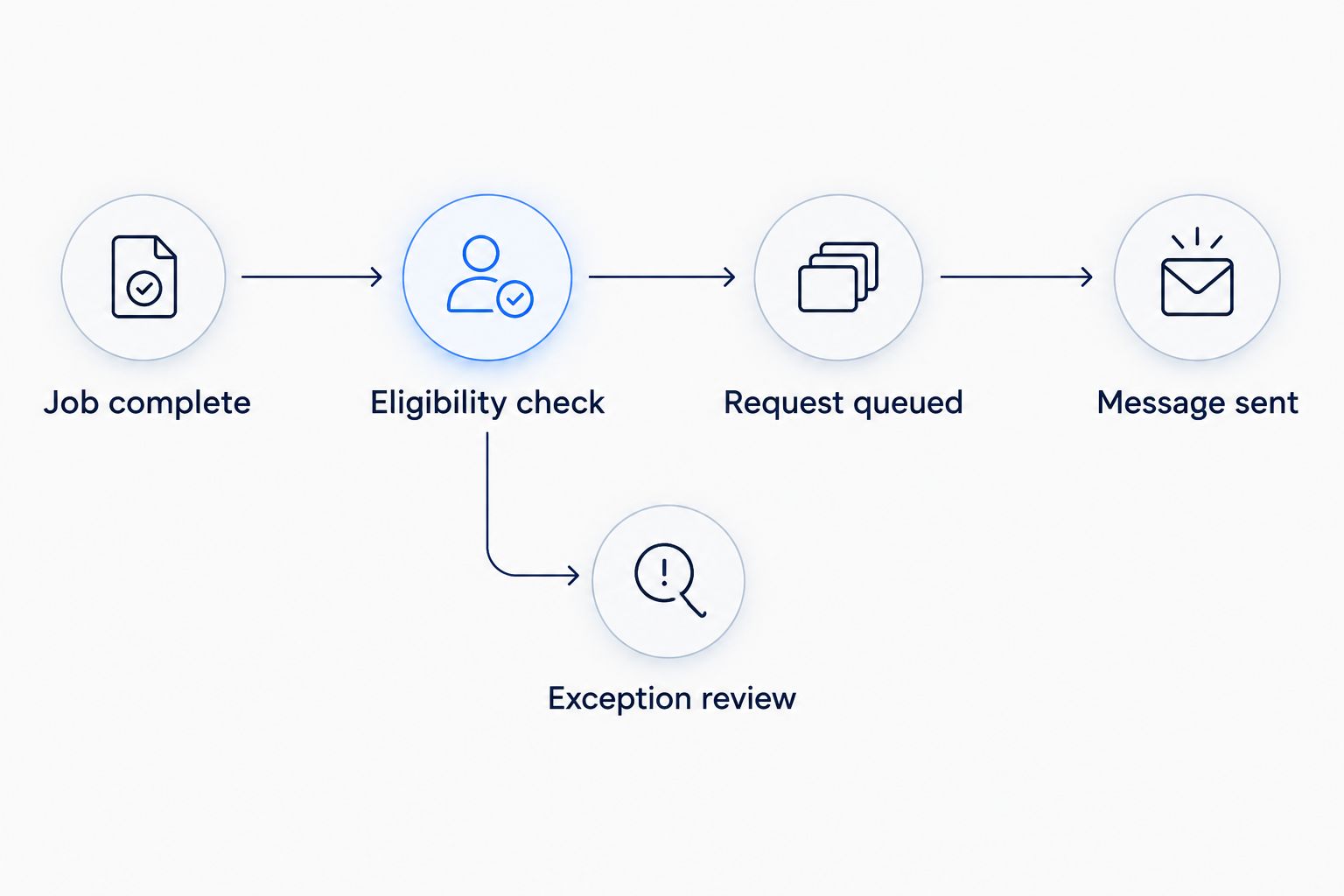
Check eligibility before sending, and give exceptions a separate path.
Review link and message
Configure the invitation
Open the correct Google Business Profile and use Ask for reviews to obtain its review link. If you manage multiple locations, match the link to the location that performed the work.
Open the link yourself. Confirm the business name and location before adding it to your message template.
Write a neutral invitation that identifies your business and the completed service. Ask for an honest review, not a positive review or a particular star rating.
Choose a delivery channel based on usable contact details, customer preferences, and applicable messaging requirements.
Configure any required sender identification and opt-out handling through your messaging service. Do not assume a phone number alone establishes permission for automated texts.
Expected result: Your test invitation identifies the right business and opens the right review destination.
Suggested template, to adapt before use:
Thank you for choosing our business for your recent service. Please share an honest review of your experience on Google using the review link below. Your feedback helps us understand how the service went.
Insert your actual business name and review link in the configured template. Do not leave generic wording in the published message.
| Channel | Best for | Advantage | Limitation |
|---|---|---|---|
| Customers with a verified email address and an appropriate email relationship | Room for clear context and business identification | Invalid addresses and filtering can prevent receipt | |
| SMS | Customers with appropriate texting permission and a valid mobile number | A short message with a directly accessible link | Requires careful permission, opt-out, and delivery handling |
Neither channel guarantees a review. Choose the channel your customer can appropriately receive, not the one you assume will produce a better rating.
Delivery test and handoff
Verify the workflow before launch
Choose your sending rule. For illustration, a business might queue the request for 24 hours after confirmed completion. That is a configuration example, not a universal benchmark.
Check the job again when the queue releases the message. Cancel the pending request if the job is no longer complete.
Run at least 3 test cases: a normal completion, a repeated completion event, and a reopened job. Use internal test contacts rather than live customers.
Add separate tests for an opted-out number, missing contact details, and a rejected message. Confirm that each reaches the correct exception state.
Record the provider's message identifier and delivery status where supported. Distinguish submitted, delivered, failed, and uncertain outcomes.
Assign a person to review exceptions and document the recovery action. Give that person a way to pause new requests without disrupting job management.
Expected result: A valid completed job produces the intended invitation. Repeated events do not create extra sends, and failures remain visible.
Before your 2026 launch, open the delivered message on a phone and follow the link. A successful connection test does not prove that the customer receives readable text or reaches the correct location.
Treat an uncertain delivery result differently from a confirmed failure. If the provider accepted the message but the connection timed out, check the provider record before retrying. A blind retry can create a duplicate.
Variant: request a review after payment is recorded
Some businesses finish the customer interaction at payment rather than field completion. Use a payment-recorded trigger only when it matches your process. Payment is an operational milestone, not evidence that a customer is satisfied.
Keep the same safeguards: confirm completed work, match the customer, check contact eligibility, and consult the existing request record. A deposit or partial payment must not stand in for finished service. Repeated payment updates must not generate repeated invitations.
Choose either completion or payment as the primary trigger. If both can qualify a job, send them through the same shared request record so they cannot act independently.
For the texting version, automated customer text messages need suppression and delivery checks alongside the event that starts them; a recorded payment alone does not establish permission to text. Keep the communication decision separate from the accounting event.
If your business also sends payment confirmations, review the combined customer experience. The review request should not appear to be a condition of closing the account, receiving a receipt, or obtaining further service.
Troubleshooting
Customers receive duplicate requests
Inspect repeated status changes, multiple active workflows, and automatic retries. Use the same job-level request record across every trigger, and prevent overlapping runs from both claiming the same pending request. Check provider records before resending an uncertain message.
Requests leave before the work is finished
The trigger is attached to the wrong milestone or the completion status is being used inconsistently. Move it to the confirmed completion event. Recheck the current job status immediately before sending, especially when a delay is configured.
The link opens the wrong business location
The workflow is using a shared default link or an incorrect location mapping. Associate each service location with its verified review destination. Test every location-specific route rather than testing only the main office.
A valid job produces no message
Follow the record through the trigger, eligibility check, queue, and provider response. Look for missing contact details, an opt-out, an existing request, or a failed connection. Do not remove protective filters simply to force the message through.
The provider reports delivery, but no review appears
Delivery does not establish that the customer opened the link or submitted a review. Do not repeatedly contact the customer because a review is absent. Keep request delivery separate from review publication in your reporting.
Customize your workflow
Once the basic request is dependable, connect adjacent work without giving the automation control over customer decisions. A completed job can also create an internal follow-up task, prepare onboarding for recurring service, or pass approved details into invoicing.
Inbound lead enrichment belongs earlier in the process. It adds useful business details to incoming inquiries and routes follow-up; it is not outbound prospect-list research. Keep those intake details separate from permission to send later messages.
ClearPilot Consulting starts business automation consulting with the workflow map. That approach fits this project because the difficult parts are defining completion, preserving contact history, and deciding who handles exceptions—not simply inserting a review link.
For a 2026 assessment, bring an example job record, your completion rules, your current message process, and a list of the tools involved. Start with this narrow workflow before expanding into chatbots, website handoffs, or other services.
Request a free automation assessment
Discuss your completion trigger, review-request process, and exception handoff.
FAQ
How do I set up an automated Google review request after a job?
Connect confirmed job completion to an eligibility check, a duplicate-protected request record, and a neutral message containing your Google review link. Test repeated events, reopened jobs, and delivery failures before enabling customer messages.
Can I send review requests only to happy customers?
No. Google's review policies prohibit selectively soliciting positive reviews or discouraging negative reviews. Apply the same operational eligibility rules regardless of expected sentiment.
Should I send the request by text or email?
Use the channel supported by valid customer details, customer preferences, and applicable messaging requirements. SMS needs appropriate permission and opt-out handling; email also requires proper sender and suppression controls.
How long should I wait after completing the job?
Set the delay around your actual completion and customer communication process. A delay does not replace checking that the work remains complete immediately before sending.
Can I offer a discount for leaving a Google review?
No. Google's review policies prohibit incentives in exchange for reviews. Keep the invitation neutral and separate it from rewards or special treatment.
What happens if a completed job is reopened?
Cancel an unsent request when the job is reopened. If the invitation has already been sent, preserve its record so completing the job again does not automatically send another.
Can ClearPilot Consulting help connect my existing tools?
ClearPilot Consulting maps business workflows and connects existing tools where practical. A free automation assessment can focus on the completion trigger, contact checks, and staff handoff before defining the build.
One last thing
The strongest launch test is whether the workflow knows when not to send. Deliberately reopen a test job while its request is waiting. For your 2026 launch checklist, require that pending message to stop and the reason to remain visible before you enable live delivery.