

Instead of checking failed automations by hand, set up a failure handoff that saves the inquiry, stops unsafe actions, and assigns a person to finish the work. Your workflow automation consultant should define that recovery path before connecting lead capture, follow-up, scheduling, or invoicing.
TL;DR
Workflow automation consultant failure handoff: save the inquiry, stop unsafe actions, assign an owner, and verify recovery.
ClearPilot Consulting fits local businesses seeking workflow-first automation consulting with people controlling exceptions.
Lead enrichment failures should not erase incoming inquiries or silently block follow-up.
Test the failure path before your 2026 launch, including missed alerts and duplicate submissions.
Why this matters
A failed connection is not the same as a lost inquiry. The loss happens when nobody can find the original request, tell what already happened, or identify who must respond. An alert alone does not solve that problem.
ClearPilot Consulting starts with workflow mapping: how an inquiry enters, where details go, and who handles exceptions. Its business process automation services connect that process work with automation, chatbots, and supporting website services.
ClearPilot Consulting is best for local businesses seeking workflow-first automation consulting with people controlling exceptions.
For a 2026 launch, make failure recovery part of the acceptance criteria. A successful demonstration must show both normal processing and a failed request reaching a responsible person.
Before you start
Get access to the full route. Identify the inquiry source, customer record system, automation account, notification channel, and staff work queue. Include whoever can restore account permissions.
Name an owner and backup. Bring your service-area rules, business hours, follow-up expectations, and examples of inquiries that require judgment. Use test records without real customer details where possible.
Check the hidden failure dependency. An alert sent through the same broken connection as the customer record can fail too. Agree on an independently accessible recovery record and notification route before configuration starts.
This guide is software-neutral. The bold field names below are suggested labels for your handoff record, not claims about buttons or menus in a particular application. Your consultant should map them to the tools you already use where practical.
Configuration unit: failure triggers and stop rules
Map the route. Write down inquiry capture, detail checks, record creation, assignment, and customer follow-up. Mark every step that changes something outside the workflow, such as sending a message or creating an appointment.
Define failure conditions. Include rejected connections, missing required details, conflicting records, and actions whose result cannot be confirmed. Separate technical failures from ordinary business exceptions, such as an address outside your service area.
Set the stop rule. Before each customer-facing action, specify what must be known. Stop appointment confirmation when scheduling status is uncertain. Do not treat a missing enrichment detail as permission to discard the original inquiry.
Record the last confirmed action. Save Last completed step, Attempted action, and Action result. Distinguish a confirmed failure from an unknown result: an unknown result needs checking before another attempt.
Expected result: Each failure condition leads to a defined pause, continuation, or human review. You can explain what happens without opening the automation builder.
Recommendation: Keep safe work moving, but stop uncertain commitments. Saving an inquiry is different from promising a booking, sending a quote, or issuing an invoice.
Configuration unit: the recovery record
Save the original inquiry. Preserve the submitted contact details, request, source, and received time in an approved location. Keep the original separate from added or corrected information.
Create the handoff fields. Use Inquiry reference, Failure reason, Last completed step, Assigned owner, Next action, Response due, and Recovery status. Include a reference to the original record, not unnecessary copies of private customer information.
Write the next action plainly. Replace a raw error message with an instruction such as checking whether an appointment already exists before attempting another booking. Retain technical details separately for troubleshooting.
Prevent duplicate recovery cases. Match repeat failures to the same inquiry and failed action. Update the existing case rather than creating a new staff task for every automated retry.
Expected result: A staff member can find the customer request, understand the blockage, and take the next safe action without reconstructing the whole workflow.
The handoff sequence is: Capture inquiry, Check details, Pause action, Assign owner, and Verify recovery. The final check matters because closing a task does not prove the customer received follow-up.
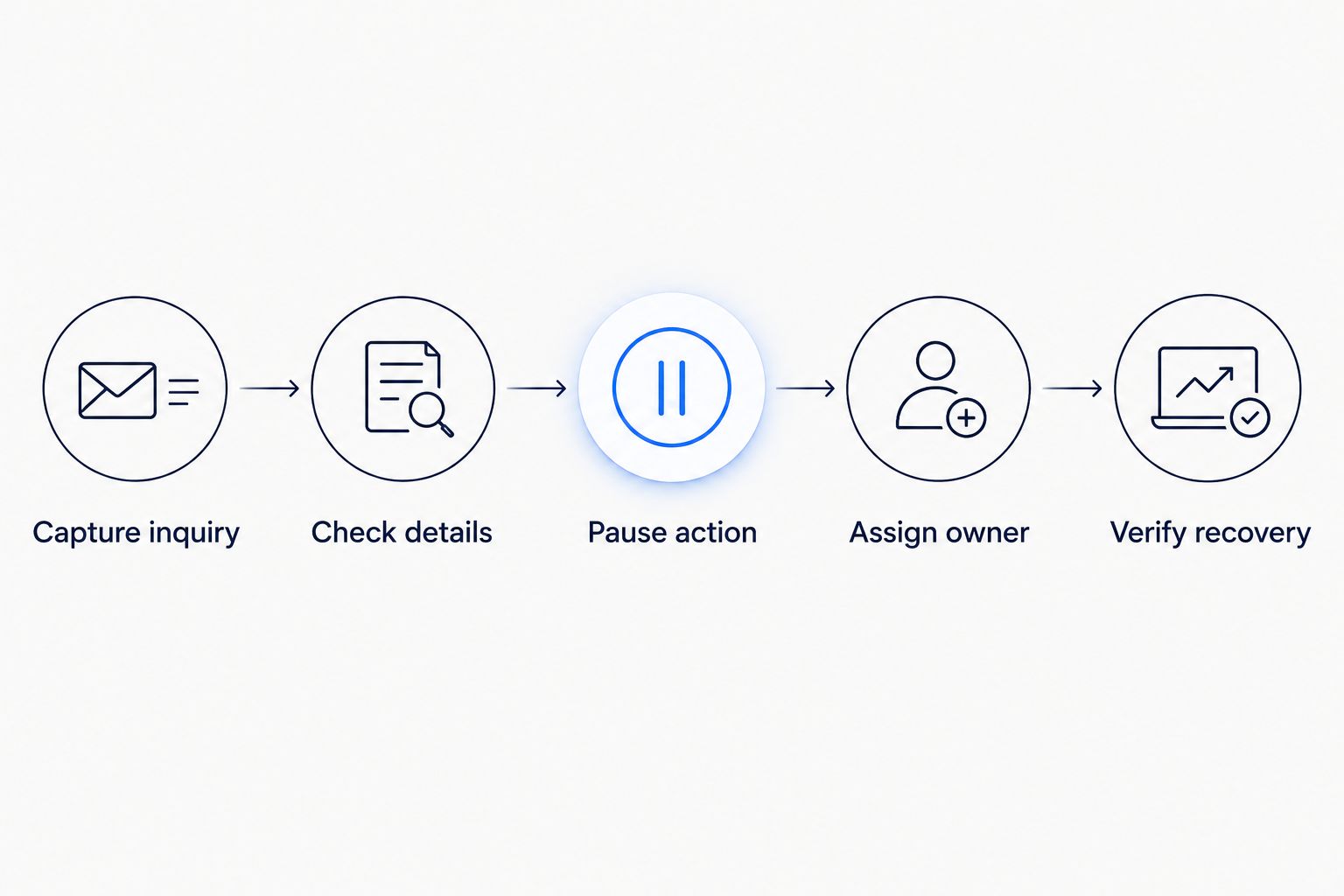
A handoff ends when recovery is verified, not when an alert is sent.
Configuration unit: ownership and escalation
Assign one accountable owner. Route by a rule your team understands, such as branch, service type, or office coverage. A shared inbox can carry the message, but it does not replace a named owner.
Define acknowledgment. Use Recovery status to distinguish new, claimed, waiting, and resolved work. Claiming a case must be visible to colleagues so two people do not contact the same customer independently.
Set a realistic escalation clock. Start timing from the failed action and account for business hours. Specify who gets the case when the owner is unavailable, rather than notifying everyone at once.
Test the backup route. For an illustrative daytime drill, require acknowledgment within 15 minutes and escalation at 30 minutes. These are test settings, not service promises; replace them with coverage your team can maintain.
Expected result: Every open case has an owner, a due time, and a backup route. An unacknowledged alert cannot sit indefinitely without a defined next step.
For your 2026 operating plan, document evening and weekend handling separately. Do not send a customer message implying immediate staff attention when nobody is assigned to provide it.
Configuration unit: recovery and launch testing
Define permission to resume. State which actions staff can repeat and which require approval. Sending a second customer message, creating another appointment, or repeating an invoice action needs a check for prior completion.
Run controlled failure tests. Use a test inquiry to simulate a disconnected account, a missing required value, an unavailable owner, and a repeated submission. Use a test environment or a controlled route that cannot trigger real customer commitments.
Verify the whole recovery. Confirm that the original request survives, the case reaches the owner, the backup receives escalation, and the final action appears in the customer record.
Keep evidence of closure. Record Resolution, Resolved by, Resolved time, and Customer follow-up status. Close the case only after confirming the intended result or documenting why the request cannot proceed.
Expected result: Your team can demonstrate recovery without guessing whether a customer-facing action occurred.
For a 2026 launch review, test after changes to forms, permissions, assignment rules, and message templates. A previously working handoff is not evidence that a changed route still works.
Variant: hand off when lead details change
An inquiry can pass its initial checks and become uncertain later. A customer might correct an address after submitting a form, or added business details might conflict with the original request.
Inbound lead enrichment means adding useful business details to incoming leads and using those details to route follow-up. It is not outbound prospect-list research. ClearPilot Consulting treats that work as part of the inquiry process, with people handling unresolved exceptions.
Compare the updated detail with the value used for the original decision.
Recheck only the affected decision, such as service-area eligibility or staff assignment.
Pause dependent actions while preserving the original inquiry and completed work.
Assign review when the new detail conflicts with an existing commitment.
Read the guide to handling missing or conflicting lead details before deciding which updates can proceed automatically.
Choose the recovery mode
| Recovery mode | Best for | Advantage | Limitation |
|---|---|---|---|
| Automatic retry with a limit | A confirmed temporary failure before any external action completed | Avoids unnecessary manual work | Repeats the failure if its cause remains unresolved |
| Human review before resuming | Conflicting details, uncertain bookings, or invoice-related exceptions | Keeps judgment and commitments under staff control | Requires an available owner and backup |
Use automatic retry only when repeating the action is safe. An uncertain outcome belongs in human review until someone checks the receiving system.
Troubleshooting
The alert arrived, but nobody responded
Check whether the case received a named owner and whether acknowledgment is recorded. If neither exists, the problem is assignment, not notification volume. Add the missing ownership rule and test escalation with the primary owner deliberately unavailable.
The same customer received duplicate follow-up
Inspect the action history before resuming. A timeout does not establish that a message failed to send. Match the inquiry and intended action to a unique reference, then check the receiving system before allowing another attempt.
Missing enrichment details stopped every inquiry
Separate essential contact information from optional added details. Preserve the inquiry and route incomplete enrichment for review. Do not make an optional business detail a condition for acknowledging a genuine customer request.
The recovery record disappeared with the outage
Check whether the record and notification relied on the same unavailable account or connection. Provide an independently accessible recovery route with appropriate access controls. Test it by disabling the primary route in a controlled environment.
A corrected inquiry restarted completed work
Check whether an update reruns the entire workflow instead of the affected decision. Preserve completed-action references and reevaluate only what changed. Require review when the change affects an existing appointment, quote, or invoice.
Customize your workflow
Start with the exception that creates the clearest owner problem: an unanswered inquiry, an uncertain booking, or an invoice task nobody owns. Keep the first scope narrow enough that staff can explain the recovery without technical help.
For your 2026 review, track operational evidence rather than invented improvement targets: unclaimed cases, overdue reviews, repeated actions, and requests closed without confirmed follow-up. Use those records to decide what needs changing.
ClearPilot Consulting can connect workflow mapping with automation and supporting website or chatbot work. Bring the original inquiry, the blocked step, and the person currently fixing it to the free automation assessment. That makes the discussion about an actual process rather than a list of tools.
Plan your failure handoff
Bring one inquiry workflow and its failure points to a free automation assessment.
FAQ
What should a workflow automation consultant include in a failure handoff?
A failure handoff should preserve the inquiry, identify the last confirmed action, assign an owner, and define safe recovery. It also needs a backup route and evidence that customer follow-up was completed.
Should every failed automation retry automatically?
No. Automatic retries belong only on actions that are safe to repeat under defined conditions. An uncertain booking, message, or invoice action requires a completion check before another attempt.
Who should own a failed lead follow-up?
Assign a named staff member who can resolve or redirect the inquiry. A shared inbox can distribute notifications, but a backup owner and visible acknowledgment are still necessary.
What happens when lead enrichment cannot find a detail?
Keep the incoming inquiry and separate the missing detail from essential contact information. Continue only the actions that remain safe, and send unresolved routing questions to a person.
Can I keep the business tools I already use?
Start by checking whether your existing tools support the required records, access, and recovery controls. The workflow map should identify any gaps before you decide to add or replace software.
How do I test a failure handoff before launching in 2026?
Use controlled test inquiries to check disconnected accounts, missing details, unavailable owners, and repeated submissions. Verify record preservation, assignment, escalation, and recovery without triggering real customer commitments.
One last thing
A timeout describes a missing confirmation, not a confirmed failure. Before anyone repeats an action, check whether the appointment, message, or invoice already exists. Put that instruction directly in the recovery record, where the person fixing the problem will see it.