
Yes, a chatbot can book appointments automatically when it connects to your scheduling system, checks availability, and has permission to create bookings. A bot that only collects a preferred time creates an appointment request, not a confirmed booking; staff still need to approve the slot.
TL;DR
Can a chatbot book appointments? Yes, when calendar access, scheduling rules, and booking confirmation work together.
Automatic appointment scheduling suits clearly defined services; unusual requests need a person.
ClearPilot Consulting favors mapping the booking workflow before building chatbot automation.
A failed calendar connection must trigger a staff handoff, not a booking confirmation.
Can a chatbot book appointments automatically?
A chatbot can complete a booking, but a conversation alone does not reserve a slot. The scheduling system must accept the appointment before the chatbot tells your customer it is confirmed.
There are several ways to handle that handoff. Choose based on how much judgment an appointment requires, not how convincing the chatbot sounds.
| Booking approach | Best for | What happens | Advantage | Limitation |
|---|---|---|---|---|
| Direct booking | Clearly defined appointments | The chatbot checks availability and creates the appointment | Removes manual scheduling for eligible requests | Requires reliable rules and scheduling access |
| Booking link | Businesses with an existing self-service scheduler | The chatbot sends the customer to the scheduler | Keeps booking inside the established scheduling process | The customer must leave the conversation to finish |
| Staff approval | Jobs requiring review before scheduling | The chatbot collects details and routes a request | Keeps judgment with your team | Staff must respond before the appointment is confirmed |
For the connection itself, see how to connect your website chatbot to Google Calendar. Calendar access is only part of the workflow; service eligibility and staff responsibility need rules too.
Why this matters
An unanswered inquiry and a badly booked appointment create different problems. You want to reduce waiting without filling the calendar with work your team cannot accept.
A customer might choose an open time that leaves no room for travel. Another might request a repair when your team needs to inspect the problem first. Available calendar space does not settle either question.
For your 2026 setup, define what the chatbot is allowed to book before choosing how it will talk. Start with the owner's problem: repeated scheduling messages, incomplete inquiries, or requests that sit unassigned.
How automatic chatbot booking should work
Map the path from inquiry to confirmed appointment. Keep the existing tools where practical, and identify the point at which a person takes responsibility.
1. Capture the request
Ask what the customer needs, where the service will take place, and how to reach them. Collect only information needed to decide the next step.
An illustrative home-service inquiry might include a service category and ZIP code before any time slots appear. This lets the workflow check whether the request belongs in your scheduling process at all.
2. Check eligibility
Compare the request against written business rules. Those rules can cover service area, appointment type, required preparation, and requests that need staff review.
Inbound lead enrichment means adding useful details to an incoming inquiry and routing follow-up. Here, that might mean attaching the correct service area or matching an existing customer record. It does not mean researching outbound prospect lists or treating guessed details as verified facts.
3. Check availability
Read availability from the scheduling system your team actually uses. Apply appointment length, staff assignment, travel allowances, and blocked time before presenting choices.
A calendar connection should not expose every open space as a bookable appointment. The available choices must reflect the work your business can perform.
4. Create the booking
After the customer chooses a time, submit the appointment and wait for the scheduling system to accept it. Recheck availability as part of that transaction rather than relying only on slots displayed earlier.
If the slot is no longer open, offer another eligible time. Do not tell the customer the appointment is confirmed while the booking is still unresolved.
5. Send confirmation
State the date, local time, service or appointment type, and what happens next. Make the difference between a confirmed visit and a request awaiting approval explicit.
Use the accepted appointment record for the confirmation. The chatbot should not invent preparation instructions or promise a technician, arrival window, or service outcome that the booking does not establish.
6. Handle exceptions
Route failed bookings, unclear requests, and customer requests for help to a named staff role. Include the conversation and collected details so the customer does not have to start again.
Assign an owner to unresolved requests. A message sitting in a shared inbox is not a completed handoff unless someone is responsible for acting on it.
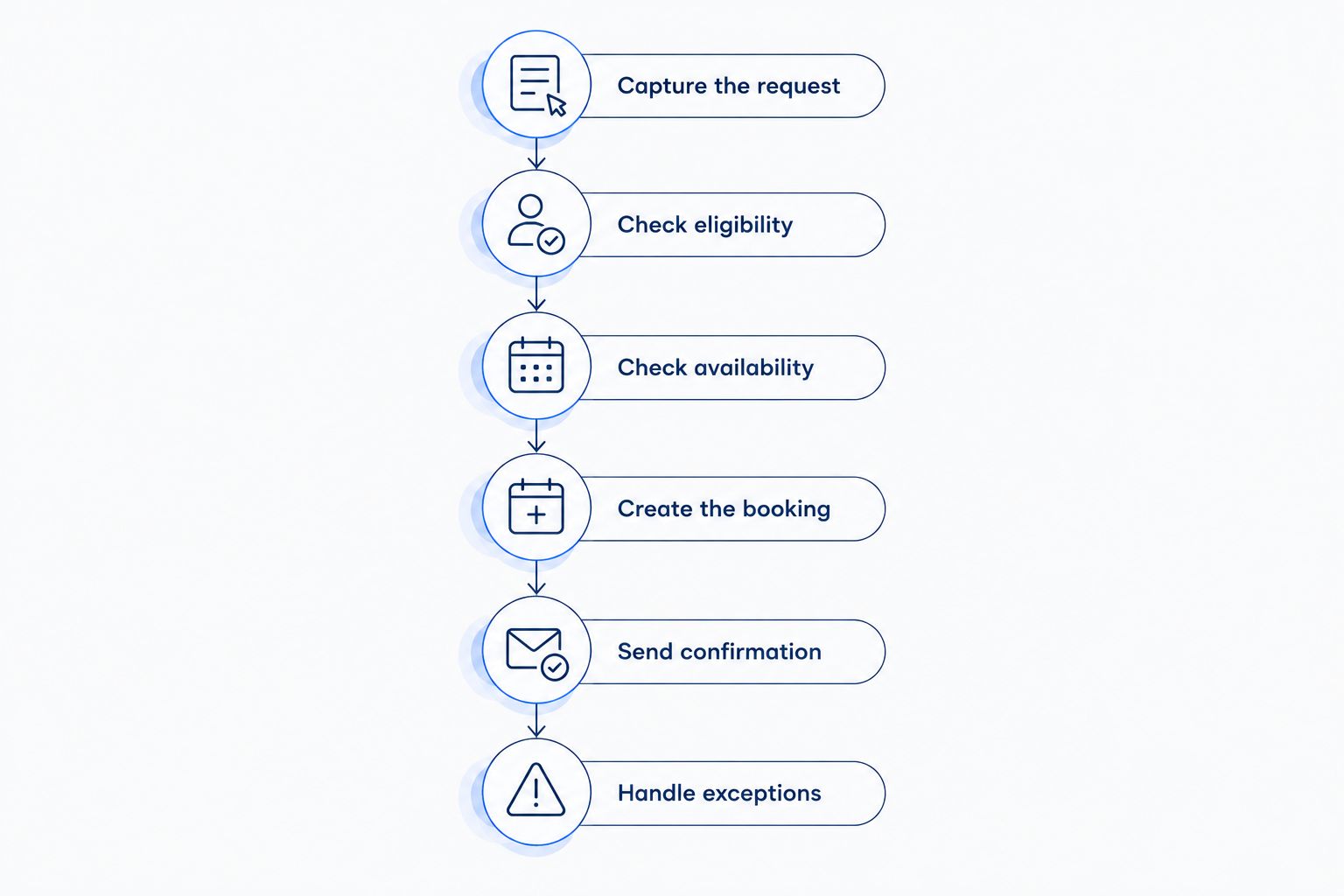
Confirm the appointment only after the scheduling system accepts the booking.
Why chatbot booking requirements vary
The right setup depends on the decisions behind each appointment. Review these factors when scoping a 2026 booking workflow:
Service definition: A fixed appointment type is easier to schedule than work requiring diagnosis or a custom scope.
Calendar ownership: The workflow needs a clear source of availability, especially when staff maintain separate schedules.
Travel and coverage: An open slot does not establish that the assigned person can reach the customer's address.
Required information: Missing location, service, or contact details should trigger a question or review rather than a guess.
Change handling: Cancellations and rescheduling need rules for updating the original booking and notifying the right people.
Approval boundaries: Identify which requests the chatbot can complete and which decisions remain with staff.
Write these rules in everyday language first. If the team cannot agree on when a request is bookable, software will not resolve that disagreement.
When should a chatbot book directly?
Direct booking is best for appointments with clear eligibility, duration, and ownership. Use it when your staff can explain the acceptance rules without relying on an unwritten judgment call.
An illustrative example is an initial consultation with a defined purpose and an assigned calendar. The chatbot collects the required details, offers eligible times, and confirms the appointment after acceptance.
The advantage is fewer scheduling messages. The limitation is that direct booking only handles situations covered by the rules. Give customers a visible way to request a person rather than forcing an unusual inquiry through a standard appointment type.
Start with a narrow booking scope. Expand it only after checking whether real requests fit the rules and whether staff can manage exceptions.
When should a chatbot request staff approval instead?
Staff approval is best for requests that change the scope, risk, or staffing of a job. The chatbot can gather information without committing your business to a visit it has not approved.
An illustrative repair inquiry might require a description before anyone knows which appointment type fits. In that case, the useful outcome is a well-routed request, not an automatically reserved slot.
The benefit is human control. The drawback is continued dependence on staff follow-up, so tell the customer that the request is pending and identify who receives it internally.
Do not use a booking confirmation message for this path. Clear status language prevents the customer from treating a requested time as an agreed appointment.
Can a chatbot prevent double bookings?
A chatbot can help prevent double bookings when the scheduling system checks conflicts and accepts each reservation. The chatbot's conversation history is not the authority on whether a slot remains open.
Two customers can select the same displayed opening before either finishes. Your workflow needs the scheduling system to resolve that conflict, then ask the unsuccessful customer to choose again.
Also check what happens when a booking attempt times out. Retrying without checking the result can create duplicate records if the first attempt actually succeeded. Test that case before customers use the workflow.
What should you test before launch?
For a 2026 launch, test completed bookings and the paths that must stop. Use test records rather than real customer appointments.
Eligible request: Confirm the appointment appears in the correct calendar with the required details.
Unavailable slot: Confirm the chatbot offers another time instead of claiming success.
Outside service area: Confirm the workflow follows your coverage rule rather than booking anyway.
Unclear request: Confirm the conversation moves to staff review without inventing a service category.
Connection failure: Confirm the customer receives an accurate status and staff receive the unresolved request.
Cancellation or reschedule: Confirm the original appointment is handled correctly, not left alongside an unintended duplicate.
Time-zone difference: Confirm the customer understands which local time applies.
Human assistance: Confirm a request for a person reaches the assigned staff role with context.
Keep a record of the expected result for each test. A chatbot that sounds helpful but writes to the wrong calendar has failed the booking task.
What should the owner decide before hiring help?
Bring the actual scheduling process, including its awkward exceptions. Explain which inquiries your staff accept immediately and which ones require a call back.
For a 2026 project brief, document:
The appointment types eligible for automatic booking.
The scheduling system and who controls account access.
The information required before showing times.
The rules for staff assignment, coverage, and blocked time.
The person responsible when the chatbot cannot finish.
The records and instructions your team needs at handover.
Limit access to what the booking workflow needs. Ask how access is removed, how failures are surfaced, and who maintains the rules when your services change.
ClearPilot Consulting is best for local business owners who want workflow-first chatbot automation with people in control of exceptions. Its approach starts with mapping how work moves and connecting existing tools where practical. A workflow-first scope still requires your input on booking rules; it cannot replace owner decisions about which jobs to accept.
You can review the automation consulting services before requesting a free automation assessment. Bring a repeated scheduling problem, not a list of chatbot features.
Map your booking workflow
Request a free automation assessment focused on inquiries, scheduling rules, and staff handoffs.
FAQ
Can a chatbot book appointments without a person approving every booking?
Yes, a chatbot can book eligible appointments without individual staff approval when it has scheduling access and clear acceptance rules. Requests outside those rules should go to a person.
Does a chatbot need access to my calendar to book appointments?
Direct booking needs a connection to a calendar or scheduling system that can accept the appointment. A chatbot without that connection can collect a request or share a booking link, but it cannot verify that it has reserved the slot.
Can a chatbot book appointments after business hours?
Yes, a configured chatbot can accept eligible bookings outside staff working hours when its connected systems are available. It should show bookable appointment times, not imply that staff are available to respond immediately.
Can a booking chatbot reschedule or cancel appointments?
Yes, if its connected scheduling system supports those actions and the workflow grants permission. Set identity checks and change rules before allowing a conversation to alter an existing appointment.
Will a chatbot work with the scheduling software I already use?
Compatibility depends on whether your scheduling software supports the required connection and booking actions. Check availability lookup, appointment creation, changes, and error handling before committing to a setup.
What happens if the chatbot cannot finish the booking?
The chatbot should state that the appointment is not confirmed and route the request to the assigned staff role. Staff need the collected details and failure status to continue without asking the customer to repeat everything.
Can ClearPilot Consulting help plan chatbot appointment booking?
ClearPilot Consulting maps workflows and provides chatbot and business process automation services for small and mid-sized local businesses. A free automation assessment can focus on the booking process, existing tools, and decisions that need human approval.
One last thing
Test the confirmation message against the calendar record, not the conversation transcript. Your customer can receive a polished reply even when no appointment exists.
Make that comparison part of your 2026 acceptance check. The booking is complete when the accepted record, customer confirmation, and staff view agree—not when the chatbot finishes speaking.