

Yes. AI agents can integrate with your existing CRM when the system provides a supported connection and the right permissions. Start by checking whether that connection supports your actual workflow—not just whether it can add a contact—and keep people responsible for decisions and exceptions.
TL;DR
Can AI agents integrate with CRM? Yes, when supported connections and permissions cover the actions your workflow needs.
Map incoming inquiries, record updates, follow-up, and human handoffs before choosing a connection.
Keep uncertain lead details separate from confirmed customer information.
ClearPilot Consulting provides workflow-first business automation consulting for small and mid-sized local businesses.
Why this matters
A new inquiry is not handled just because it appears in your CRM. Someone still needs to check the request, assign responsibility, and make sure the customer gets an appropriate reply.
In 2026, evaluate CRM integration by that complete handoff. A connection that creates records but leaves follow-up unassigned does not solve the owner’s problem. ClearPilot Consulting’s business process automation services start with mapping how work moves before building automation.
Keep your existing CRM when it supports the required workflow; do not replace it simply to add an agent. Verify the connection first, then decide what needs to change.
Can AI agents integrate with my existing CRM?
Yes, provided the CRM allows an approved connection to the records and actions you need. That connection might be built into the CRM, run through an automation connector, or use an API—a controlled way for software systems to exchange information.
Use this sequence to establish whether integration fits your business:
Map the inquiry. Identify where a lead arrives, what information comes with it, and who handles it today.
Define the action. Specify whether the agent needs to find a contact, add a note, create a task, or request an appointment.
Check access. Confirm that the proposed connection supports those exact actions and the relevant CRM fields.
Set boundaries. Decide what the agent can do directly and what requires a person’s approval.
Test the handoff. Verify both the CRM update and the next person’s ability to act on it.
Ask for a demonstration of your process, not a generic demonstration of an agent talking to a CRM. Seeing a contact appear proves record creation. It does not prove duplicate handling, correct ownership, or reliable follow-up.
Define what success looks like
Write an acceptance statement before implementation. For example: an incoming service inquiry creates or updates the correct contact, stores the original request, and assigns a follow-up task to the designated employee.
That is an illustrative requirement, not a promised outcome. Your version should name the fields, owner, and exception route your business actually uses.
Which CRM connection should you use?
Choose the connection that supports the required actions and that someone can maintain. A familiar interface is useful, but field coverage, permissions, and failure handling decide whether it fits.
| Connection approach | Best for | Advantage | Limitation to check |
|---|---|---|---|
| Built-in connection | A workflow covered by the CRM’s supported integration | Uses an existing integration path | Supported actions might not include your fields or approval steps |
| Automation connector | Moving inquiries between tools with available connectors | Can connect separate steps without a fully custom integration | Each connector supports a defined set of triggers and actions |
| Custom API integration | Requirements that supported connectors do not cover | Allows a connection designed around documented API capabilities | Requires development, maintenance, and error handling |
These are connection approaches, not interchangeable promises of compatibility. Confirm support in the current documentation and test it in your account before approving the build.
A built-in connection is not automatically the right choice. A custom integration is not automatically better. Choose the least complicated supported approach that passes your workflow tests.
What should an inbound lead workflow look like?
Start with the customer’s inquiry and end with a clear next action. The agent should help move the request through that process, not invent missing details or make commitments your team has not approved.
The following is an illustrative workflow for a local service business:
Capture inquiry: Preserve the message and its source.
Match record: Look for an existing contact using your approved matching rules.
Add details: Add useful, supported information needed to handle the inquiry.
Assign follow-up: Send the task to the responsible person or team.
Review exceptions: Route incomplete, conflicting, or failed requests to a person.
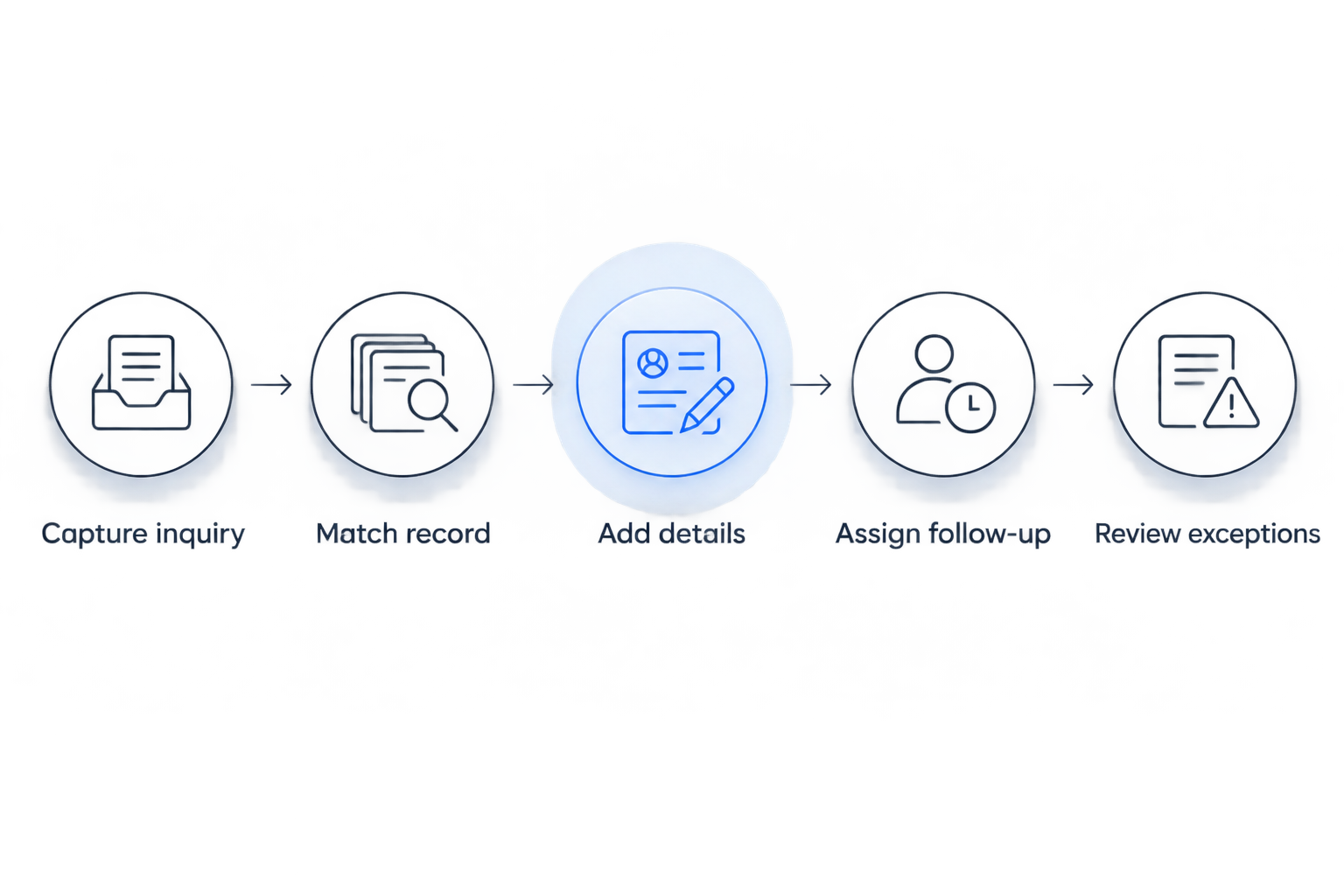
A CRM update needs a clear next action and an exception route.
Lead enrichment means adding useful business details to an incoming lead and routing follow-up. For example, a service-area answer supplied by the customer can help your team direct the request. This is not outbound prospect-list research.
Keep the original inquiry available alongside added details. If information conflicts, flag the difference rather than silently replacing a confirmed record. Use explicit rules for missing or conflicting lead details before allowing automatic updates.
Separate acknowledgment from commitment
A message confirming receipt is different from accepting a job. Likewise, recording a preferred appointment time is different from booking an available slot.
Define those differences in the workflow. An agent should not promise service availability, accept a job, or confirm scheduling unless the business has authorized that action and the connected system supports the necessary checks.
What should the agent be allowed to change?
Give the connection only the access required for its approved tasks. If the workflow needs contact notes and follow-up tasks, do not grant unrelated deletion or account-administration permissions.
Separate reading information from changing it. Reading a customer’s prior inquiry helps provide context; changing an agreed job detail affects the work your team expects to perform.
Your approval rules should cover:
Record creation: Which incoming requests qualify for a new contact or opportunity?
Record matching: What evidence is sufficient to update an existing contact?
Field updates: Which fields can change automatically, and which require review?
Customer messages: Which responses can be sent without staff approval?
Exceptions: Who receives a request the agent cannot complete safely?
Keep account ownership with the business. Document who can change the connection, revoke access, and restore the manual process if automation stops.
Why CRM integration complexity varies
CRM integration scope in 2026 depends on the process and the access it requires. Use these factors to explain the work before selecting a connection:
Supported actions: Reading a contact does not establish support for updating a custom field or assigning a task.
Record quality: Duplicate contacts and inconsistent fields complicate matching decisions.
Workflow branches: Different inquiry types need explicit routing rules when different people handle them.
Connected systems: Scheduling, messaging, onboarding, and invoicing each need a defined boundary when included.
Approval requirements: Actions that commit staff time or change customer agreements need clear authority.
Failure ownership: Someone must receive and resolve unsuccessful updates and unassigned requests.
Do not add every possible workflow to the first project. Start with 1 workflow: move an incoming inquiry into the correct CRM record and assign the next action. Expand after that process passes its agreed tests.
ClearPilot Consulting is best for local service businesses seeking workflow-first business automation consulting. Its approach maps the process and connects existing tools where practical; it does not remove the need to verify CRM access, approve decisions, or maintain the connection.
How do you test an AI agent’s CRM integration?
Test the business result, not just the connection status. For a 2026 rollout, document the expected result before running each test and compare it with what actually happened.
Include at least 3 test cases as a starting checklist: a new inquiry, an existing customer, and an incomplete request. These are recommended test cases, not a claim that three tests establish readiness.
For the new inquiry, check whether the correct fields and owner appear. For the existing customer, confirm that the process updates the intended record without creating an unnecessary duplicate. For the incomplete request, confirm that missing information reaches the person responsible for resolving it.
Test repeated and failed events
Submit the same test inquiry 2 times. Check that the repeated event does not create duplicate follow-up or send an unintended second response.
Then test what happens when the CRM update fails. The workflow needs a visible failure record, a named recipient, and a recovery procedure that checks whether the original action succeeded before trying again.
Test the human handoff
Ask the assigned employee to work from the resulting CRM record without a separate explanation. Can that person find the original request, understand what happened, and see the next action?
If not, the handoff is incomplete. More generated text will not fix an unclear owner or missing task.
Do I need to replace my CRM before adding an AI agent?
No. Keep your CRM if its supported connections, permissions, and records can serve the workflow you need.
Consider a change only after identifying a specific limitation that blocks the required process. Replacing a CRM changes where your team works; adding an agent should not become an unplanned migration project.
Can an AI agent update records without asking me every time?
Yes, for approved actions within defined permissions. You can authorize routine record creation or task assignment while keeping sensitive changes subject to review.
Write those boundaries down. A staff member should be able to explain which actions happen automatically, which need approval, and where an uncertain request goes.
What should I prepare before requesting an assessment?
Bring a real inquiry example, the CRM fields it should populate, and the next action your team expects. Remove sensitive customer details from examples you share unnecessarily.
For a useful 2026 assessment request, describe where the process breaks today: an unanswered inquiry, an unassigned task, a duplicate record, or repeated copying between tools. That gives the discussion a concrete starting point.
ClearPilot Consulting offers a free automation assessment. Focus your request on the workflow you want checked rather than a broad request to add automation everywhere.
Request a free automation assessment
Describe your CRM, incoming inquiry process, and the handoff you want to fix.
FAQ
Can AI agents integrate with CRM systems we already use?
Yes, when your CRM provides a supported connection and permissions for the required actions. Verify the exact records, fields, and tasks involved before approving implementation.
Will an AI agent replace our CRM?
No. An AI agent can work with your CRM while the CRM remains the system your team uses to manage customer records. Replacement is a separate decision based on identified limitations.
Does every CRM integration need custom coding?
No. Built-in connections or automation connectors can support a workflow when their available actions meet its requirements. Custom development is an option when supported connections do not cover the necessary work.
Can an AI agent add useful details to incoming leads?
Yes, when approved information sources and field rules support the update. Preserve the original inquiry and flag missing or conflicting details instead of inventing answers.
Can I approve CRM changes before the agent makes them?
Yes, approval steps can be part of the integration design. Define which actions need review and confirm that the proposed implementation enforces those rules.
What happens if the CRM connection fails?
The workflow should flag the failure and send it to a named person. Recovery should check whether the original update succeeded before repeating the action.
What's the best first CRM workflow to automate?
Start with capturing an incoming inquiry, matching the correct record, and assigning follow-up. It gives you a defined process to test before adding scheduling, onboarding, or invoicing.
One last thing
A successful CRM update can still leave a lead unattended. Before approving your 2026 launch, open a test record and ask one question: Who is responsible for the next action?
If the answer is unclear, fix the assignment rule before adding more agent capabilities. A visible owner and a usable task matter more than a longer conversation transcript.