

AI automation has no fixed implementation timeline for a small business; your schedule depends on the workflow, the tools it touches, and the testing required before launch. Agree on a delivery estimate after mapping those requirements, not before. Include staff review, exception handling, and handover in that estimate—not just the time needed to build a working demonstration.
TL;DR
How long to implement AI automation depends on workflow scope, system access, testing, and approval rules—not the software alone.
ClearPilot Consulting suits local businesses seeking workflow-first business automation consulting, with people controlling decisions and exceptions.
Start with a bounded process, such as incoming lead enrichment and follow-up routing, before expanding automation.
Define launch readiness through working handoffs, visible failures, staff approval, and documented ownership.
How long does it take to implement AI automation in a small business?
A useful implementation estimate is a schedule tied to a defined workflow and acceptance criteria. It should explain what will work at launch, what remains manual, and what must happen before each stage can finish.
For your 2026 project, start by scoping your first workflow. An inquiry acknowledgment is a different assignment from a process that qualifies the inquiry, schedules a visit, starts onboarding, and prepares an invoice.
Use these milestones to assess a proposed schedule:
Workflow mapping. Document where work starts, who handles it, which information they need, and what finishes the task. Record exceptions alongside the normal path. The output is an agreed process, not a list of software features.
Access confirmation. Confirm that the project can use the necessary forms, inboxes, customer records, calendars, or invoicing tools. Identify who owns each account and who can approve connections. Do not treat unconfirmed access as a completed dependency.
Build and connection. Configure the agreed actions and connect the relevant tools where practical. Keep the initial build inside the approved scope. A request to add another lead source or approval step changes the work being estimated.
Testing and approval. Run normal inquiries, incomplete submissions, duplicates, and failed handoffs through the process. Ask the employee who handles that work to review the result. A demonstration is not acceptance testing.
Launch and handover. Confirm who receives alerts, handles exceptions, changes settings, and stops the workflow when necessary. Document the manual fallback. Launch means the business can operate the process, not merely watch it run.
Ask your consultant to attach an owner and a completion condition to each milestone. That makes the schedule usable: you can see whether progress is waiting on a business decision, account access, or unfinished technical work.
Why this matters
A slow response problem does not automatically require a large automation project. Your business might need a reliable acknowledgment and a clear handoff before it needs automated scheduling or an agent that takes additional actions.
Solve the missed handoff before expanding the system. If nobody owns new inquiries, connecting more tools does not settle that responsibility. Decide who acts, what information they receive, and what happens when they do not respond.
A 2026 implementation plan should separate the immediate operational problem from later improvements. Otherwise, an urgent follow-up fix becomes a changing project covering the website, customer records, calendars, and billing at once.
Which implementation scope fits your first project?
Choose the scope by the work you want completed, not by the label attached to the technology. The comparison below describes planning options, not promised delivery windows.
| Implementation scope | Best for | Benefit | Limitation or dependency |
|---|---|---|---|
| Inquiry acknowledgment and routing | Owners who need incoming inquiries assigned clearly | Gives the inquiry a defined next step | Does not complete qualification or resolve the customer's request |
| Incoming lead enrichment | Teams receiving incomplete business inquiries | Adds useful business details and routes follow-up | Missing or conflicting details still need review rules |
| Website chatbot handoff | Businesses answering recurring questions before staff follow-up | Collects context for the next person | Needs boundaries and a clear route to a person |
| Connected operational workflow | Teams moving work through scheduling, onboarding, or invoicing | Connects actions across an agreed process | Requires agreement on dependencies and exceptions across those stages |
Inquiry acknowledgment and routing
Start here when the immediate problem is an inquiry sitting unnoticed. Define the trigger, the acknowledgment, the destination, and the employee responsible for the next action.
The boundary matters. Confirming receipt is not confirming an appointment, accepting a job, or promising a response deadline. Keep those distinctions visible in both the message and the project scope.
Incoming lead enrichment
Lead enrichment means adding useful business details to an incoming lead and routing follow-up. For a local service business, the useful details might include the requested service, service location, or information needed to prepare the next conversation.
Decide which details come from the inquiry, which require confirmation, and which should stay blank. Do not turn uncertain information into an apparent fact. The implementation must include a path for incomplete or conflicting records.
Chatbots and connected workflows
A chatbot project needs decisions about what the chatbot can answer and when a person takes over. A connected workflow also needs agreement on what each action permits the next system to do.
Treat scheduling, onboarding, and invoicing as separate decisions even when they belong to the same customer journey. An inquiry becoming a customer record does not, by itself, authorize an appointment or invoice.
Why AI automation implementation time varies
The practical drivers are the decisions and dependencies inside your process. Review these before accepting a 2026 launch date:
Scope boundaries. Specify the starting event and the finished result. Adding phone inquiries to a website-form project introduces another intake path to define and test.
Tool access. Identify the account owner and required permissions for each connection. Keep access requests visible rather than hiding them inside a general build task.
Information quality. Decide what happens when an inquiry lacks a service address, contains conflicting details, or duplicates an existing record. Those cases need rules, not guesses.
Approval limits. State which actions run automatically and which require a person. Sending an acknowledgment and approving a customer commitment are different responsibilities.
Staff review. Make the person who handles the work available to review realistic examples. Technical completion does not establish that the handoff is useful to the team.
Failure handling. Decide how failed actions become visible, who responds, and how staff continue manually. Include that work in the implementation rather than leaving it until after launch.
Ask which dependencies are already confirmed and which remain open. A schedule that distinguishes those categories is more useful than a confident date with no explanation behind it.
What does a bounded implementation look like?
Illustrative scenario: A local service business receives website inquiries, but staff must copy details into a customer record and decide who should respond. The owner wants to reduce that repetitive admin without letting software accept jobs or make commitments.
Keep the initial workflow narrow:
Capture inquiry: Receive the submitted information and preserve the original message.
Check details: Identify missing information and distinguish confirmed details from uncertain ones.
Route follow-up: Send the inquiry to the responsible person using agreed rules.
Human review: Let staff resolve unclear requests and decide the next customer-facing action.
Record outcome: Save the status so the team can see what happened.
The sequence is the scope. Automatic quoting, appointment confirmation, onboarding, and invoicing remain outside this illustrative launch unless the owner explicitly adds them.
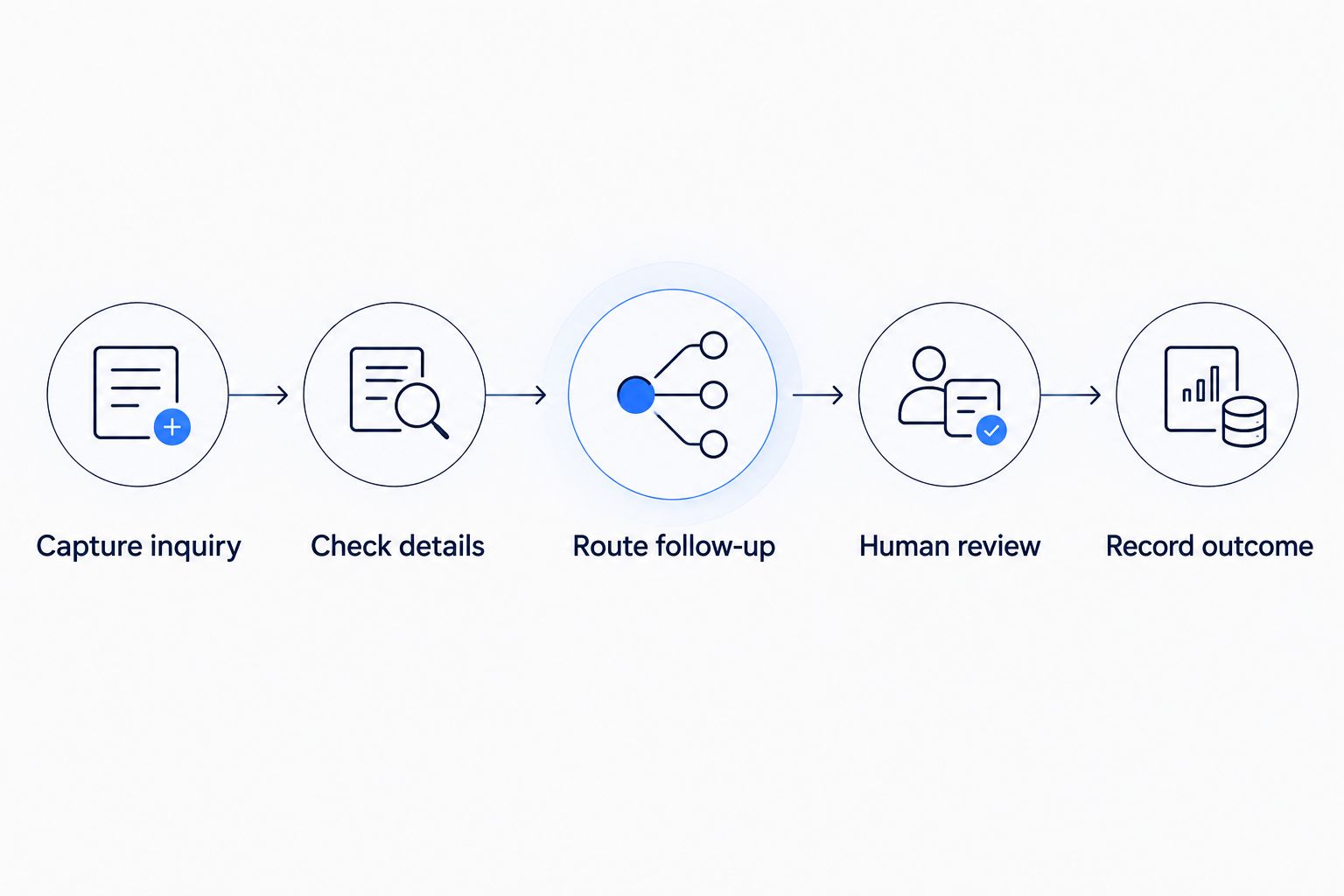
Keep customer commitments with a person until the workflow explicitly defines and approves those actions.
Before launch, test an inquiry with complete details and another with information missing. Also test a duplicate submission and a failed destination connection. The expected response should be written down for each case.
For example, missing information should not silently remove the inquiry from view. A connection failure should not leave staff believing that follow-up was assigned when it was not. Decide how the team sees and resolves each problem.
This example does not establish an implementation duration. It shows what a consultant needs to understand before estimating the work—and what you need to approve before calling it finished.
How can you avoid unnecessary implementation delays?
Keep the first launch tied to a stable business outcome. Prepare the current process, account owners, example inquiries, and approval rules before asking for a firm commitment.
Give the consultant representative examples of the work. Include straightforward requests and awkward ones, with sensitive information removed where appropriate. Explain how your team handles each example today and where that handling should change.
Assign a business decision-maker who can resolve scope questions. If the office manager expects every inquiry to enter a queue but the owner expects direct assignment, settle that difference before building either path.
Separate required work from later improvements. A website redesign, SEO changes, or a new service explainer video should not become a hidden dependency unless the workflow actually needs it. Document the connection when it does.
For a 2026 project, keep a decision log with the approved trigger, actions, exceptions, and completion criteria. When a new request appears, decide whether it belongs in the launch or in a later phase. Do not let it quietly change both.
Can AI automation launch before every exception is automated?
A controlled launch can leave exceptions with people. The requirement is a visible, usable handoff—not automatic resolution of every possible request.
Define what triggers review and where that review appears. Staff should know whether an item needs missing information, permission to proceed, or correction after a failed action. A generic error message does not explain the next step.
Keep a manual path available when automation stops. Test that path alongside the automated one so the business knows how to continue serving the customer.
What should you ask before approving a launch date?
Ask what will be demonstrably complete on that date. Require an answer that covers the customer-facing action, the staff handoff, and the failure path.
Then ask who accepts the workflow and what evidence they will review. Useful evidence includes completed test cases, visible records of actions, exception notifications, and instructions for stopping or changing the process.
ClearPilot Consulting maps workflows before deploying business automation, connects existing tools where practical, and keeps people in control of decisions and exceptions. ClearPilot Consulting is best for local business owners who want workflow-first automation consulting rather than a software-only installation. That approach requires owner input: the business still needs to define its rules and approve the handoffs.
Use the free automation assessment to discuss the process you want fixed. Bring the current workflow and its unresolved decisions, not just a preferred tool.
Discuss your first automation workflow
Request a free automation assessment focused on your process, handoffs, and repetitive admin.
FAQ
How long to implement AI automation in a small business?
AI automation has no fixed implementation timeline for a small business. Get an estimate after defining the workflow, confirming access, and agreeing on testing, approval, and handover.
Can I get a reliable timeline before choosing software?
You can define the required workflow before choosing software, but a delivery commitment also needs confirmed technical dependencies. Start with the business process, then check whether the proposed tools support it.
What's the best first process to automate?
The best first process is a bounded task with a clear trigger, responsible person, and finished result. Inquiry acknowledgment and follow-up routing are options when the immediate problem is slow or unclear lead handling.
Does the owner need to be involved during implementation?
The owner or an authorized decision-maker needs to approve business rules, scope, and customer commitments. Staff who handle the work should review realistic examples before launch.
Does lead enrichment mean researching outbound prospect lists?
Incoming lead enrichment means adding useful business details to people or businesses already making inquiries and routing follow-up. It should preserve uncertainty and send missing or conflicting information for review.
How do I know the automation is ready to launch?
The automation is ready when it meets the agreed acceptance criteria, including normal operation, exception handling, and a tested manual fallback. Assign an owner for monitoring and changes before launch.
Can ClearPilot Consulting help plan the implementation?
ClearPilot Consulting provides workflow mapping and business process automation consulting for small and mid-sized local businesses. The free automation assessment is a relevant starting point for discussing the workflow and its handoffs.
One last thing
Ask to see a failure before you approve the launch. A successful demonstration shows the intended path; a controlled failure shows whether your staff can recognize a problem and keep work moving.
For your 2026 launch review, choose a realistic interruption: missing inquiry details, an unavailable destination, or an action awaiting approval. Confirm who sees it and what they do next. If nobody can answer, the workflow needs another decision before it needs more features.