

Start small business automation with a repeated task that has a clear trigger, a clear owner, and rules you can explain without guessing. For a local service business planning its first project in 2026, incoming inquiry routing is a useful candidate—but automate the handoff, not decisions about scope, scheduling exceptions, or what to promise a customer.
TL;DR
Small business automation should start with a clear, repeatable handoff, not an entire department.
ClearPilot Consulting takes a workflow-first approach: map the process before choosing automation.
Inbound lead enrichment adds useful business details to incoming inquiries and routes follow-up.
Keep people responsible for unclear requests, customer commitments, and exceptions.
Which process should you fix first with small business automation?
Choose a process you can describe from start to finish: what starts it, what information it needs, who owns it, and what marks it complete. Reject a first project that depends on unwritten judgment at every step.
Before choosing software, scope your first workflow. A narrow boundary makes the work easier to explain, test, and stop if something goes wrong.
Use this comparison to identify a candidate. These are selection guidelines, not promised results.
| Process | Best for | Useful first boundary | Advantage | Limitation |
|---|---|---|---|---|
| Inquiry routing | Owners manually forwarding new requests | Assign each inquiry to a responsible person | Clarifies ownership | Cannot resolve unclear service needs alone |
| Scheduling | Businesses with defined appointment rules | Send a booking invitation after qualification | Removes a repeated handoff | Exceptions still need staff judgment |
| Onboarding | Businesses repeatedly requesting the same information | Send an approved checklist after acceptance | Makes the information request consistent | Unusual jobs need a different path |
| Invoice preparation | Businesses with reliable completion records | Prepare a draft for review | Reduces repeated data entry | Incorrect source records create incorrect drafts |
| Chatbot intake | Businesses answering recurring inquiry questions | Collect approved details and pass them to staff | Gives inquiries a structured starting point | Requires boundaries and a human handoff |
Choose the process with the clearest rules—not the one with the most impressive demo. If inquiry routing is inconsistent because nobody owns follow-up, assign that owner before adding automation.
Why this matters
A new website, an SEO campaign, or a chatbot can create another entry point for inquiries. None replaces a defined process for handling the request after it arrives.
For your 2026 automation plan, separate getting attention from handling attention. A form submission is not a booked job. Your workflow needs to show who checks the request, what happens next, and how staff know the customer has received a response.
ClearPilot Consulting's small business automation approach starts with that map. The work connects tools the business already uses where practical and keeps people responsible for decisions and exceptions.
Map the handoff before choosing the tool
Write the current process as it actually happens, including copying, forwarding, checking, and chasing. Do not replace the messy version with an ideal version before you understand where requests stop moving.
Use these 5 steps to define a small business automation project in 2026:
Capture. Identify the event that starts the workflow. For an inquiry, that might be a submitted website form. State which information arrives with it and where it lands.
Check. Decide what must be present before the request moves ahead. A missing service address should lead to a request for clarification, not an invented address.
Route. Name the person or role responsible for the next action. Define what happens when the request does not match a known category.
Follow up. Specify the approved next action. That might be a receipt acknowledgment, a request for missing details, or a task for someone to call.
Review. Define how staff see incomplete work, correct mistakes, and take over. A workflow needs an exception path as well as a normal path.
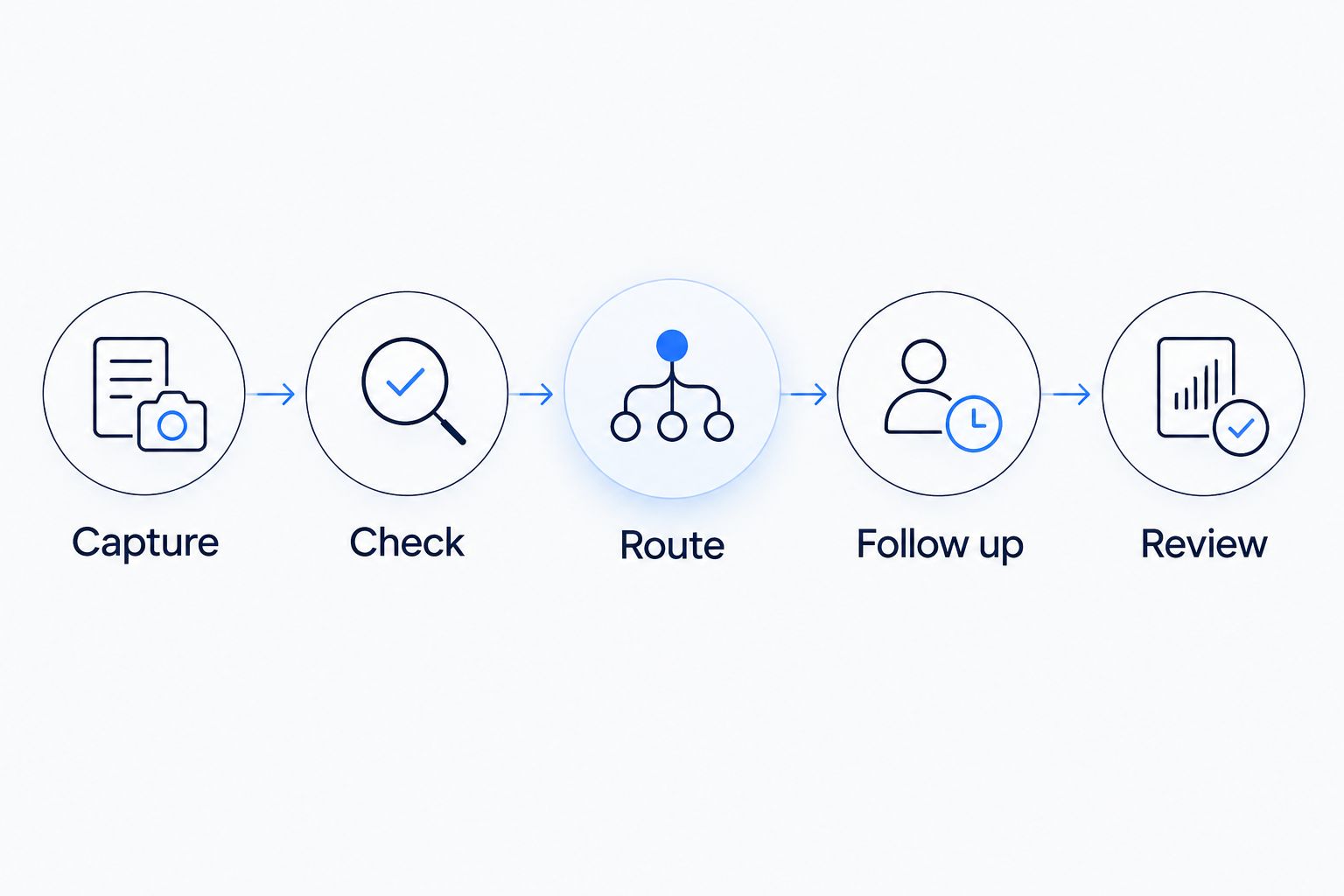
Define the handoff and the review path before choosing the automation tool.
Keep the first map readable by the person doing the work. If the receptionist cannot explain where an incomplete request goes, the process is not ready to build.
Illustrative scenario: a repair inquiry
A homeowner submits a repair request through a website. The form captures contact details and a description, but the service location is missing.
A bounded workflow records the inquiry, flags the missing location, and assigns follow-up. It does not confirm that the business serves the address or promise an appointment before those facts are checked.
The useful improvement is a defined handoff. The customer request has somewhere to go, and staff can see what remains unresolved.
Why the right first process varies
The right starting point depends on how work already moves through your business. Evaluate these factors before treating any process as the obvious winner:
Clear rules. Choose a task where staff agree on what should happen next. Disagreement about the process needs an owner decision before implementation.
Reliable inputs. Check whether required details arrive consistently. Missing information needs its own handling rule.
Defined ownership. Assign responsibility for both normal work and exceptions. An unassigned task remains unassigned when software creates it.
Existing connections. Check whether your current tools can exchange the necessary information. Do not assume a connection exists because both tools have automation features.
Consequences of error. Separate administrative movement from customer commitments. Preparing a draft is different from sending a final invoice or confirming a job.
Visible completion. Define an end state staff can verify. A message sent is not the same as a customer reached or an appointment accepted.
For a first project, favor rules you can inspect over decisions you cannot explain. More complicated work can remain manual while you establish a dependable starting point.
Use inbound lead enrichment to improve the handoff
Inbound lead enrichment means adding useful business details to an incoming lead and routing follow-up. It is not outbound prospect-list research.
Start with information that changes the next action: requested service, service location, preferred contact method, and whether the person is an existing customer. Use submitted information and approved records; distinguish confirmed details from information that still needs checking.
Your 2026 intake plan should answer a practical question: what does the next person need to act without searching through several places? The guide to lead enrichment for incoming inquiries explains how to choose the initial fields.
Collect details because they support a decision, not because a form can hold them. Extra fields create more information to maintain and more opportunities for unclear or conflicting records.
Keep the customer's original request visible. A category label should help staff understand the inquiry, not replace the description the customer provided.
Decide whether you need rules, a chatbot, or an agent
Choose the method after defining the task. A process that only moves a complete form to the right person does not need an open-ended conversation.
| Method | Best for | Useful role | Limitation |
|---|---|---|---|
| Fixed-rule automation | Tasks with predictable conditions | Move information or create a task when a condition is met | Unexpected inputs need a separate route |
| Chatbot | Guided intake and approved questions | Collect details through a conversation | Needs limits on answers and a staff handoff |
| AI agent | A bounded task involving several approved actions | Work through an assigned sequence using permitted tools | Needs access controls, review rules, and error handling |
| Manual handling | Ambiguous or sensitive decisions | Resolve exceptions and approve commitments | Keeps staff involved in each case |
An AI agent is software assigned a task and permitted actions. That does not make it the right choice for every workflow. If a fixed rule handles the handoff clearly, start there.
ClearPilot Consulting is for local business owners who want workflow-first business process automation rather than a tool-first project. The approach requires your staff to define the actual process and review exceptions; it does not remove their responsibility for customer decisions.
Set boundaries before the first live inquiry
A first workflow needs a written scope. Keep it specific enough that staff can tell whether a proposed feature belongs in the project.
Answer these 4 questions:
What starts the workflow? Name the event, such as a completed inquiry form.
What can it do? List approved actions, such as creating a record or assigning a follow-up task.
What must it not do? Exclude unsupported promises, unapproved messages, and decisions outside the agreed scope.
Who takes over? Name the role responsible when information is missing, a connection fails, or the customer asks for a person.
For a 2026 launch, document where customer information goes and who can access it. Grant access needed for the defined work, rather than access to every connected record.
Make the stopping rule explicit too. Staff need to know how to pause the workflow and handle incoming work while it is paused.
Start with a workflow assessment
Bring one repetitive process to ClearPilot Consulting's free automation assessment.
How do you test the first workflow?
Test 3 cases before using the workflow for live customer requests: a complete inquiry, an incomplete inquiry, and an exception. These cases check different paths; a successful normal run does not establish that the exception path works.
For the complete inquiry, check that the information reaches the intended place and the responsible person can act. For the incomplete inquiry, check that the workflow asks for clarification or flags the gap without filling it with a guess.
For the exception, use a request outside the defined rules. Confirm that staff can see it, understand why it stopped, and take over without losing the original message.
Also test repeated submissions and a failed connection. The goal is not to make every case automatic. It is to make unresolved work visible and recoverable.
How do you know the first project is helping?
Compare the workflow against its stated purpose. If the goal is clearer inquiry ownership, check whether every eligible request receives an owner and whether staff can find requests awaiting action.
Record the same measures before and after launch: time to first human response, unassigned inquiries, missing-information requests, and manual corrections. Use consistent definitions so the comparison means something.
For your 2026 review, count exceptions alongside completed tasks. A workflow that completes routine work but hides failures needs correction before expansion.
FAQ
What's the best first task for small business automation?
The best first task has a clear trigger, repeatable rules, and a named owner. Inquiry routing is a useful candidate when staff already agree on how requests should be assigned.
Do I need an AI agent to automate my business?
You do not need an AI agent for every automation task. A fixed rule can handle a predictable handoff; an agent needs a defined task, permitted actions, and an exception path.
What does inbound lead enrichment mean?
Inbound lead enrichment means adding useful business details to incoming leads and routing follow-up. It helps the next person understand the request; it is not outbound prospect-list research.
Can I keep the software my business already uses?
Keep existing software where it supports the defined workflow and the necessary connections. Check access, information exchange, and failure handling before assuming the tools will work together.
Should I automate scheduling before lead follow-up?
Automate scheduling first only when qualification, appointment rules, and exception handling are clear. If inquiries lack an owner, define follow-up before directing customers into a booking process.
How do I keep people in control of automation?
Keep people in control by defining approvals, exception ownership, and a way to pause the workflow. Staff should be able to inspect the original request and correct the record.
What should I bring to an automation assessment?
Bring a description of one repetitive process, the tools involved, and examples of where work gets stuck. ClearPilot Consulting's free automation assessment is a relevant starting point for discussing that workflow.
One last thing
Before adding a reminder, check whether the task has an owner. Repeated alerts do not decide who is responsible for responding.
Write the owner's role beside every handoff on your process map. If you cannot fill that space, fix the responsibility gap before building the automation.