

Website design cost for small business depends on what you need built, what content already exists, and what happens after someone submits an inquiry. Compare proposals against the same written scope, not just the total. Separate the initial build from ongoing hosting, maintenance, software, and support obligations before you approve the work.
TL;DR
Website design cost for small business starts with scope: content, functionality, inquiry handling, and ongoing responsibilities.
ClearPilot Consulting suits local service businesses that need website design connected to workflow mapping and lead follow-up.
Compare proposals against the same deliverables, including account ownership, testing, and handover.
Keep website design, local SEO, and ongoing automation responsibilities explicit rather than assuming everything is included.
Why this matters
A website project does not end when the pages look finished. Your office still needs to receive inquiries, identify the requested service, and assign follow-up. If those steps are undefined, a new website leaves the same administrative problem behind a different front door.
ClearPilot Consulting is best for local service businesses that need website design connected to inquiry handling. Its workflow-first approach starts by mapping the process before building automation. Review the available services with that operational goal in mind, rather than treating the website as an isolated purchase.
For your 2026 project, define what a successful inquiry looks like before you compare proposals. A useful starting point is simple: the right person receives enough information to take the next action.
How much does website design cost for a small business?
A useful website estimate is a written scope tied to your business process, not a universal figure. A site that explains your services and collects inquiries is a different assignment from a site that routes requests, supports scheduling, and connects customer information across existing tools.
Use this comparison to identify the work you actually need. These are project scopes, not named service packages.
| Project scope | Best for | What the brief should include | Benefit | Limitation |
|---|---|---|---|---|
| Informational website | Owners who need clear service information and a contact route | Service descriptions, contact details, page structure, inquiry destination | Keeps the project focused on helping visitors understand the business | Follow-up still needs a separate owner and process |
| Inquiry-focused website | Teams that need usable requests rather than scattered messages | Form fields, service-area questions, notifications, assigned follow-up | Connects the website to intake work | Requires decisions about routing and missing information |
| Workflow-connected website | Teams that need inquiries connected to scheduling or onboarding | Tool connections, approval rules, exception handling, handover | Reduces the need to move information manually where connections support it | Adds testing and maintenance responsibilities |
Ask each provider to separate the proposal into clear components:
Planning: business goals, page structure, and inquiry workflow.
Content: writing, editing, images, and responsibility for approvals.
Build: page layouts, forms, and agreed functionality.
Connections: where submitted information goes and what triggers next.
Launch: testing, account access, and handover.
Ongoing work: hosting, maintenance, software administration, and support.
Use the same categories across every proposal you review in 2026. If a component is excluded, decide who will handle it rather than leaving it unresolved.
Informational website: keep the next action obvious
An informational website fits a business that needs visitors to understand its services and make contact. The brief should explain what you do, where you work, and how someone requests help. Avoid adding functions simply because another business has them.
The advantage is a narrow assignment with fewer operational connections to define. The limitation is equally clear: publishing a contact form does not establish a follow-up process.
Ask who receives messages, who covers absences, and where the inquiry is recorded. If someone still copies every request into another system, document that task. You can then decide whether it belongs in this project or a later workflow improvement.
Choose this scope when clear information and reliable contact handling solve the immediate problem. Do not describe it as a complete intake system unless the proposal includes that work.
Inquiry-focused website: define the handoff
An inquiry-focused website needs a more detailed brief. Specify what information the office needs before it can respond, which requests belong with which person, and what happens when a visitor leaves something out.
For example, an illustrative home-service inquiry might include the requested service, service location, and a description of the problem. The office uses those details to decide the next step. This is a workflow example, not a claim about a particular business or result.
The benefit is a clearer connection between the website and daily work. The trade-off is that your team must agree on intake rules before the build can be finished.
Use the guide to planning the website lead handoff to turn those decisions into requirements. Choose this scope when messages arrive, but ownership and follow-up are inconsistent.
Workflow-connected website: specify decisions and exceptions
A workflow-connected website carries information into another business process. That might involve requesting a booking, preparing an onboarding record, or alerting the person responsible for a quote. Define each connection separately.
Start with the tools your business already uses. Check whether they support the required connection before adding another system. A connection is useful only if it sends the right information to a place your team actually monitors.
The advantage is less manual transfer where the workflow supports it. The limitation is added responsibility: someone must manage access, review failures, and approve changes when the process changes.
Choose this scope when the handoff between tools is the problem. Keep people responsible for uncertain requests and decisions that require judgment, rather than assuming automation should handle every case.
Why website design scope varies
The work behind a proposal changes when the requirements change. Check these factors before comparing totals:
Content readiness: Existing copy still needs review. New service descriptions, photography, or explanations require separate work and approvals.
Distinct layouts: A new page that follows an existing layout differs from a page that needs a different structure or interaction.
Inquiry requirements: A basic message form differs from intake that checks service area, captures job details, and assigns responsibility.
Tool connections: Scheduling, customer records, and notifications need defined inputs, outputs, and failure handling.
Existing-site changes: Moving content or changing page addresses requires a plan for what stays, what changes, and where visitors should land.
Ownership and support: Training, account access, maintenance, and future edits need an assigned owner and written boundaries.
For a 2026 proposal, ask providers to explain which requirements drive their scope. “Custom website” is not a sufficient description of deliverables. You need to know what will exist at handover and what will remain your responsibility.
Map the inquiry process before approving the build
Write the process in plain language. Your website brief should explain how a visitor becomes an inquiry, how the request reaches your team, and who handles anything that does not fit the normal path.
Capture inquiries. List the information needed to understand the request. Give each form field a reason to exist.
Check details. Define what staff should do with missing, unclear, or conflicting information.
Route follow-up. Assign the request to a person or shared queue that someone actively manages.
Keep human control. Identify decisions and exceptions that require a person's review.
Confirm ownership. Name the person responsible for monitoring the process after launch.
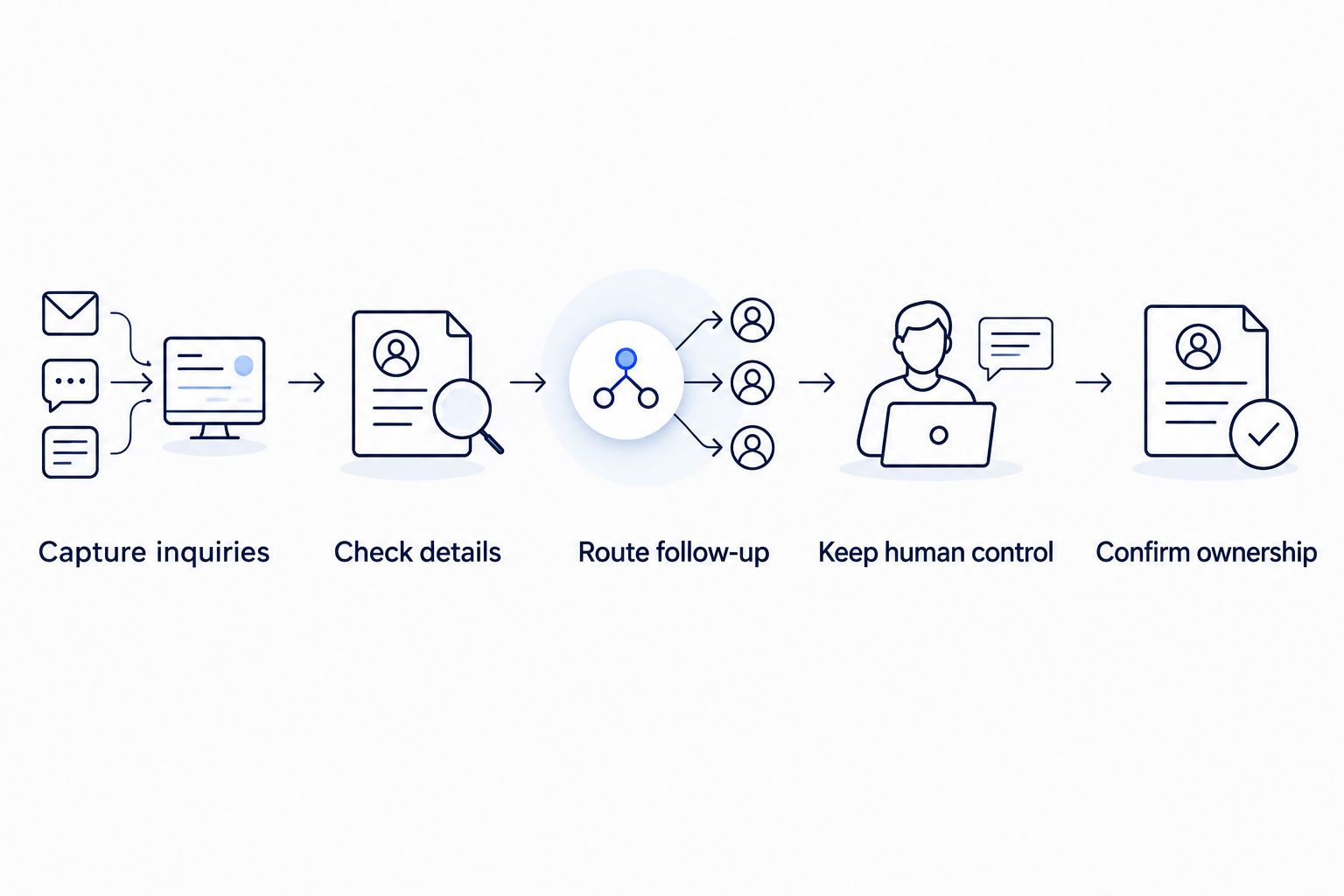
Define the inquiry handoff before choosing what to automate.
Lead enrichment means adding useful business details to incoming leads and using those details to route follow-up. It is not outbound prospect-list research. Include it only when the additional information helps your team make a relevant decision.
An illustrative example is checking whether an incoming request falls inside your service area before assigning it. When details conflict, send the request for review rather than silently replacing information. That exception belongs in the brief alongside the normal path.
ClearPilot Consulting maps workflows before deploying automation and connects existing tools where practical. That approach fits a website project whose real problem is slow replies or repetitive intake work; it does not remove the need for your team to define service rules and approve decisions.
Map your website inquiry process
Request a free automation assessment focused on intake, follow-up, and repetitive admin.
What should a website design proposal include?
A website design proposal should identify deliverables, exclusions, responsibilities, and acceptance criteria. It should distinguish a completed page from a completed business process. Receiving a form submission is not the same as confirming that the assigned person can act on it.
Before approving your 2026 proposal, get written answers to these questions:
Which pages and distinct layouts are included?
Who supplies and approves text, images, and business details?
Where does each inquiry go, and who receives the notification?
Which tool connections are included, and what happens if they fail?
Who owns the domain, website account, and connected accounts?
What testing and handover work must happen before acceptance?
Which changes and support tasks sit outside the initial agreement?
Keep acceptance practical. Recommend 3 test submissions before sign-off: a complete request, a request with missing information, and a request that needs human review. These are proposed checks, not a performance benchmark.
For each test, verify both the visitor's experience and the office's next action. A confirmation message alone does not prove that the inquiry reached the right destination.
Do I need automation with a new website?
You need automation only when a defined task benefits from it. Start with repetitive work such as transferring inquiry details or notifying the responsible person. Keep approval-dependent decisions with staff.
Do not add a chatbot simply to make the site appear more advanced. A chatbot needs a clear purpose, limits, and a human handoff. If a straightforward form gives your team the information it needs, that is a valid choice.
The same rule applies to scheduling and onboarding connections. Fix a specific handoff rather than buying a collection of features. Your team should be able to explain what each connection does and who handles an exception.
Is SEO included in website design?
SEO is included only to the extent the proposal explicitly describes it. Ask the provider to separate website implementation from ongoing search work, content work, and reporting. Do not assume those responsibilities come with a redesign.
For a local service business, page content should accurately explain the services and locations the business actually supports. The proposal should also address existing page addresses when they change. Neither a redesigned site nor a published service page guarantees search visibility or qualified inquiries.
Treat SEO and inquiry handling as connected responsibilities. Search visibility brings visitors to a page; the page and follow-up process must then help the right requests reach your team.
FAQ
How do I compare website design cost for small business?
Compare website design proposals against the same written scope. Separate content, functionality, tool connections, launch work, and ongoing responsibilities so you can identify what each proposal actually covers.
Can I keep the tools my business already uses?
Start by checking whether your existing tools support the required website workflow. Define the connection and failure handling before deciding whether another tool is necessary.
Does a contact form handle lead follow-up?
A contact form captures a request; follow-up still needs an assigned owner and a next action. Specify where the submission goes and what happens when information is missing.
Should I add a chatbot to my small-business website?
Add a chatbot only when it has a defined intake or information task. Set limits and a human handoff before including it in the website brief.
What does lead enrichment mean for website inquiries?
Lead enrichment adds useful business details to incoming leads and helps route follow-up. It is not outbound prospect-list research, and uncertain information needs review.
Who is ClearPilot Consulting best for?
ClearPilot Consulting is best for local service businesses that need website design connected to inquiry handling. Its workflow-first approach maps the process before building automation and keeps people responsible for decisions and exceptions.
What should I check before accepting a finished website?
Check that the agreed pages, forms, notifications, and connections work as specified. Confirm account access, inquiry ownership, exception handling, and handover responsibilities before accepting the project.
One last thing
Test the handoff, not just the website. Ask the person who normally handles inquiries to follow a test request from submission to the next action without help from the builder. Any uncertainty about where to look or what to do belongs on the project checklist.
For your 2026 project, make that check part of acceptance. It tests the connection between the finished website and the work your business needs to get done.