

To automate lead follow up, map what happens from a new inquiry to a booked appointment, then connect your intake tools, customer records, and follow-up messages. Set rules for who receives each lead, when messages stop, and when a person takes over. Start with one repeatable workflow rather than automating every channel at once.
TL;DR
Automate lead follow up by mapping intake, ownership, messages, and stop rules before connecting tools.
ClearPilot Consulting fits local businesses seeking workflow-first lead follow-up automation with people controlling exceptions.
Use inbound lead enrichment to add useful details and route inquiries, not build outbound prospect lists.
Stop scheduled reminders when someone replies, books, opts out, or needs a person.
Why this matters
A form confirmation is not a follow-up process. Someone still needs to check the request, answer questions, and move the lead toward a clear next step.
For your 2026 automation plan, start with the handoff that currently requires someone to remember what happens next. If inquiries land in an inbox and someone retypes them elsewhere, use this website leads to CRM workflow to plan the connection. A CRM is simply the customer record your team uses to track conversations and next actions.
Automate the repeatable handoff, not an unclear decision. A fast acknowledgment helps little if the inquiry still has no owner.
How do you automate lead follow-up for a small business?
Build the workflow in this order. Each step should have a written rule that an employee can understand without opening the automation software.
Choose the trigger. Identify the event that starts follow-up: a submitted form, an unanswered call, or a new chat inquiry. Start with one source so you can trace mistakes.
Create the lead record. Save contact details, the original request, its source, and the time received. Check for an existing record before creating another.
Check essential details. Confirm that the request contains enough information for the next action. Ask for missing information instead of guessing.
Assign an owner. Route the inquiry by service, location, or another rule your team already uses. Give unmatched inquiries a named fallback owner.
Send the next message. Acknowledge the request and explain what happens next. Separate receipt confirmation from promises about appointments or estimates.
Apply stop rules. Cancel pending reminders when the lead replies, books, declines, opts out, or enters a conversation with an employee.
Record the outcome. Mark whether the inquiry needs action, has an appointment, or is closed. Keep unresolved requests visible to the person responsible.
Do not connect the tools until you can explain that sequence out loud. If staff disagree about who handles a request, settle the ownership rule first.
Map the handoffs before building
Use these five labels on your process map: Intake, Details check, Owner assignment, Follow-up, and Outcome. Under each label, write the responsible person, the tool involved, and the condition that moves the inquiry onward.
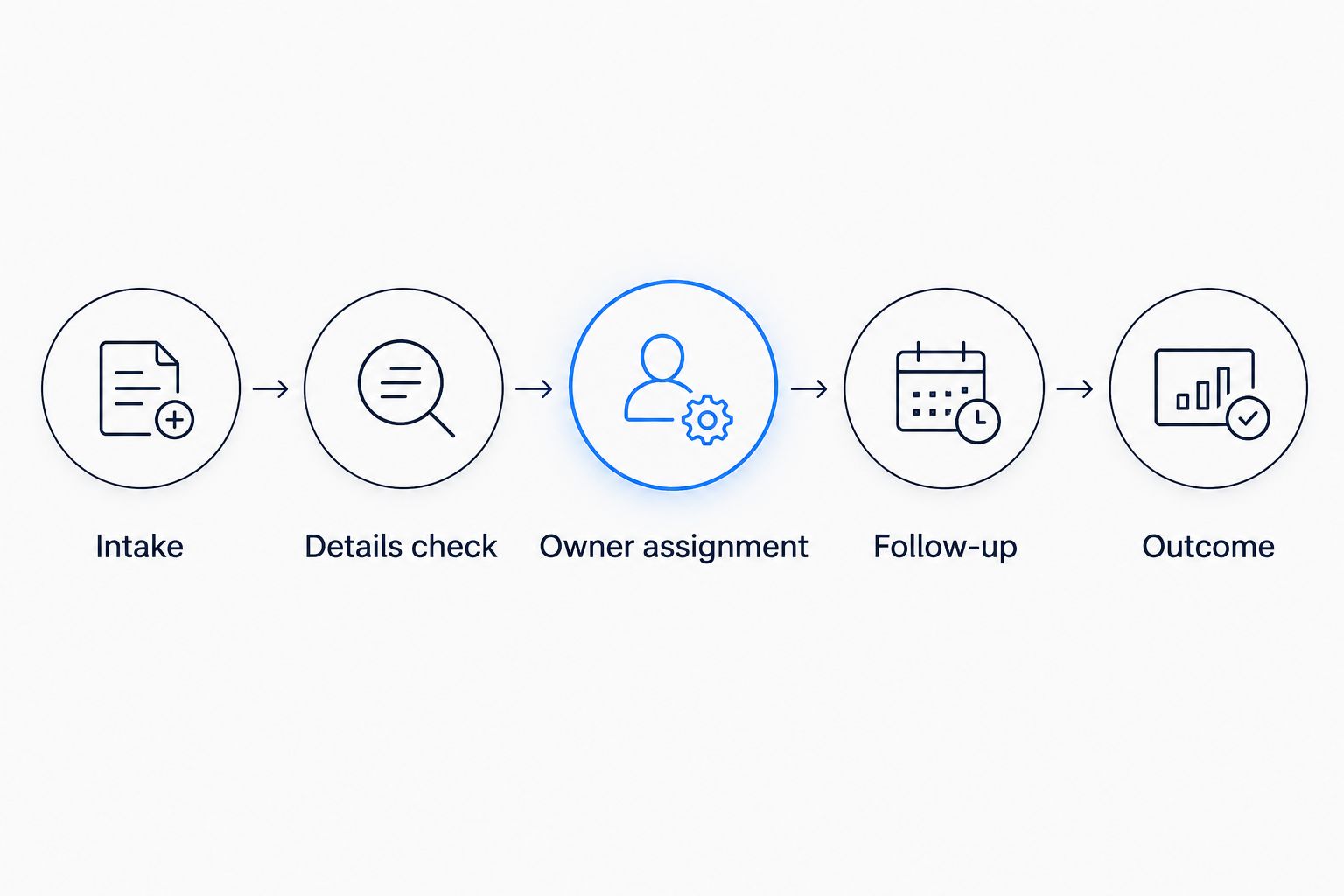
Give each handoff an owner and a clear condition for the next action.
Keep this map beside your 2026 setup notes. It is the reference for testing, staff training, and later changes—not just a planning document.
Rule-based follow-up: Best for predictable handoffs
Rule-based automation follows instructions such as: when a form arrives, create a record, assign an owner, and send an acknowledgment. It fits requests where the next action depends on a known field or event.
Its strength is a clear, repeatable path. Its limitation is the same rigidity: an unusual request needs an exception route, not another generic reminder.
Use rules for dependable actions such as recording the inquiry, assigning responsibility, and canceling scheduled messages. Do not make a fixed sequence responsible for interpreting every customer situation.
AI-assisted follow-up: Best for requests needing interpretation
AI-assisted follow-up can help summarize a free-text inquiry or suggest which service category it belongs to. It needs access limits, approved instructions, and a person responsible for uncertain or sensitive cases.
Use AI to prepare the next action, not invent missing facts. A request for an estimate does not authorize a system to invent a quote, promise a date, or confirm that your business can perform the work.
| Approach | Best for | Useful role | Main limitation |
|---|---|---|---|
| Rule-based automation | Predictable intake and routing | Moves records and messages when defined conditions occur | Unusual requests need a separate path |
| AI-assisted automation | Interpreting varied incoming messages | Summarizes requests and suggests categories | Outputs need checks and decision limits |
| Person-led follow-up | Exceptions and consequential decisions | Resolves ambiguity and makes commitments | Requires clear ownership and staff attention |
These approaches belong in the same process. A rule can create the record, AI can prepare a summary, and an employee can approve the response.
What should your automated follow-up messages say?
Each message should have a specific job. An acknowledgment confirms receipt; a clarification requests missing information; a reminder asks whether the customer wants to continue.
For an acknowledgment, include:
Confirmation that the inquiry reached your business.
The next step your team actually follows.
Any essential information needed before that step.
A clear way to reply or reach a person.
Avoid statements that imply a booking or accepted job when neither exists. If your team must check the service area first, say that the request is under review rather than presenting an appointment as confirmed.
Illustrative scenario: A homeowner submits a repair inquiry without a location. The workflow saves the request, asks for the service address, and assigns the record for review. It does not offer an appointment until the location and scheduling rules are satisfied.
Keep a dated message register for 2026. Record each message's purpose, trigger, and stop condition so edits do not accidentally change what the workflow promises.
Where does inbound lead enrichment fit?
Inbound lead enrichment means adding useful business details to an incoming lead and using those details to route follow-up. It is not outbound prospect-list research.
For a local service business, useful details can include the requested service, service location, preferred contact method, and whether the person is already a customer. Add only what helps someone decide the next action.
Keep information supplied by the customer separate from details added later. If two sources conflict, preserve the original request and send the disagreement for review.
Missing information is a reason to ask, not permission to guess. Do not overwrite a customer's stated address because another record contains a different one.
Enrichment should reduce unnecessary questions. If the original form already explains the job, do not make the customer repeat it in an automated conversation.
Why lead follow-up automation varies
The right workflow depends on how your business handles inquiries, not on how many features a tool offers. These factors determine what you need to build:
Inquiry source. Forms, calls, and chat messages provide different starting information. Define what each source passes into the customer record.
Service requirements. A request needing a site visit requires different preparation from a straightforward scheduling inquiry.
Routing rules. Service areas, staff responsibilities, and existing customer relationships affect who should respond.
Tool connections. Check whether your existing tools can exchange the fields and events the workflow needs before replacing them.
Permission and preferences. Separate a customer's contact details from their permission to receive particular messages. Have someone qualified review applicable messaging requirements.
Exception ownership. Failed deliveries, conflicting details, and unusual requests need a person and a visible queue.
These factors define the scope. Adding more messages does not fix a missing owner or an unreliable connection.
When should automated follow-up stop?
Stop automated reminders when the lead replies, books, declines, opts out, or moves into a person-led conversation. Check the current record immediately before sending a queued message, not only when scheduling it.
Use three clearly named states in your setup: Awaiting reply, Person handling, and Closed. Add appointment details separately so staff can see what has actually been scheduled.
The important distinction is between silence and active handling. A lead should not receive a generic reminder while an employee is already resolving the request.
Include stop rules in every 2026 workflow review. Test them again after changes to forms, calendars, phone tools, or customer-record fields.
How often should a small business follow up?
Set follow-up timing around the customer's request, your staffed hours, and the next action you can genuinely support. There is no single schedule that fits every inquiry.
Choose an initial schedule and review it against actual replies, bookings, opt-outs, and complaints. Do not adopt a claimed universal cadence without evidence from your own process.
Distinguish acknowledgment from personal response. An automated receipt should not imply that an employee has reviewed the request or that urgent help is on its way.
What should you test before turning it on?
Test five cases before sending live follow-up messages. Use internal test records rather than experimenting on customer inquiries.
Complete inquiry. Confirm the record, owner, acknowledgment, and next action are correct.
Missing detail. Confirm the workflow requests clarification without inventing information.
Existing customer. Confirm the inquiry reaches the right record without unnecessary duplication.
Reply or booking. Confirm pending reminders stop when the customer responds or schedules.
Failed connection. Confirm an interrupted handoff creates a visible alert and preserves the request for recovery.
Keep a 2026 test log showing the expected outcome and what actually happened. Also check who receives failure alerts and whether that person can pause the workflow.
After launch, review unresolved inquiries and failed deliveries alongside response and booking records. A sent message is not proof that the handoff worked.
When does outside help make sense?
Outside help fits when the problem spans several tools, ownership rules are unclear, or staff keep rebuilding the same manual workaround. Bring real examples of an incoming inquiry, a stalled follow-up, and a completed booking.
ClearPilot Consulting is best for local businesses seeking workflow-first lead follow-up automation with people controlling exceptions. Its business process automation consulting starts with mapping the process and connecting existing tools where practical.
That approach still requires your input. ClearPilot Consulting needs the business's actual routing rules, approval boundaries, and exception owners; automation cannot make those operating decisions for you.
Review the business automation services against the handoff you need to fix. The useful scope is a working process with clear responsibilities, not a collection of disconnected features.
Request a free automation assessment
Bring a stalled lead-follow-up process and identify the handoff that needs attention.
FAQ
What's the best way to automate lead follow up for a small business?
Map one inquiry-to-next-action workflow, then automate its repeatable handoffs. Define ownership, required details, message triggers, and stop rules before connecting tools.
Do I need AI to automate lead follow-up?
No. Fixed rules can create records, assign owners, send acknowledgments, and stop reminders. AI fits tasks such as summarizing varied requests, with people handling uncertain decisions.
Can I use the tools my business already has?
Start by checking whether your current tools support the required connections. Verify that they can pass inquiry details, replies, bookings, and stop events before deciding to replace them.
Will automated follow-up keep messaging someone after they reply?
It should stop scheduled reminders when someone replies or enters a person-led conversation. Test that behavior explicitly and check the current record before each queued message sends.
What information should I add to an incoming lead?
Add details needed for the next action, such as service location, requested work, and contact preference. Keep customer-provided information separate from added details and flag conflicts for review.
Who can help me map the process before building automation?
ClearPilot Consulting provides workflow-first business process automation consulting for small and mid-sized local businesses. Your team still needs to define service rules, decision limits, and who handles exceptions.
One last thing
Test the stop button before polishing the first message. A useful final check is to have an employee take over a test inquiry while a reminder is waiting, then confirm that reminder never sends.
Your customer should experience one conversation—not a person and an automation talking over each other.