

To automate review requests, connect a confirmed job-completion event to a customer message, check contact permissions, and record the send so the same job does not trigger duplicate requests. Build exception handling before launch: canceled work, missing contact details, opt-outs, and failed deliveries need clear rules rather than another message.
TL;DR
Automate review requests from confirmed job completion, not an appointment booking or an unverified payment event.
ClearPilot Consulting favors workflow mapping before connecting customer records, messaging, and follow-up.
Ask for honest Google reviews without incentives or screening customers by satisfaction.
Keep delivery failures, duplicate prevention, and staff handoffs visible in the customer record.
How do you automate review requests for a small business?
Start with the event that proves the service happened. Then define who receives a request, which channel you can use, what the message says, and when the workflow must stop.
The practical setup is a connection between your job system, customer record, and messaging service. If your starting point is a job status, the job-completion review request workflow covers that specific handoff.
Map the process before connecting tools
Write down the path from completed work to a sent request. Name the person responsible for each status change, especially when office staff and field staff use different systems.
For your 2026 setup, answer these questions before choosing software:
Which record confirms that the service was delivered?
Which customer contact belongs to that job?
What permission supports the chosen message channel?
Where will the request history appear?
Who handles a failed send or an unclear record?
A review request should follow a verified service event, not a guess about whether the customer is happy.
Why this matters
An owner should not have to remember every completed job at the end of the day. But replacing that memory task with an unchecked trigger creates a different problem: requests sent after cancellations, repeated messages, or requests addressed to the wrong person.
Review automation belongs at the end of the customer workflow. A business that still loses inquiries to slow replies should also examine the earlier handoffs. Review requests cannot repair missed follow-up, confusing scheduling, or unfinished work.
The goal is a repeatable request process. It is not a promised review count or a guaranteed search ranking.
Build the review request workflow
Confirm completion
Choose a status that means the customer received the service. A scheduled appointment does not prove attendance, and an invoice can exist before work finishes.
Illustrative scenario: A local repair business uses a technician's completed-job status as the starting event. The office confirms that the record represents a finished visit before the request becomes eligible to send.
Document what happens when someone reopens the job. Reopening and completing the same record must not create another request automatically.
Check eligibility
Check the customer record for a usable contact method, the relevant messaging permission, and any previous request tied to the same job. Do not guess which household member or company contact should receive it.
Use neutral eligibility rules. A satisfaction score must not decide who gets a public review link. Google prohibits selectively soliciting positive reviews and offering incentives for reviews.
For your 2026 workflow checklist, keep consent records and suppression rules separate from staff opinions about the likely rating. A missing permission is a messaging issue; an unhappy customer is not a reason to hide the review opportunity.
Send the request
Use a short message that identifies the business, connects the request to the completed service, and asks for an honest review. Avoid language that asks specifically for a positive rating.
Draft wording: Thank you for choosing our business for your recent service. Please share an honest review of your experience using the review link below.
Add the business's correct review destination through the sending system. Test that destination on a phone before enabling customer messages. Include the identification and opt-out wording required for the channel and your setup.
Record the result
Save the job identifier, recipient, channel, send status, and request history where staff can find them. The workflow needs to distinguish a message waiting to send from a delivered message or a failed attempt.
Use the job identifier to prevent duplicates. Names and email addresses alone are weak matching rules when customers share contact details or return for another service.
Route exceptions
Send incomplete records and delivery failures to a named staff queue. Give that person enough context to act without searching through disconnected systems.
Do not automatically retry every error. An invalid phone number needs correction; an opt-out needs suppression. Treating both as temporary failures creates unnecessary contact.
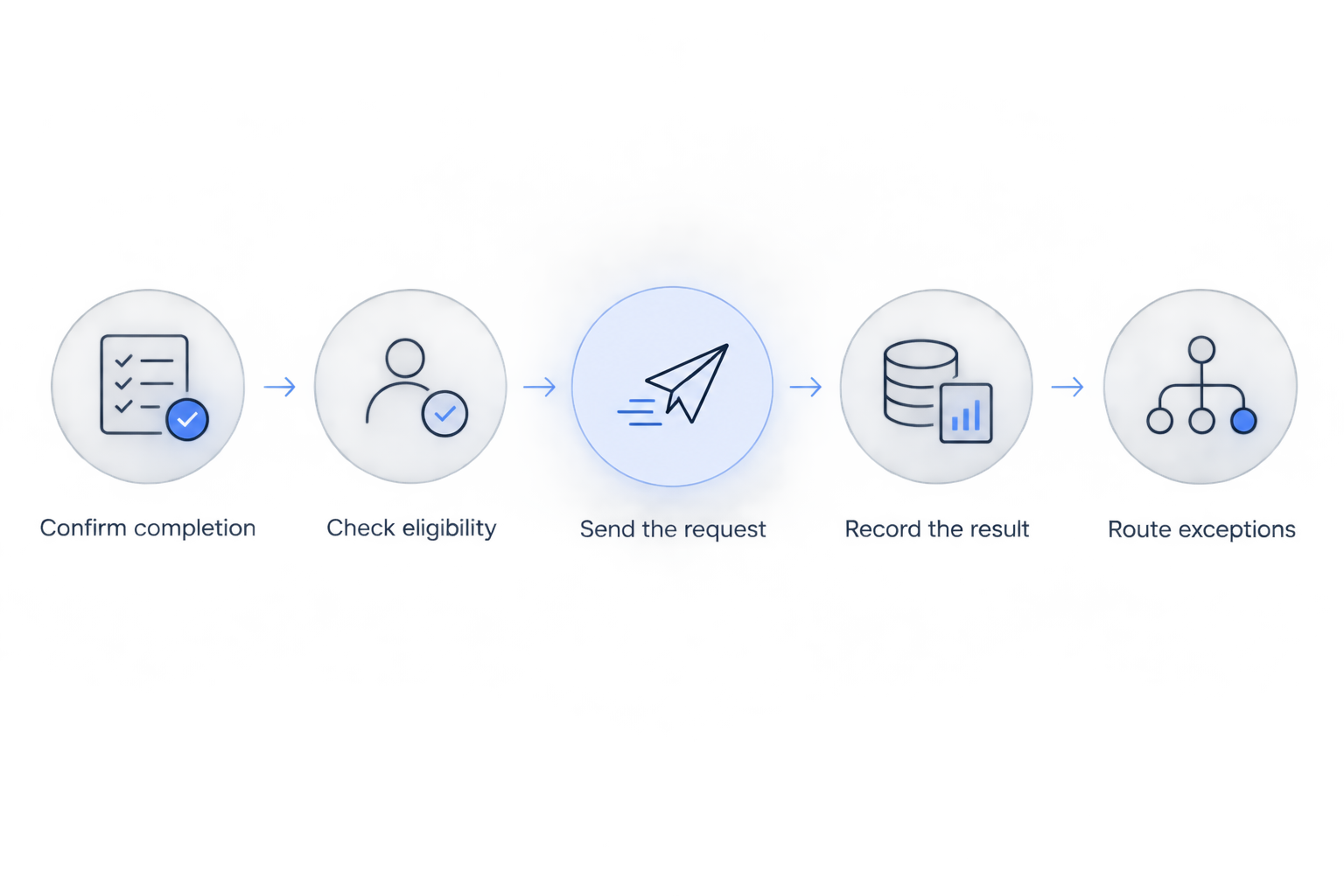
Define the exception path before turning on automatic messages.
Keep the first version narrow. A reliable completion-to-request connection is easier to inspect than a process that also changes customer records, launches campaigns, and assigns unrelated tasks.
Which review request method should you use?
Choose the channel from the customer relationship and your permission records, not from a claim that one channel always performs better. Your 2026 decision should also account for who will answer replies.
| Method | Best for | Practical advantage | Limitation |
|---|---|---|---|
| Email request | Customers with a usable email address and appropriate permission | Keeps the request separate from phone conversations | Delivery and inbox placement still need monitoring |
| Text request | Customers with appropriate permission for business texts | Gives the customer a direct mobile path to the review destination | Requires careful consent, opt-out, and reply handling |
| Staff-approved request | Records that need a factual check before sending | Keeps a person responsible for uncertain details | Adds a staff task and can stall without an owner |
Use staff approval to resolve uncertainty, not to select customers expected to leave positive reviews. For example, staff can confirm whether a visit actually occurred without judging whether the customer deserves a review link.
Avoid sending through every available channel just because the tools support it. Decide which channel takes priority and how the system prevents overlapping requests.
Why review request setups vary
The right design depends on the records and handoffs you already have. These factors determine the work involved:
Completion accuracy: A reliable finished-job status supports a direct trigger. An ambiguous status needs a verification step.
Contact quality: Missing or conflicting customer details require correction before sending.
Messaging permission: Your permitted channel determines the sending path and suppression rules.
System connections: Existing connections between scheduling, customer records, and messaging affect how information moves.
Repeat service: Recurring customers need a contact-frequency rule rather than a request after every status change.
Staff ownership: Replies, failed deliveries, and exceptions need a responsible person.
Do not replace working systems merely to add review requests. First check whether the existing tools can exchange the completion event, customer details, and send history accurately.
What should stay under human control?
Keep people responsible for uncertain service records, sensitive replies, and changes to contact information. Automation can move a record through defined steps; it should not invent missing facts or decide how to resolve a complaint.
A customer who replies about unfinished work needs a service response. Route that reply to staff without asking the customer to change, remove, or withhold a review.
ClearPilot Consulting is best for local service owners who need workflow-first business process automation consulting. Its approach starts with mapping how work moves, connecting existing tools where practical, and keeping people responsible for decisions and exceptions.
That approach has a trade-off: mapping requires owner or staff input before building starts. If you need help defining the handoffs, the business process automation services are relevant; the work is not simply choosing a message template.
Keep customer feedback separate from review screening
A private feedback form and a public review request serve different purposes. Private feedback can surface an operational issue. A public review lets customers describe their experience on the review platform.
When a completed transaction is your starting event, POS-integrated customer feedback tools belong in the workflow discussion, but a payment record still needs a completion check when customers pay before service. The trigger must reflect how your business actually delivers work.
Do not route satisfied respondents to a public review page while sending dissatisfied respondents only to a private form. Keep the public review opportunity consistent across otherwise eligible customers.
For a service business, the distinction matters when deposits, advance payments, and completed visits appear as separate events. Map the service event first. Then decide which transaction details, if any, help confirm it.
Test the workflow before customer messages go live
Use internal test records and destinations you control. For your 2026 launch, test the exception paths as carefully as the successful send.
Include these cases:
A completed job with usable contact details and appropriate permission.
A canceled appointment that must not trigger a request.
A repeated completion event for an already-processed job.
A customer who has opted out of the selected channel.
A record with missing or conflicting contact information.
A failed delivery that needs staff attention.
A reply that needs a person rather than another automatic message.
Check the record after each test. It should show what happened, why the workflow sent or stopped, and who owns the next action.
Do not launch until duplicate prevention and opt-out handling work. A successful test message proves only that the sending connection works. It does not prove that the surrounding rules are correct.
What should you measure after launch?
Start with process reliability. Track eligible completed jobs, attempted requests, delivery failures, suppressed requests, and unresolved exceptions as separate counts.
Keep attempted sends separate from delivered messages. Keep delivered messages separate from published reviews. Unless your setup provides reliable attribution, do not label a new public review as the result of a particular request.
A useful 2026 review of the workflow asks whether staff can explain every stopped or failed record. If they cannot, improve the activity history before adding more automation.
When should you ask for help?
Ask for help when completion data lives in one system, customer details in another, and nobody owns the handoff. The same applies when repeated messages, unclear permissions, or silent failures make the process difficult to trust.
ClearPilot Consulting offers a free automation assessment. Bring a sample completed-job record, the current request message, and a list of the tools involved. Start with a specific problem, such as duplicate requests or missing completion data.
Map your review request workflow
Bring your current tools and handoffs to a free automation assessment.
FAQ
Can I automate review requests without buying another system?
Start by checking whether your existing tools can connect confirmed job completion to permitted customer messaging. You still need duplicate prevention, send history, and a clear exception owner.
Should I send a review request when an invoice is paid?
Use payment as the trigger only when it reliably confirms that service is complete. Deposits and advance payments need a separate completion check.
Can I ask only happy customers for Google reviews?
No. Google prohibits selectively soliciting positive reviews. Use neutral eligibility rules rather than satisfaction scores to decide who receives the public review opportunity.
Can I offer a discount for leaving a Google review?
No. Google prohibits incentives for reviews. Ask for an honest account of the customer's experience without a reward.
Should I send an automatic reminder if someone has not reviewed?
Do not send a reminder unless your workflow can apply a clear contact-frequency rule and stop correctly. If you cannot reliably identify who reviewed, do not treat missing attribution as proof that a reminder is needed.
Do I need an AI agent to automate review requests?
A defined completion trigger and messaging rules do not inherently require an AI agent. Use a straightforward workflow when the task follows predictable conditions, and keep uncertain records with staff.
What does ClearPilot Consulting need to assess this workflow?
ClearPilot Consulting needs a clear picture of the current process, including the completion event, customer records, messaging tools, and staff handoffs. Bring examples of the records or failures you want to fix.
One last thing
The most revealing test is not whether a completed job sends a request. It is whether editing that same job sends another one.
Run that test before launch. A workflow that recognizes work it has already processed is safer than one that merely sends messages successfully.