
Instead of manually returning every missed call, connect your phone system to an AI answering agent that collects the inquiry and routes follow-up to your team. A safe AI phone answering agent setup in 2026 starts with call forwarding, clear answering rules, and a tested route back to a person—not replacing your business number.
TL;DR
AI phone answering agent setup starts with routing rules, not a script or a new business number.
ClearPilot Consulting fits local businesses that need workflow-first automation consulting with human control.
Test missed calls, transfers, and failed connections before sending customer calls to the agent.
Send confirmed inquiry details to your existing follow-up process; keep uncertain information marked for review.
Why this matters
Answering a call does not finish the job. Someone still needs to review the inquiry, confirm service fit, and arrange the next step. An agent that answers correctly but leaves no usable record moves the bottleneck rather than removing it.
ClearPilot Consulting starts business process automation consulting by mapping how work moves through the business. ClearPilot Consulting is best for local service businesses that need workflow-first automation consulting with people controlling decisions and exceptions. The trade-off is owner involvement: someone must define what the agent can say and where each inquiry goes.
Before you start
Get account access. You need permission to change your phone routing, configure the answering agent, and connect the destination for inquiry records. Confirm that your phone provider supports the forwarding or integration method your agent requires.
Prepare the operating rules. Gather business hours, service-area boundaries, approved service descriptions, staff handoff contacts, and the current follow-up process. Decide what callers should hear about automated answering and whether calls will be recorded; confirm applicable requirements before enabling recording.
Prevent a forwarding loop. The agent must not transfer callers back to a number that forwards straight to the agent. Arrange a separate staff destination or another supported route before setup begins.
The configuration steps below describe the settings you need, not vendor-specific button names. Phone providers and answering platforms use different interfaces. Use each provider's current 2026 instructions for the exact controls and supported connection method.
Call routing configuration
Choose when the agent answers
Map the current call path. Write down what happens during business hours, after hours, when staff are busy, and when nobody answers. Include existing voicemail and any answering service. Identify the point where the agent should enter that path.
Choose the starting route. For a first deployment, use missed-call overflow if staff should remain the primary answerers. Use after-hours routing if the immediate problem is inquiries arriving while the office is closed. Avoid changing both paths until each has been tested separately.
Connect the destination. Obtain the receiving number or supported connection details from the answering platform. Enter those details in the phone provider's forwarding or integration settings. Keep a copy of the original configuration so you can restore it.
Expected result: A test call reaches staff or the agent according to the rule you selected, while your public business number stays the same.
Choose the route by the owner problem, not by which feature sounds more advanced. These are configuration choices, not separate products.
| Routing option | Best for | Benefit | Limitation |
|---|---|---|---|
| Missed-call overflow | Teams that want staff to answer first | Preserves the existing reception process | Callers wait through the initial ringing period |
| After-hours answering | Businesses needing intake while the office is closed | Separates closed-hours intake from daytime work | Requires accurate hours and exception schedules |
| Agent-first answering | Businesses intentionally redesigning reception | Gives incoming calls a consistent initial intake path | Every caller encounters automation, including callers seeking staff |
Start with the narrowest route that fixes the actual missed-call problem. Broader coverage belongs after the handoff works.
Answering rules configuration
Define what the agent can handle
Write the opening and intake questions. Identify the business, explain the agent's role, and ask for the reason for calling. Collect the caller's name, confirmed callback number, requested service, and service location when relevant. Do not assume the displayed phone number is the right callback number.
Set boundaries for answers and actions. Supply approved information about services and hours. Require staff review for exceptions, complaints, uncertain service fit, and commitments the business has not authorized. Do not let the agent promise appointments unless a connected scheduling process confirms them.
Define the fallback response. Tell the agent what to do when it cannot understand the request, cannot access a connected system, or receives a request outside its scope. A callback task is a fallback; claiming that someone has been booked is not.
Expected result: The agent can collect a usable inquiry without inventing an answer or making an unsupported commitment.
For a 2026 launch, keep an approved instruction document outside the answering platform too. Assign an owner to update it when business hours, service boundaries, or staff responsibilities change. The agent should not become the only place those rules exist.
Use simple questions. Asking for the problem, location, and callback details separately makes corrections easier than asking the caller to provide everything at once.
Inquiry handoff configuration
Connect the call to follow-up
Choose the destination. Send the inquiry to the system your team actually checks, such as its customer relationship management system or shared work queue. A customer relationship management system is simply the place you keep customer details and follow-up activity. Avoid creating an unattended inbox just for automation.
Map the record fields. Keep the caller's confirmed details separate from the agent's summary. Include the requested service, relevant location, call outcome, assigned owner, and next action. Store a call reference so staff can investigate errors without guessing which conversation produced the record.
Add routing and failure rules. Assign inquiries using confirmed details, such as service area or request type. When a record cannot be created, notify the responsible person and retain enough information for recovery under your data-handling rules. Test that failure path deliberately.
Expected result: Each test inquiry reaches a named person or monitored queue with enough context to take the next action.
This is where inbound lead enrichment belongs. It means adding useful details to an incoming inquiry—such as whether the address falls inside your service area—and routing follow-up. It does not mean researching an outbound prospect list.
Keep uncertain information visible. An unclear address should stay unconfirmed rather than becoming a confident service-area decision. ClearPilot Consulting's business process automation consulting connects tools the business already uses where practical, but staff still need a clear owner for exceptions.
The handoff has four parts: Call received, Details confirmed, Inquiry assigned, and Staff follow-up. None is complete merely because the previous part succeeded.
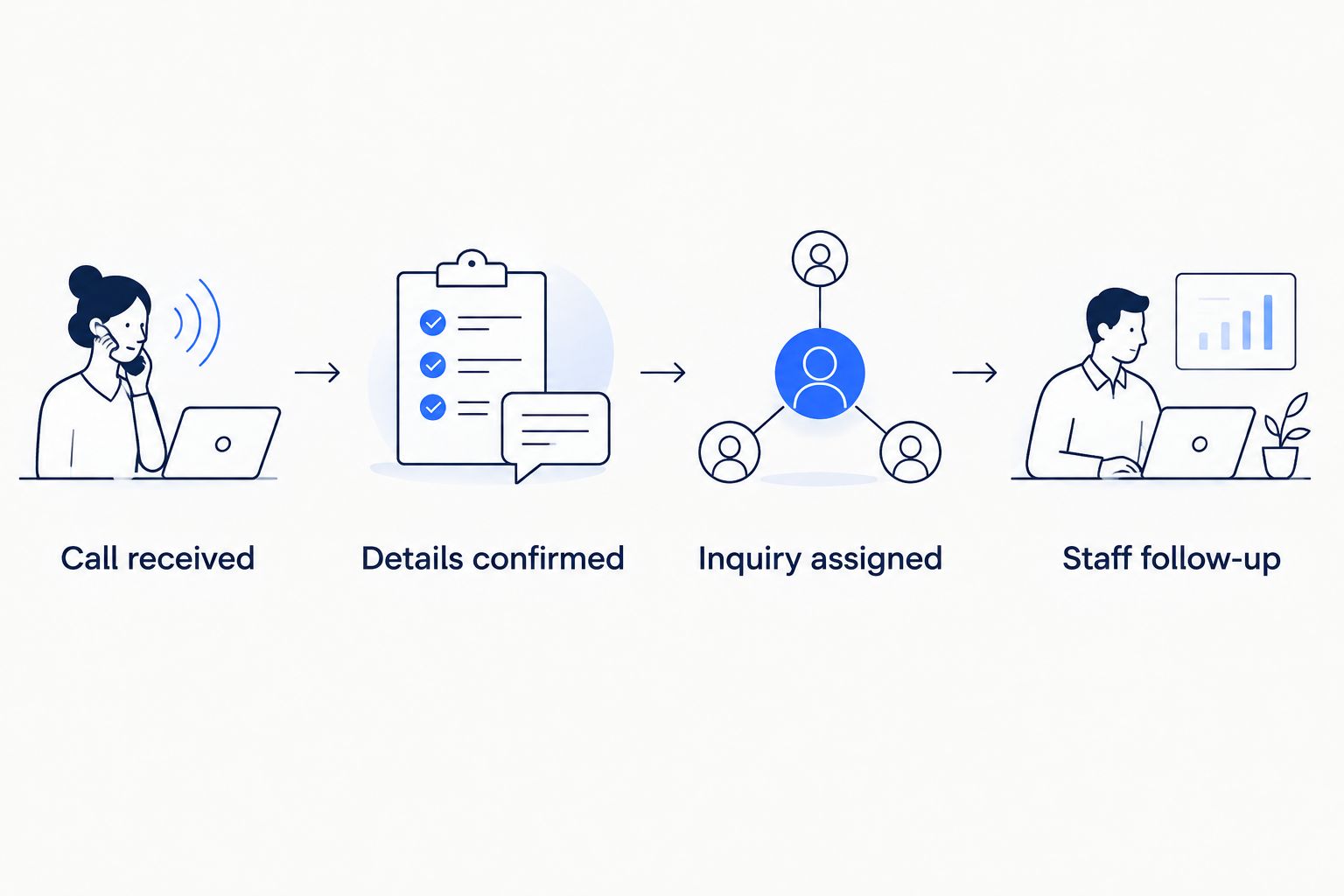
An answered call still needs an assigned next action.
Launch testing configuration
Verify the complete call path
Prepare realistic test calls. Include a routine inquiry, an unclear request, a caller asking for a person, an out-of-area request, and a failed staff transfer. These five test calls are a suggested checklist, not proof that every possible failure has been covered.
Test timing and competing routes. Check whether voicemail answers before forwarding begins. For an illustrative test, compare a 15-second overflow delay with a 30-second delay if your provider supports both. These are test settings, not recommended industry benchmarks; choose based on the actual caller experience.
Check the record and restore path. Confirm that the right staff member receives the inquiry and can understand the next action. Then disable the agent route and verify that the original phone path works. Record who can make that change during a service interruption.
Expected result: You can follow a call from ringing through intake, transfer or callback, and staff ownership. You can also return to the original setup without rebuilding it.
Save a dated 2026 launch checklist with the approved configuration. Record what happened during each test, not just whether the agent sounded natural. A pleasant conversation can still produce an unusable inquiry record.
Second workflow: after-hours intake
After-hours intake needs different instructions from daytime overflow. A caller should not hear that staff are about to answer when the office is closed.
Set the business-hours schedule and its time zone in the system responsible for routing. Identify which system controls the schedule if both the phone provider and answering platform have one.
Give the agent an approved closed-hours explanation and a clear callback process. Do not promise a callback deadline unless the business has authorized it and assigned someone to meet it.
Route after-hours inquiries into a monitored queue for the next working period. Test a call on each side of the opening-time boundary and check that the correct instructions apply.
Best for: Businesses that want daytime reception to stay unchanged while capturing closed-hours inquiries. The benefit is a separate intake path; the limitation is that collection does not equal immediate service.
For a 2026 operating schedule, include holiday exceptions and temporary closures. Ordinary weekday hours are not enough when the business is closed on an otherwise normal working day.
Troubleshooting
Calls return to the agent after a transfer
Inspect the transfer destination. If it forwards back to the agent, replace it with a supported staff route that does not re-enter the same call path. Do not treat an unanswered transfer as a completed handoff.
Design the alternative before launch: return to the conversation where supported, collect a callback request, or use an approved fallback destination. A safe failure handoff needs an owner and a next action, not just an error message.
Voicemail answers before the agent
Compare the existing voicemail behavior with the forwarding rule. Test from an outside phone rather than assuming a saved setting has taken effect. Adjust only supported controls, then repeat the call through the public number.
Keep notes on the working configuration. Otherwise, a later voicemail change can quietly alter the route you already tested.
The agent answers but cannot resolve the request
Separate intake from decisions requiring judgment. Requests involving unclear details, exceptions, or a failed transfer expose AI phone answering limitations: answering the call does not establish that the request has been understood or resolved.
Reduce the agent's scope when it lacks reliable information. Have it confirm the request, explain the next step, and assign human follow-up instead of repeating an unsupported answer.
Inquiry records are missing or duplicated
Check the connection permissions, required destination fields, and failure notifications. Confirm whether repeated delivery attempts create new records or update the original record.
Use a call reference to help identify repeated events where the integration supports it. Do not merge every inquiry sharing a phone number: the same caller can contact the business about different jobs.
Scheduling claims do not match the calendar
Remove permission to confirm bookings until the scheduling connection reliably returns a successful result. Distinguish between a requested time and a confirmed appointment in both the conversation and the inquiry record.
Test what happens when the calendar cannot be reached. The fallback should preserve the request for staff review without telling the caller that a booking exists.
Customize your workflow
Expand only after the basic answering and handoff path works. Add scheduling, service-area checks, or onboarding tasks one at a time so you can identify which change caused a problem.
Connect phone inquiries with website and chatbot inquiries where practical. Keep the same ownership rules across channels so a caller does not receive conflicting follow-up after submitting a form too.
ClearPilot Consulting's free automation assessment is a starting point for owners who need to map this process before building it. Bring your current call path, the tools your team checks, and examples of inquiries that lose momentum.
Map your call-handling workflow
Start with a free automation assessment focused on intake, follow-up, and human handoffs.
FAQ
Can I connect an AI answering agent to my existing business number?
You can keep your existing business number when your phone provider and answering platform support a compatible forwarding or integration method. Confirm the method before changing your current routing.
What's the safest way to start an AI phone answering agent setup?
Start with a limited call route and a tested human fallback. Missed-call overflow or after-hours intake lets you test a defined workflow before changing every incoming call.
Do I need to replace my phone system?
A replacement is not automatically necessary. First confirm whether your current system supports the required call routing, transfers, and connection method.
Can the answering agent book appointments?
The agent should confirm appointments only when an authorized scheduling connection reports a successful booking. Otherwise, collect the preferred time as a request for staff review.
What happens if the caller asks for a real person?
The workflow should use a tested staff transfer or a clearly explained callback process. If the transfer fails, the caller still needs a defined next step.
Should I record calls during setup?
Enable recording only after confirming applicable requirements and your business's handling rules. Define access, retention, and deletion before storing recordings or transcripts.
What should I send to my team after each call?
Send confirmed contact details, the reason for calling, the call outcome, and the assigned next action. Keep uncertain details marked for review rather than treating them as facts.
One last thing
Test the call nobody answers after the agent transfers it. That moment reveals whether you built an answering feature or a complete handoff. The caller needs a clear next step even when the intended staff member is unavailable.