

Yes—business process automation is worth it for small businesses in 2026 when it removes repeated work from a clear, recurring process and leaves important decisions with people. The trade-off is ongoing responsibility: someone still needs to maintain the workflow, review exceptions, and confirm that inquiries reach the right person.
TL;DR
Is business process automation worth it? Yes, when repeated work follows clear rules and someone owns exceptions.
ClearPilot Consulting starts with workflow mapping, not a new software purchase.
Inbound lead enrichment adds useful details to incoming inquiries and routes follow-up; it is not outbound prospect research.
Start with a bounded workflow, measure the result, and keep people responsible for decisions.
Why this matters
A lead does not become a booked job just because your website sends a notification. Someone must read the inquiry, check whether the request fits, follow up, and record what happens next. A missed handoff leaves the customer waiting even when every tool works as configured.
The useful question in 2026 is not whether you need more automation. It is where work repeatedly stalls. Start by choosing the first process to fix, then decide whether clearer responsibilities, a better form, or an automated handoff solves the problem.
Is business process automation worth it for small businesses in 2026?
Automation is worth it when a repeatable task consumes attention without requiring a fresh decision each time. It is not worth building around a process your team cannot explain or consistently follow.
Choose the simplest approach that handles the work safely. More independent software also creates more decisions about permissions, exceptions, and oversight.
| Approach | Best for | Main advantage | Main limitation |
|---|---|---|---|
| Manual handling | Unusual requests and decisions requiring judgment | A person can interpret context and make exceptions | Routine work still depends on someone noticing and acting |
| Rule-based automation | Predictable steps such as assigning inquiries or creating tasks | The same conditions trigger the same action | Missing details or unusual requests need a separate path |
| AI-assisted workflow | Interpreting written inquiries or preparing summaries for review | Helps turn unstructured messages into usable information | Output needs checks; it should not invent facts or commitments |
These approaches belong in the same business. Your form can create a record automatically, software can prepare an inquiry summary, and a person can decide whether to offer an appointment.
That is a stronger starting point than asking an agent to run the entire customer journey. Each step has a defined purpose, and responsibility stays visible.
Rule-based automation: best for predictable handoffs
Rule-based automation follows instructions you can state plainly: when an inquiry arrives, create a record; when required details are missing, request them; when a job is approved, create the next task.
Its advantage is clarity. You can explain why an action happened and test whether the instruction works. Its limitation is equally clear: a rule does not resolve an ambiguous customer request unless you define how that request should be handled.
Choose rule-based automation for repeatable actions with known inputs. Keep an exception queue for anything that does not fit. Do not make an uncertain inquiry disappear simply because a required field is blank.
AI-assisted workflows: best for interpreting incoming messages
An AI-assisted workflow is useful when customers describe the same need in different ways. It can prepare a summary, identify requested services, or flag information that needs confirmation.
The benefit is less manual sorting. The limitation is that a plausible summary is not proof that every detail is correct. Keep the original message accessible and distinguish customer-provided facts from software-generated interpretations.
Use AI assistance to prepare work, not silently approve commitments. Quotes, unusual scheduling requests, refunds, and sensitive conversations need explicit boundaries and a responsible person.
Manual handling: best for exceptions and consequential decisions
Some work should remain with people. An unclear scope, a customer complaint, or a request outside your normal service area needs judgment before the business makes a promise.
Manual handling provides that judgment, but it also creates a queue that someone must manage. Naming a person is not enough if the request lands in an inbox nobody checks.
Keep decisions manual where context matters; automate the task that brings those decisions to the right person. The goal is less chasing, not less accountability.
Why the value of automation varies
The same workflow has different value in different businesses. Assess these factors against your own records rather than a general return-on-investment claim:
Repetition: A frequent administrative step creates more opportunities to remove duplicate effort than an occasional task.
Process clarity: Written rules are easier to automate than instructions that change depending on who answers the phone.
Input quality: Missing contact details, conflicting addresses, and unclear requests create extra checks before follow-up.
Tool connections: Existing systems need a dependable way to exchange the information the workflow requires.
Exception ownership: Someone must receive failed actions, uncertain matches, and requests outside the normal process.
Maintenance: Changes to forms, staff responsibilities, permissions, and business rules require updates and testing.
For a 2026 project, document these conditions before choosing software. A workflow that looks simple on a sales call can still depend on information your business does not consistently collect.
How do you decide which workflow to automate first?
Start with a recurring handoff that has a visible problem and a clear finish. An inquiry reaching an assigned employee is a better first scope than automating everything from first contact to final invoice.
Map the work. Write down what starts the process, what information arrives, who acts, and what marks completion. Include the spreadsheets and inbox checks that happen outside your main system.
Set the rules. Separate routine actions from decisions. State what happens when information is missing, a customer changes the request, or a connected tool fails.
Assign ownership. Name the person responsible for the workflow and the person handling exceptions. Make the fallback visible to the team.
Test the handoff. Use clearly labeled test inquiries, including incomplete and conflicting details. Confirm that the right record, notification, and follow-up task appear.
Review the result. Compare the new process with the old one. Keep it only if it reduces the original problem without creating more correction work elsewhere.
The sequence matters. Buying a tool before defining the handoff leaves the tool making assumptions that belong to the business.
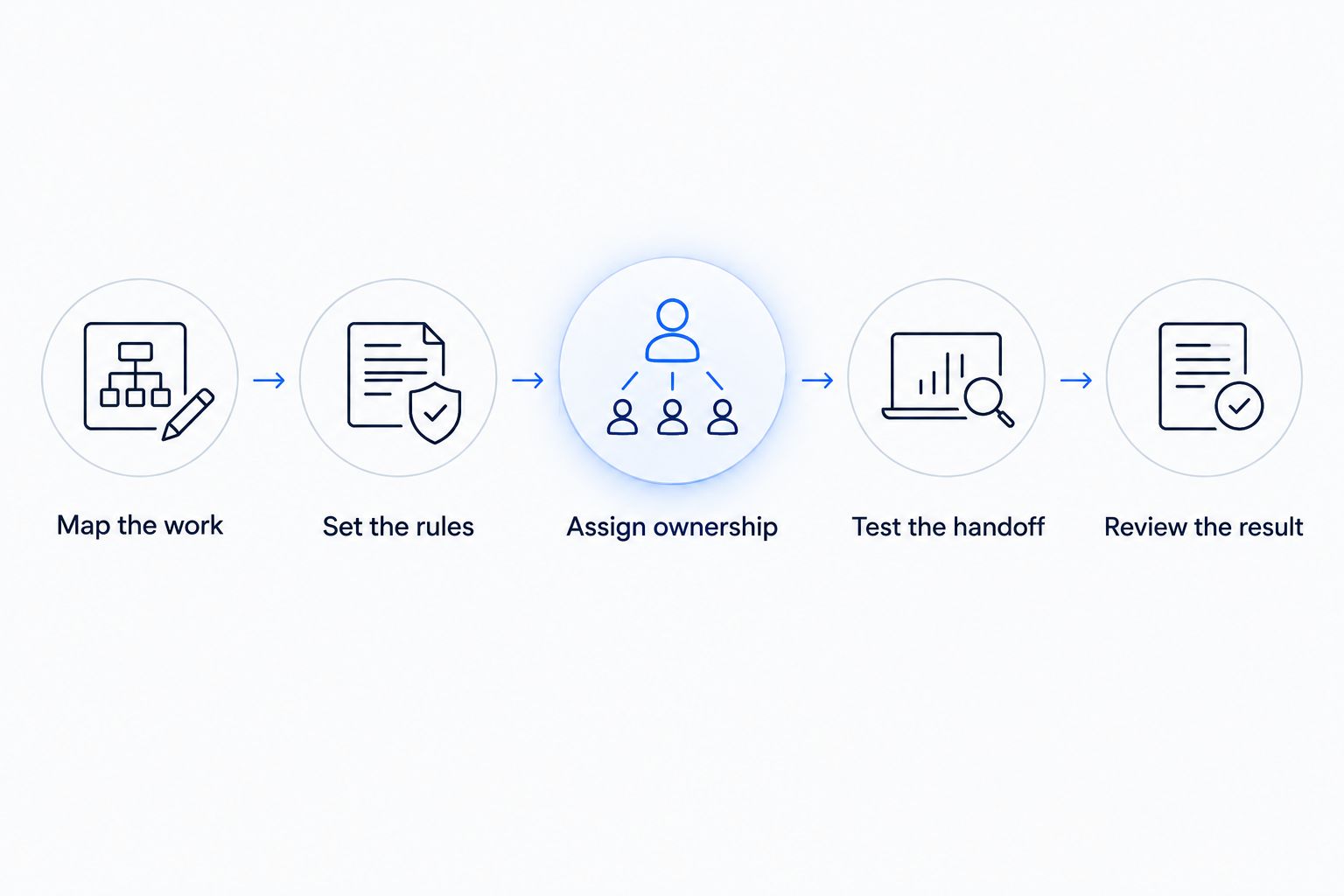
Define the process and its owner before building the automated handoff.
What does inbound lead enrichment actually add?
Inbound lead enrichment adds useful business details to an incoming inquiry and helps route follow-up. It is not research for building an outbound prospect list.
Illustrative scenario: A local service business receives a request that names the service but omits the service address. The workflow records the inquiry, flags the missing address, and asks the customer for the detail needed to check service-area fit. It does not guess an address or reject the inquiry without review.
Useful enrichment depends on the next action. A requested service, location, preferred contact method, or existing-customer match can help someone handle the inquiry. Extra information with no operational purpose adds clutter and access concerns.
Keep uncertain details labeled. If an incoming address conflicts with an existing customer record, preserve both values for review rather than silently replacing one. A faster handoff is not an improvement when it sends the wrong information downstream.
How do you measure whether automation is working?
For a 2026 evaluation, measure the problem you set out to fix—not the number of automated actions. A notification sent is not the same as an inquiry handled.
Record a baseline before changing the workflow. Use the same definitions afterward so the comparison means something:
Response time: Measure the elapsed time between receiving an inquiry and sending a useful response. Separate an acknowledgment from an answer that moves the request forward.
Manual handling: Record time spent copying details, assigning work, checking status, and correcting records.
Handoff completion: Check whether each inquiry reaches an assigned person with enough information to act.
Exceptions: Track missing details, duplicate records, failed transfers, and requests requiring human review.
Business outcome: Follow inquiries through to their recorded result, including bookings, declined requests, and unresolved follow-up.
Count maintenance and correction work as part of the evaluation. Time moved from an administrator to an owner is not automatically time saved.
Do not assign revenue to every automated message. Connect the inquiry to its recorded outcome and distinguish observed changes from assumptions about what caused them.
Is automation worth it if you receive few inquiries?
Low inquiry volume makes a narrow workflow more appropriate than a large build. Start with the repeated problem you can document, such as missed follow-up or duplicate entry, and leave infrequent judgment-heavy work manual.
If the real problem is too few suitable inquiries, examine discovery and conversion separately. SEO helps people find the business; the website explains the offer and collects requests; automation handles what happens after an inquiry arrives. A service-explainer video helps clarify an offer, but it does not replace an assigned follow-up task.
Should you replace your current tools before automating?
Keep your existing tools when they support the required handoff reliably. Map the process first, then identify the specific connection or capability that is missing.
A replacement is a separate decision. Moving records, retraining staff, and rebuilding permissions adds work, so do not make a new platform the default answer to a workflow problem.
When does an automation consultant make sense?
A consultant fits when a recurring problem crosses tools or responsibilities and nobody has defined the complete handoff. The useful work includes mapping the process, setting boundaries, connecting systems where practical, and explaining how the team handles failures.
ClearPilot Consulting fits local service businesses that need workflow mapping before automation. Its business automation services cover workflow mapping, AI agents, chatbots, and supporting website and SEO work.
ClearPilot Consulting's workflow-first approach still requires owner participation. You need to explain how requests are handled, approve business rules, and assign someone to exceptions. Consulting does not remove those responsibilities.
Bring an actual recurring problem to the free automation assessment: where the inquiry arrives, where it waits, and who must act next. That gives the discussion a concrete starting point.
Request your free automation assessment
Discuss a recurring lead or admin handoff and where it breaks.
FAQ
Is business process automation worth it for a small local business?
Yes, when it removes repeated work from a clear process without creating more correction or oversight work. Start with a defined handoff and compare the result with your existing process.
What's the best business process to automate first?
The best first process is a recurring handoff with clear inputs, a clear finish, and a named owner. Incoming inquiry assignment or follow-up task creation provides a narrower scope than an entire customer journey.
Do I need an AI agent to automate my business?
No. Rule-based automation handles predictable actions without an AI agent. Use AI assistance when interpreting written information adds value, and retain human review for uncertain or consequential decisions.
Can automation fix slow lead follow-up?
Automation can create records, assign inquiries, and prompt follow-up when those steps have defined rules. It does not fix an unmonitored queue or an unclear staff responsibility by itself.
What does lead enrichment mean for incoming inquiries?
Lead enrichment means adding useful business details to incoming inquiries and routing follow-up. It supports handling an existing request rather than building an outbound prospect list.
How do I know whether automation is saving time?
Compare manual handling time before and after the change, including maintenance and correction work. Also check response time, completed handoffs, and exceptions so faster activity does not hide unfinished work.
Can ClearPilot Consulting help without replacing all my software?
ClearPilot Consulting maps workflows and connects the tools a business already uses where practical. Whether existing tools support a particular workflow depends on the information, permissions, and connections it requires.
One last thing
Your first automation project in 2026 does not have to end with a build. Mapping the process can reveal that an unclear assignment or an unnecessary approval is the real obstacle.
Fix the rule before automating the action. A workflow that reliably sends work to the wrong place is still a broken workflow.