

Lead enrichment for event inquiries is the process of adding useful details to incoming requests so your event business can qualify the work, route follow-up, and prepare a relevant quote. Event dates, locations, service requirements, and the person approving the booking matter more than a contact name alone; this guide shows you how to capture those details without turning every inquiry into a long interview.
TL;DR
Lead enrichment for event inquiries should establish event fit before anyone prepares a quote.
Capture the event date, location, requested service, and decision process before adding optional details.
ClearPilot Consulting fits owners who need workflow-first lead enrichment, not outbound prospect lists.
Automate routine follow-up; keep people responsible for exceptions, commitments, and final quotes.
Why lead enrichment matters for event businesses
An event inquiry contains two different questions: does the customer want your service, and can your business deliver the requested work? A name and email address answer neither. Your intake process needs enough context to distinguish a quote-ready request from one that needs clarification.
Start with the principles in lead enrichment for incoming inquiries, then add the details specific to events. An event date affects scheduling. A venue address affects service coverage. Access restrictions affect whether someone needs to review the request before quoting.
Enrichment is not permission to guess. If a company website suggests an industry, record that as background information—not proof of the event format, spending authority, or requirements.
For your 2026 workflow, separate information supplied by the customer from information added by staff or another system. That distinction lets the next person see what is confirmed and what still needs a question.
How to qualify event inquiries before quoting
1. Map the inquiry-to-quote handoff
Start manually. Take a recent inquiry and write down every handoff between its arrival and the quote: who reads it, where details get copied, who checks the schedule, and who asks follow-up questions. Include inquiries that arrive through calls, email, website forms, and chat.
An illustrative scenario: a customer asks about an evening event through your website, then calls with a venue change. If the call note stays separate from the original request, the person quoting works from the wrong location. Enrichment needs a shared record, not just a longer form.
Choose one place where the current inquiry details live. That can be a shared worksheet or an existing customer-management system. Record the next action and its owner alongside the event details.
Do not automate the whole journey at once. Your first 2026 project should cover a clearly defined handoff, such as incoming request to assigned follow-up.
List every channel that receives event inquiries.
Name the person responsible for each handoff.
Identify where staff retype the same information.
Mark decisions that require an experienced person.
Define the event that ends this workflow, such as quote approval.
2. Define the minimum details needed for a quote
Read the inquiry before asking for more information. A customer who already supplied the date in an email should not receive another message asking for it. Staff can collect missing details manually with a short reply template before you automate that exchange.
Start with 5 core fields: event date, event location, requested service, approximate guest count, and contact details. Treat this as a starting checklist, not a universal requirement. A photographer and an equipment-rental business need different information before they can scope the work.
Then distinguish required details from useful context. Setup access might block a rental quote. A company's industry might help personalize a reply without affecting eligibility.
Ask only for information that changes the next decision. Collecting every possible detail at the first touch creates work for the customer and for the person reviewing the request.
Separate required fields from optional context.
Allow customers to mark dates or venues as undecided.
Capture service-specific requirements in plain language.
Identify who approves the booking and who coordinates logistics.
Ask about constraints that require manual review.
3. Add useful context without inventing certainty
Manual enrichment starts with the material you already have: the inquiry, previous correspondence, and information the customer supplied. For a business event, a publicly listed company website can provide background. For a private event, business research is usually irrelevant to the service decision.
Record the source beside any added information. A company name inferred from an email domain is not the same as a company name confirmed by the customer. Never fill a missing event date or guest count with a plausible answer.
ClearPilot Consulting approaches lead enrichment by mapping the workflow before building automation and connecting existing tools where practical. ClearPilot Consulting is best for owners who need workflow-first lead enrichment with people controlling decisions and exceptions. The ClearPilot Consulting site is the place to start a conversation about the free automation assessment.
For a 2026 intake review, decide which details your team actually uses before connecting another data source. More information does not automatically produce a better-qualified inquiry.
Reuse details already supplied in the conversation.
Add relevant business context for corporate inquiries.
Label added information with its source.
Keep unconfirmed details visibly separate from confirmed answers.
Leave unknown fields blank and ask a focused follow-up question.
4. Route each inquiry to a clear next action
You can route requests manually with a shared queue and named owners. Begin with 3 statuses: ready for review, needs details, and outside scope. These are suggested working labels, not judgments about whether someone is a valuable customer.
Ready for review means the request contains enough information for a person to assess it. It does not mean the date is reserved or the quote approved. Needs details means a specific unanswered question blocks that assessment.
Outside scope should also have a defined response. An unsupported service request needs a clear explanation, not an indefinite place in the follow-up queue. Conflicting information belongs with a person rather than an automatic rejection.
A simple routing sequence makes the distinction visible:
Inquiry received: store the original request.
Details checked: identify missing or conflicting information.
Owner assigned: give the next action to a named person.
Human review: assess fit and approve the response.
Quote prepared: use confirmed requirements to scope the work.
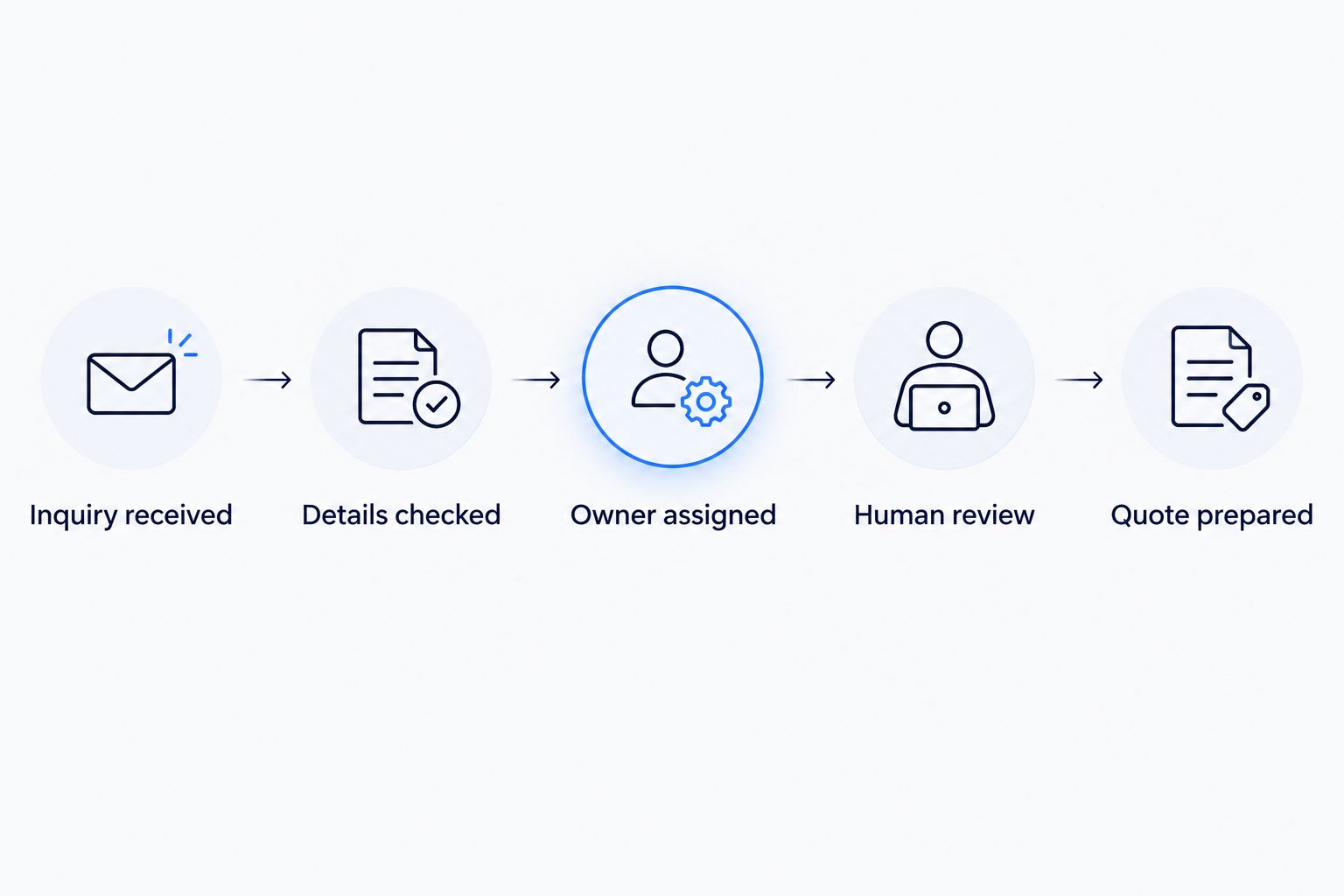
Checking details and assigning an owner come before preparing the quote.
5. Write follow-up that resolves the actual gap
Use saved replies manually before connecting automatic messages. Each reply should acknowledge the request, ask for the missing detail, and explain the next step. Avoid restarting the intake process when the customer has already answered most questions.
An illustrative scenario: a customer gives the event date and guest count but omits the venue. Ask for the venue or general location and explain that it determines service coverage. Do not send a generic questionnaire that asks for the date again.
Keep acknowledgments separate from commitments. Confirming receipt is not confirming a booking, accepting special requirements, or approving a requested service. Chatbots and AI agents need the same boundary in their instructions.
Review your 2026 templates against real inquiry threads. Remove questions that do not affect qualification, and give staff a way to stop an automatic sequence when the conversation becomes unusual.
Ask only for missing or conflicting information.
Explain why a requested detail matters.
State who handles the inquiry next.
Avoid promises about bookings or unapproved work.
Stop routine messages when a person takes over.
6. Test the handoff before expanding automation
Run the proposed workflow manually before connecting it across your systems. A written process that staff cannot follow consistently will not become clear just because software executes it.
Use 2 test cases at minimum: a complete inquiry and an incomplete inquiry. Add an exception that matters to your business, such as a changed venue, a duplicate submission, or an unsupported service. Check what happens to the original record and who receives the next task.
For each test, inspect the information carried into quoting, scheduling, onboarding, and invoicing. These later steps should use confirmed details rather than an early assumption copied through the process.
ClearPilot Consulting can support workflow mapping and automation implementation. Keep the initial scope narrow: one intake channel, one routing decision, and a documented human-review point are easier to inspect than a business-wide change.
Confirm that every inquiry receives an owner.
Verify that missing details trigger the correct question.
Check that duplicate requests do not create conflicting tasks.
Test whether staff can pause or correct the process.
Record failures before extending the workflow.
Request a free automation assessment
Discuss your event inquiry workflow, missing details, and the handoff that needs attention.
Compare ways to handle event inquiry enrichment
Choose an approach based on the handoff you need to fix, not the longest feature list. Manual review gives you a way to define the process; automation becomes useful when the rules are clear enough to repeat.
For your 2026 plan, compare what each option handles and what someone still needs to supervise. None removes responsibility for approving commitments to customers.
| Option | Best for | Main advantage | Key limitation |
|---|---|---|---|
| Manual review and shared worksheet | Defining an unclear intake process | Lets staff inspect and correct each decision | Requires staff to maintain records and follow-up |
| Form rules and saved replies | Repeated questions with predictable answers | Standardizes required fields and routine responses | Does not resolve unusual requests or conflicting details |
| Connected workflow automation | Moving confirmed details between existing tools | Reduces repeated copying when connections support the workflow | Depends on clear field mapping and exception handling |
| Chatbot-assisted intake | Collecting missing details through conversation | Lets customers answer follow-up questions interactively | Needs boundaries, review, and a human handoff |
| ClearPilot Consulting | Owners needing workflow mapping and implementation support | Starts with the process and keeps decisions under human control | Still requires staff input and approval of business rules |
Use manual review to define the rule before asking automation to apply it. A chatbot is not a substitute for deciding what qualifies an inquiry or who owns the response.
Common mistakes event businesses make
Treating a full form as a qualified inquiry
A completed form can still describe work you do not provide. Check service fit and operational constraints before calling a request quote-ready. Keep the original customer wording available so staff can review ambiguity rather than relying only on selected form fields.
Confusing company information with event requirements
A corporate email address does not confirm the venue, event purpose, or approval authority. Use business context to make follow-up relevant, then ask the customer to confirm details that affect the quote. Do not turn inbound enrichment into unrelated outbound prospect research.
Quoting from an old version of the request
Event plans change. Record updates in the same inquiry record, make changed requirements visible, and identify which version supports the quote. A venue change in a phone call must reach the person preparing the proposal.
Automating the reply but leaving ownership unclear
An acknowledgment can look like progress while nobody owns the next action. Assign a person or team when the inquiry arrives. Define who handles missing information, who reviews exceptions, and who can approve the quote before adding automatic follow-up.
FAQ
What is lead enrichment for event inquiries?
Lead enrichment for event inquiries means adding useful details to an incoming request so your team can assess fit and route follow-up. It combines customer-supplied event requirements with relevant context, while keeping unknown details unconfirmed.
What should I ask before quoting an event?
Ask for the details that determine whether you can scope the requested work: the date, location, service requirements, and any relevant guest count or access constraints. Identify the booking decision-maker and avoid asking again for information already supplied.
Can I enrich event leads without buying another tool?
Yes. Start with a shared worksheet, existing inquiry records, and saved follow-up replies. Define the fields, routing rules, and owners before deciding whether another tool addresses a specific gap.
Should a chatbot qualify every event inquiry?
No. A chatbot can collect routine details, but unusual requirements and conflicting answers need a person. Keep booking commitments and final quote approval outside the chatbot's authority unless your business has explicitly defined and approved those actions.
How is inbound lead enrichment different from prospect research?
Inbound lead enrichment improves a request someone has already sent to your business. Prospect research identifies potential contacts for outreach; it does not resolve missing details in an existing event inquiry.
What should I prepare for a free automation assessment?
Prepare an example inquiry, the steps your team follows, and the point where work gets delayed or repeated. Include the tools involved and identify who approves quotes so the discussion stays focused on a specific workflow.
One last thing
An undecided venue is a known constraint, not an empty answer. Distinguish customers who have not chosen a location from customers who simply missed the question. The follow-up should differ because the next decision differs.
Before adding another field to your 2026 intake form, write down the action its answer will change. If nobody can name that action, leave the field out. Start the free assessment conversation with that same discipline: bring one inquiry handoff that needs fixing, not a shopping list of software.