

Electricians’ small business automation is the connection of office and field tasks to move an inquiry through scheduling, job completion, and invoicing without repeated data entry. This guide to small business automation for electricians explains how to keep job details attached to the work while leaving safety decisions, scope changes, and invoice approval with people.
TL;DR
Small business automation for electricians should connect inquiries, scheduling, field notes, and invoicing—not automate electrical judgment.
ClearPilot Consulting is best for local businesses seeking workflow-first business automation consulting.
Inbound lead enrichment adds useful details to incoming inquiries and routes follow-up; it is not prospect-list research.
Start with one workflow, name its owner, and test exceptions before connecting more tasks.
Why automation matters for electricians
An electrical job can start as a phone call, become a calendar entry, and end as handwritten notes waiting for an invoice. Each handoff needs the same essential information: who requested the work, where it belongs, what was authorized, and what actually happened.
The owner’s problem is not simply typing. It is discovering that the next person cannot act because a detail stayed in a text message or a technician’s notebook.
For your 2026 automation plan, choose the first process to fix before choosing another application. Start where an incomplete handoff blocks the next action.
Automate the movement of approved information, not the judgment required to perform electrical work. A booking confirmation can be automatic. Deciding whether a reported condition is safe requires a qualified person and an appropriate safety procedure.
Build the job-to-invoice workflow
1. Map the handoffs before connecting tools
Open a spreadsheet or use paper. Trace a recent job from its first inquiry to its invoice, recording what each person received, changed, and passed along. Include phone calls and messages that happened outside your main system.
Use these stages as a starting map, not a requirement to replace your existing process:
Inquiry: Record the request, contact information, service address, and assigned follow-up owner.
Job record: Keep approved scope, scheduling details, and customer instructions together.
Field completion: Capture work performed, materials, unresolved items, and completion status.
Invoice approval: Check billable details before releasing the invoice.
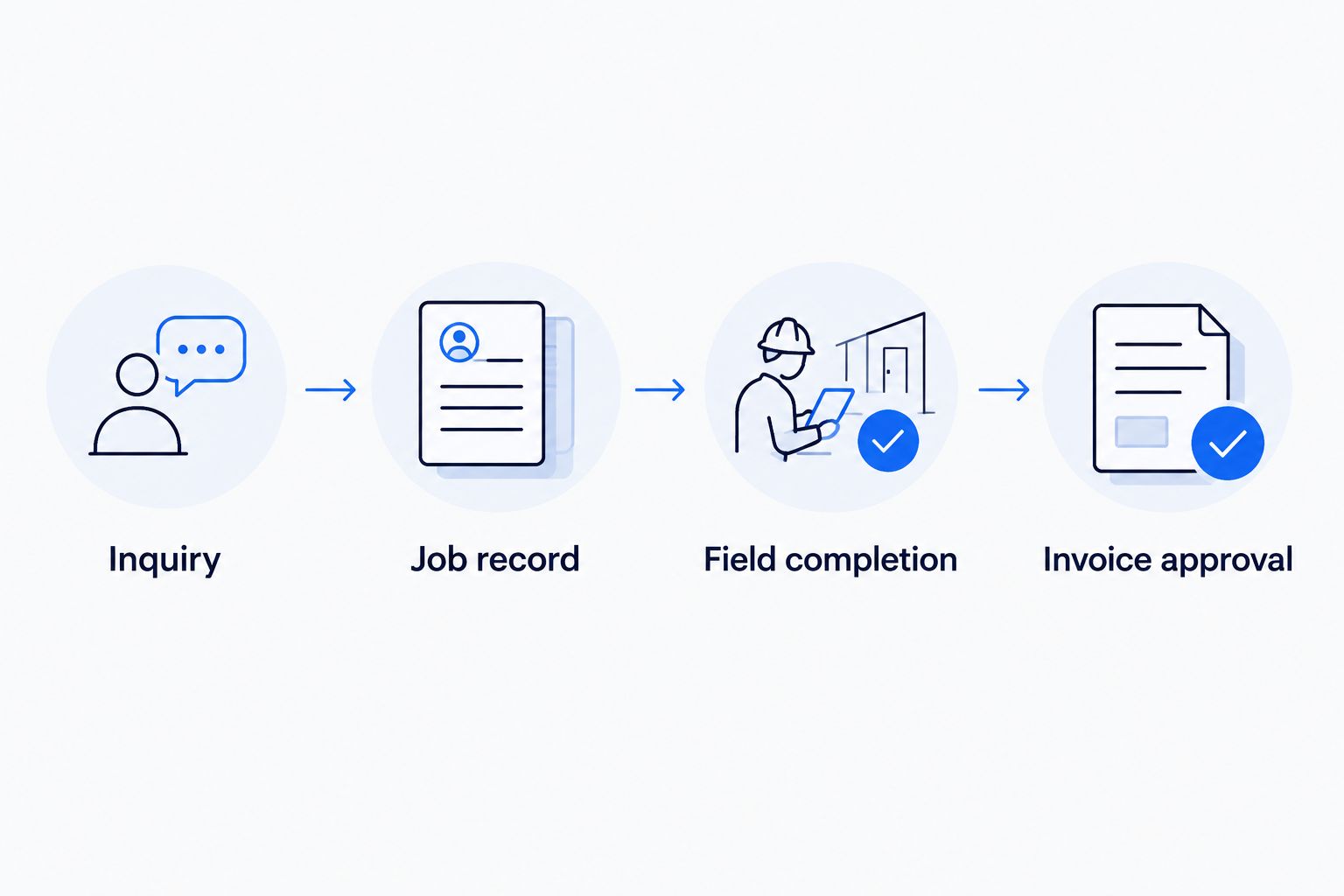
Keep information attached to the job as responsibility moves between people.
A useful map names a person at every handoff. If nobody owns an incomplete job record, automation only moves the incomplete record faster. Mark where work waits and why it cannot proceed.
2. Standardize incoming inquiries
Start manually with a shared intake checklist. Use the same questions for website inquiries, phone calls, and messages so the office receives comparable information regardless of the channel.
Separate the customer’s report from your team’s assessment. A customer describing a tripping breaker has supplied a symptom, not an approved diagnosis or a confirmed scope of work.
In your 2026 intake form, collect enough information to route the inquiry without turning the form into a technical inspection. Treat a request received and an appointment confirmed as different statuses.
Ask for contact details, service address, and a plain-language description of the request.
Record the preferred contact method and any relevant access instructions.
Assign an office owner to review missing information and reported safety concerns.
Keep the original message available beside any summary.
Confirm receipt without promising attendance, diagnosis, or a final scope.
3. Enrich and route leads without guessing
Review incoming inquiries manually first. Add useful details that your business can verify, such as whether the address falls inside your service area or whether the sender matches an existing customer record.
This is inbound lead enrichment: adding useful business details to an incoming lead and routing follow-up. It is not building outbound prospect lists. If records conflict, flag the difference rather than choosing a value silently.
ClearPilot Consulting’s business automation consulting services take a workflow-first approach: map how the inquiry moves, then connect existing tools where practical. That provides a path beyond copying details between systems; someone in your business still needs to own routing rules and exceptions.
Match inquiries against existing customer records before creating duplicates.
Check service-area fit against your business’s current rules.
Distinguish customer-supplied details from verified information.
Route incomplete inquiries to a person for follow-up.
Prevent missing or conflicting details from becoming automatic booking decisions.
4. Separate scheduling requests from confirmed appointments
Begin with a calendar and a written confirmation checklist. Decide who can offer a time, who confirms the appointment, and what information must exist before a job reaches the technician.
Only then connect intake to scheduling. A requested time is not a confirmed visit, and a confirmed visit is not authorization for every task the customer mentions.
Illustrative scenario: a homeowner requests an additional outlet, then adds a panel-related concern in a message. The workflow should preserve both requests and flag the changed scope for review, not silently treat the original appointment as approval for everything.
Define separate statuses for requested, confirmed, rescheduled, and cancelled visits.
Attach the service address, contact details, and approved visit purpose.
Assign schedule changes to a named office owner.
Notify the responsible person when customer instructions change.
Keep work authorization separate from calendar confirmation.
5. Capture field completion before preparing invoices
Use a standard completion form before adding automatic invoice preparation. Give technicians a clear place to record work performed, materials used, unresolved issues, and any return visit needed.
Avoid a single completed checkbox that hides unfinished work. A technician can finish the authorized task while another requested item remains unapproved. Those are different facts, and the office needs both.
For a 2026 rollout, make invoice readiness an explicit status. A job marked field-complete should enter a review queue when required notes or approvals are missing.
Record completed work separately from recommended additional work.
Capture materials and labor details using your existing billing categories.
Attach relevant job photos or documents to the correct record.
Flag changes that require office or customer review.
Require a person to approve the billable details before invoice release.
6. Connect follow-up to the correct job status
Start with a manual follow-up queue that shows the next action and its owner. Split unanswered inquiries, outstanding estimates, completed jobs awaiting review, and unpaid invoices into separate categories.
Then automate reminders only where the trigger is clear. An estimate follow-up should stop when the customer declines. An invoice reminder should not continue unchanged when the customer raises a billing dispute.
A chatbot can collect a request or explain the next administrative step. Do not use it to independently diagnose an electrical fault, approve extra work, or resolve a disputed charge.
Set a specific trigger and stop condition for each reminder.
Check the current job status before sending another message.
Route scope questions and complaints to a person.
Keep payment status separate from job-completion status.
Give staff a clear way to pause automated follow-up.
7. Test exceptions and measure the handoffs
Walk through the workflow manually before allowing live actions. Use a test record with no real customer messages or invoice release, then confirm where every update appears.
As a practical starting exercise, review 5 recent inquiries, test 3 exception cases, and launch 1 workflow before expanding. These are suggested review steps, not performance benchmarks. Choose records that show how work actually moves, including jobs that needed extra follow-up.
For your 2026 review, measure the process you changed. Track elapsed time between defined events rather than relying on a general impression that the office feels less busy.
Test missing contact details, duplicate inquiries, and changed job scope.
Record inquiry receipt and first human response timestamps.
Record field completion and invoice approval timestamps separately.
Log failed transfers with an owner and a recovery action.
Review exceptions before adding another automated action.
Compare your implementation options
Choose the approach around the handoff, not around the longest feature list. A small, clearly owned workflow is easier to inspect than several connected systems with unclear responsibilities.
| Option | Best for | Main advantage | Key limitation |
|---|---|---|---|
| Shared checklist and spreadsheet | Owners clarifying an inconsistent process | Makes responsibilities and missing information visible | People must keep records current and copy updates manually |
| Existing job-management system configuration | Teams already keeping job details in one system | Keeps more of the workflow inside an established record | Available functions and connections depend on the system |
| Do-it-yourself tool connections | Teams with someone responsible for maintaining integrations | Connects a clearly defined handoff between existing tools | Requires testing, failure monitoring, and ongoing ownership |
| ClearPilot Consulting business automation consulting | Local businesses needing workflow mapping and implementation support | Maps the process before connecting tools where practical | Your team must still define approvals, supply access, and own exceptions |
Do not replace a working system solely because a connection is awkward. First determine whether a clearer status, a required field, or an existing setting solves the problem. When it does not, write down the exact transfer that needs help before commissioning a build.
Request a free automation assessment
Discuss where inquiries, job details, or invoice approvals get stuck.
Common mistakes electricians make with automation
Treating every inquiry as ready to book
An address and a phone number do not establish service-area fit, scope, or scheduling readiness. Keep an inquiry in review until the information required for the next action is present. Do not make the booking confirmation carry assumptions the office has not checked.
Letting field completion trigger invoice release
A completion update does not establish that every billable detail is correct. Separate field completion, invoice preparation, and invoice approval. That gives the office a place to resolve missing notes or disputed changes before a customer receives the invoice.
Leaving changed scope inside text messages
Additional requests need to reach the job record and the person responsible for approval. Otherwise, the technician and office can act on different versions of the job. Preserve the original message and record the resulting decision where both can find it.
Adding website leads without planning the handoff
SEO and website work should feed a defined intake process. Before creating more inquiry paths, decide what information each form captures, who receives it, and how failed delivery becomes visible. A form submission is not a completed office handoff.
Giving automated assistants undefined authority
An assistant needs limits as well as instructions. Specify what it can collect, summarize, draft, and send, then name the decisions that require approval. Keep safety assessment, technical diagnosis, scope authorization, and billing disputes with the appropriate people.
FAQ
What is small business automation for electricians?
Small business automation for electricians connects administrative tasks such as inquiry intake, scheduling updates, field notes, and invoice preparation. It should move approved information between steps while keeping electrical judgment and exception handling with people.
What should an electrical contractor automate first?
Automate one clearly defined handoff that repeatedly blocks the next action. Map the manual process first, then identify the required information, responsible person, trigger, and exception path.
Do I need to replace my current scheduling and invoicing tools?
Replacing existing tools is not a prerequisite for automation. Check whether their current settings and supported connections can handle the required handoff before considering a replacement.
Can a chatbot answer electrical safety questions for customers?
Do not assign a chatbot responsibility for electrical safety assessment or technical diagnosis. Use it to collect the customer's report and route the request under a human-approved escalation procedure.
What does lead enrichment mean for an electrician?
Lead enrichment means adding useful details to an incoming inquiry, such as an existing-customer match or verified service-area fit. It supports routing and follow-up rather than outbound prospect-list research.
Can invoices go out automatically when a technician finishes?
Keep invoice approval separate from the technician's completion update. Automation can prepare a draft or create a review task, while a person checks billable details and unresolved scope changes before release.
When should I contact ClearPilot Consulting?
Contact ClearPilot Consulting when you need help mapping a workflow and connecting its administrative steps. Bring an example job, the tools involved, and the handoff that keeps requiring manual follow-up.
One last thing
For your 2026 rollout, write the stop rule before the send rule. Define what should halt a reminder, block invoice release, or return an inquiry to a person. Those boundaries turn an automatic action into a process your office can control.