

Yes, AI automation can help reduce appointment no-shows by sending reminders, handling replies, and making it easier for customers to confirm or reschedule. It does not guarantee attendance: your calendar must stay accurate, and someone must handle replies the system cannot resolve. Start with the booking workflow, not an AI tool.
TL;DR
Can AI automation reduce no shows? Yes, by connecting appointment reminders, customer replies, rescheduling, and staff follow-up.
Use fixed reminders for predictable messages; add AI when customers need help explaining or changing a booking.
ClearPilot Consulting starts business process automation with workflow mapping and keeps people responsible for decisions and exceptions.
Measure attendance separately from cancellations, rescheduling, and message delivery before judging results.
Why this matters
An unanswered reminder leaves you guessing. A customer might intend to attend, need a different time, or have a question that prevents confirmation. Sending another message does not resolve those different situations.
For your 2026 appointment workflow, connect each reminder to an action. The customer should know how to confirm, request a change, or reach your team. Your staff should see the resulting status without searching through separate conversations.
If booking starts in website chat, first understand how to connect your website chatbot to Google Calendar. Reminder logic needs to use the same appointment details your team trusts.
Can AI automation reduce no-shows for appointments?
AI automation can address preventable gaps between booking and attendance. The useful part is not generating a friendly reminder. It is keeping the appointment, customer response, and next action connected.
Build the process in this order:
Booking record: Save the appointment time, service, location, contact details, and current status in the scheduling system your team uses.
Reminder: Send approved appointment details through the customer's permitted communication channel. Explain how to confirm or request a change.
Customer reply: Separate a clear confirmation from a cancellation, a question, an unclear answer, or a request to reschedule.
Calendar update: Change the appointment only after checking the current record and following your booking rules.
Staff handoff: Send unresolved replies and failed updates to a named person, with the conversation attached.
Do not treat a sent reminder as a confirmed appointment. Delivery, confirmation, and attendance describe different events. Keep those statuses separate so your team knows what actually happened.
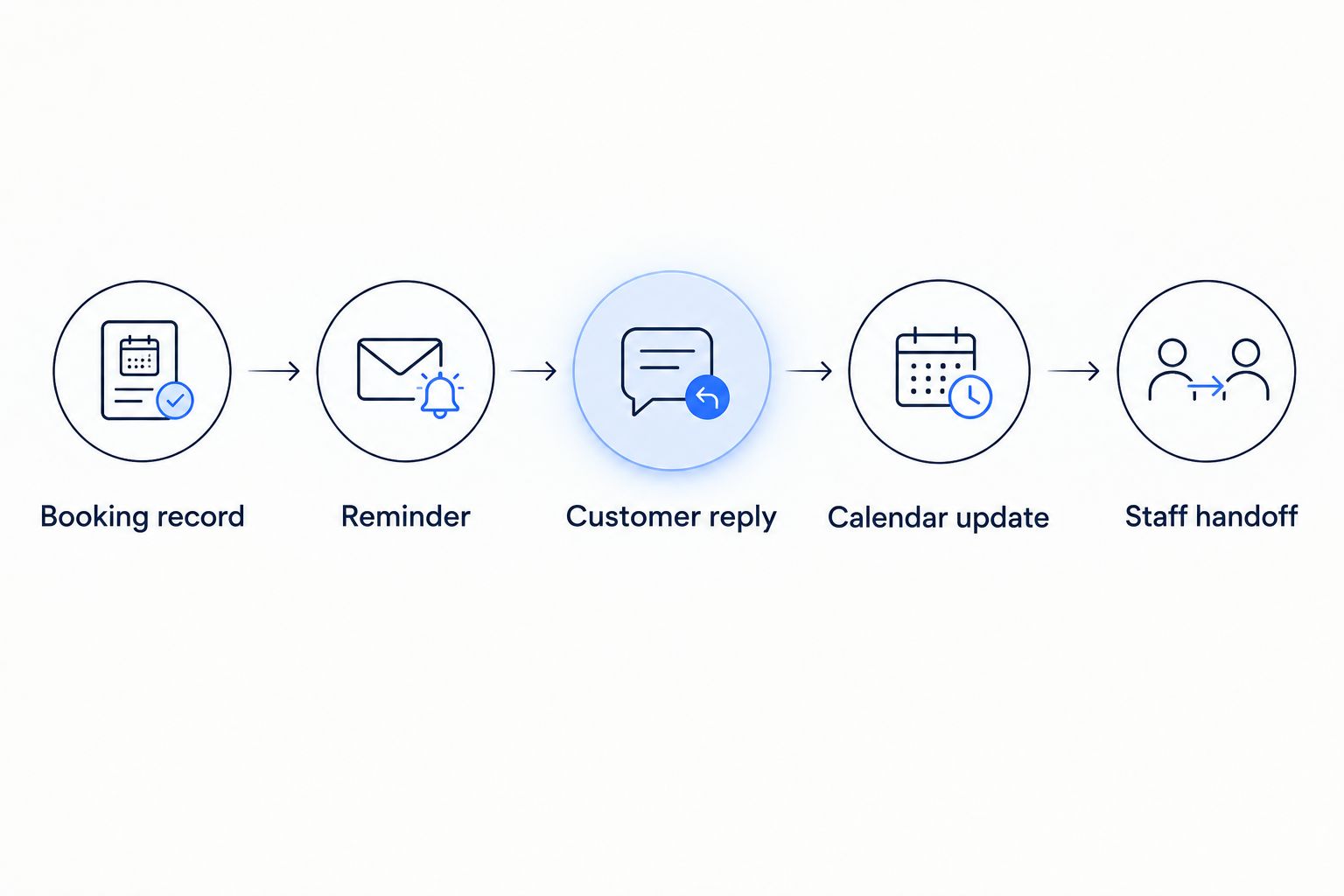
A reminder needs a path from the customer's reply to a calendar update or staff handoff.
A useful 2026 workflow also checks for changes before sending a queued reminder. If the appointment has moved, the old message should stop. Otherwise, your automation can send contradictory instructions.
Fixed reminders: best for straightforward confirmations
Best for: Businesses with clear appointment details and predictable confirmation requests.
Fixed reminders follow rules you write in advance. They can send an approved message when an appointment reaches a defined stage and record a structured confirmation. You do not need AI to repeat a known date, time, and location.
Their strength is control. Their limitation is interpreting unexpected replies: a message asking whether someone can arrive after school pickup needs more than a simple confirmation button.
AI-assisted replies: best for conversational changes
Best for: Businesses receiving appointment questions and rescheduling requests in everyday language.
AI can interpret a customer's wording and identify the requested next step. Give it approved information, limited actions, and a clear point at which it must ask for help.
The limitation is judgment. A message can contain conflicting instructions, an unusual request, or information the system should not act on. Use AI to interpret the request; use booking rules to control the action.
Staff-led follow-up: best for exceptions
Best for: Unclear requests, disputed details, sensitive conversations, and changes outside your normal rules.
A person can clarify context and decide what happens next. Manual follow-up also creates work for your team, so reserve it for situations where judgment matters rather than every routine confirmation.
| Approach | Best for | Main advantage | Main limitation |
|---|---|---|---|
| Fixed reminders | Straightforward confirmations | Consistent, approved instructions | Limited handling of unexpected replies |
| AI-assisted replies | Conversational appointment requests | Interprets everyday wording | Needs accurate records and action limits |
| Staff-led follow-up | Exceptions and sensitive requests | Human judgment and clarification | Requires staff attention |
These approaches belong in the same workflow. A fixed reminder can start the conversation, AI can identify a request, and a person can resolve an exception. You do not have to replace your scheduling process to improve a weak handoff.
Why no-show reduction varies
Automation addresses communication and process problems. It cannot make every customer attend, and sending more messages is not a substitute for understanding why appointments are missed.
Review these factors before changing your 2026 reminder process:
Contact accuracy: An incorrect phone number or email address prevents the message from reaching the intended customer.
Booking clarity: Customers need the correct time, location, service details, and any preparation instructions your business actually requires.
Reply handling: A request for help needs an answer, not another reminder that ignores the question.
Rescheduling friction: Customers need a clear way to request a different time without creating duplicate bookings.
Calendar accuracy: Changed and canceled appointments must stop triggering outdated messages.
Staff ownership: Unresolved requests need a responsible person and a visible next action.
Choose reminder timing around your appointment process rather than copying a universal schedule. Consider when customers book, what they need to prepare, and whether your team has time to resolve questions before the appointment.
Map the customer information before adding automation
Start with the information needed to fulfill the appointment. For a local service business, that can include the service address, requested work, appointment type, and the right contact person. Collect only what the workflow needs.
Inbound lead enrichment means adding useful business details to an incoming inquiry and routing follow-up. It is not building an outbound prospect list. Used here, it helps staff understand the appointment before they contact the customer.
Keep customer-provided details separate from added information. If an incoming form lists one address and a later reply gives another, flag the conflict instead of silently replacing the record. An automated reminder is only useful when its details are trustworthy.
Illustrative scenario: A customer books an estimate and replies that the property address is different from the billing address. The workflow flags the service address for confirmation, assigns the question to staff, and avoids treating the appointment as ready until the conflict is resolved.
ClearPilot Consulting's business process automation approach starts by mapping these handoffs. It connects tools the business already uses where practical and keeps people in control of decisions and exceptions. That approach still requires staff to approve rules and own unresolved work.
Set boundaries before letting AI change appointments
Write down what the system can do without permission. Sending an approved confirmation and proposing an open appointment are different from overriding a booking rule or promising an exception.
Your 2026 launch checklist should define:
Which calendar is the authoritative appointment record.
Which changes the system can make automatically.
Which customer details require verification before a change.
Which replies must go directly to a person.
What happens when a calendar update fails.
Who can pause messages if something goes wrong.
Never send a successful rescheduling confirmation before the calendar accepts the change. If the update fails, tell the customer the request still needs attention and notify staff. Do not describe a requested appointment as a completed booking.
For the human side of that process, use this guide to when a small-business chatbot should hand over to a person. A useful handoff includes the customer's request, the current booking, and the action that failed or needs approval.
How do you know whether appointment automation is working?
Judge appointment automation by attendance and resolved follow-up, not message volume. Define a no-show as a scheduled appointment that was neither attended nor canceled under your documented rules. Apply that definition consistently.
Track completed appointments, no-shows, cancellations, rescheduled appointments, unresolved replies, and failed messages separately. A timely cancellation is not attendance, but it is also not the same operational problem as an unexplained absence.
For a 2026 comparison, keep the appointment types and counting rules consistent. Note changes in your booking process alongside the results. Otherwise, a different service mix or a changed cancellation definition can distort the comparison.
Also inspect the work left for staff. If people still copy replies between systems or discover unresolved requests after the appointment, the workflow needs repair even when messages are being delivered.
What should you test before switching it on?
Test the path that works and the paths that fail. A normal confirmation proves little about a workflow that must also handle cancellations, contradictory details, and unavailable appointment times.
Use clearly labeled test records to check:
A customer confirms without changing anything.
A customer requests a time that is no longer open.
A cancellation arrives after a reminder has been queued.
A reply contains an unclear request or conflicting details.
A message cannot be delivered.
A calendar connection fails during an update.
For each case, inspect the customer message, appointment status, and staff task. All should describe the same situation. Start with a defined appointment workflow, review exceptions, and expand only after the handoffs work as intended.
ClearPilot Consulting is best for local business owners who want workflow-first appointment automation with human oversight. The free automation assessment is a relevant starting point when you know follow-up is breaking down but have not identified where.
Map your appointment follow-up
Request the free automation assessment to discuss booking, reminders, rescheduling, and staff handoffs.
Should you automate reminders or fix booking first?
Fix booking first when appointment details are incomplete or inconsistent. Reminders repeat the information they receive; they do not repair an unclear service request, an incorrect location, or a booking your team cannot fulfill.
Does every unconfirmed appointment need a staff call?
Not every unconfirmed appointment needs a staff call. Set a follow-up rule based on your service process, and distinguish silence from a failed delivery or a customer question that nobody answered.
FAQ
Can AI automation reduce no shows for a local service business?
Yes, AI automation can help reduce no-shows by connecting reminders, customer replies, rescheduling, and staff follow-up. It cannot guarantee attendance or compensate for inaccurate appointment details.
Do I need AI to send appointment reminders?
No, fixed-rule automation can send approved appointment reminders without AI. Add AI when you need help interpreting questions or change requests written in everyday language.
Can AI reschedule appointments automatically?
AI can support automatic rescheduling when it has permission to check availability and update the scheduling system under defined rules. Confirm the change only after the calendar accepts it, and send exceptions to staff.
What happens if a customer does not reply to a reminder?
A missing reply should follow a documented follow-up rule, not trigger an automatic assumption that the customer has canceled. Keep unconfirmed, canceled, and undelivered statuses separate.
Will appointment automation work with my existing tools?
Compatibility depends on the scheduling, messaging, and customer-record tools you use. Check their connection options and update permissions before deciding whether to connect them or change the process.
What should I measure after automating appointment follow-up?
Measure attendance, no-shows, cancellations, rescheduling, unresolved replies, and delivery failures separately. Use consistent definitions so changes in reporting do not look like changes in customer behavior.
Can ClearPilot Consulting help plan appointment automation?
ClearPilot Consulting maps workflows and deploys business process automation for small and mid-sized local businesses. Its workflow-first approach connects existing tools where practical and keeps people responsible for decisions and exceptions.
One last thing
Ask who receives a failed rescheduling request. If the answer is unclear, fix that before adding more reminders. The most polished customer message still leaves a broken process when nobody owns the next step.